5
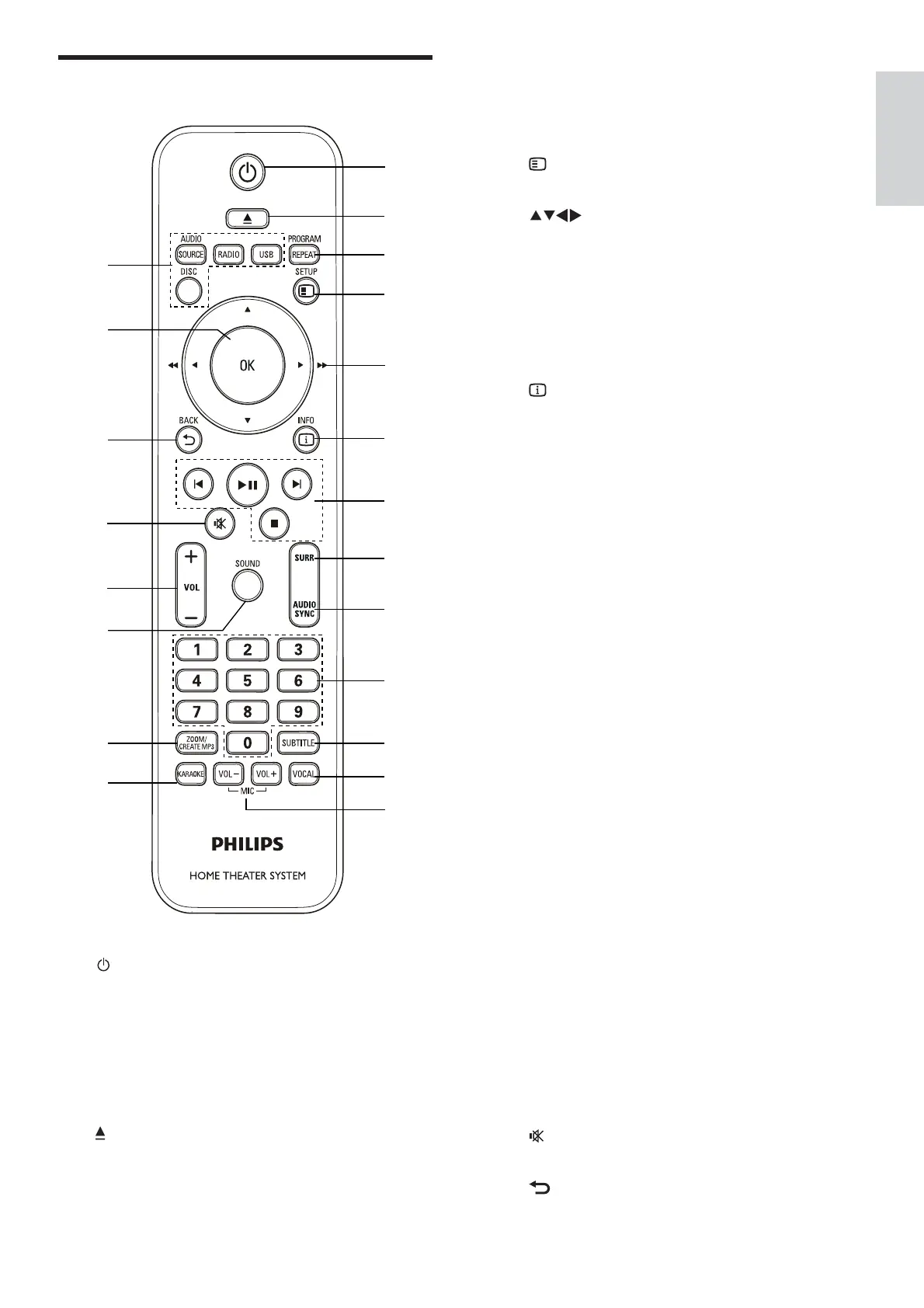
c REPEAT / PROGRAM
Selects a repeat or shuf e mode.
•
In radio mode, programs radio stations.•
d
SETUP
Accesses or exits the setup menu.
e ( Navigation buttons )
Navigate menus.
•
In video mode, press left or right to •
fast backward or fast forward.
In radio mode, press left or right to
•
search a radio station; press up or
down to ne tune a radio frequency.
f INFO
Displays information about what is playing.
g Playback buttons
Control playback.
h SURR ( Surround Sound )
Switches to surround sound or stereo
sound.
i AUDIO SYNC
Selects an audio language or channel.
•
Press and hold to synchronize audio •
with video. Use with +/- .
j Numeric buttons
Selects an item to play.
k SUBTITLE
Selects subtitle language for video.
l VOCAL
Turns off the vocal by changing the audio
channel.
m MIC VOL +/-
Increases or decreases microphone volume.
n KARAOKE
Accesses or exits the karaoke menu.
o CREATE MP3 / ZOOM
Accesses the menu to create MP3.
•
Zooms into a video scene or picture.•
p
SOUND
Selects a sound mode.
q VOL +/-
Increases or decreases volume.
r ( Mute )
Mutes or restores volume.
s BACK
Returns to a previous menu screen.
Remote control
a ( Standby-On )
Switches the home theater on or to
•
standby.
When EasyLink is enabled, press
•
and hold for at least three seconds
to switch all connected HDMI CEC
compliant devices to standby.
b OPEN/CLOSE
Opens or closes the disc compartment.
o
a
b
c
d
e
f
g
h
i
j
k
n
p
s
t
u
r
q
l
m
English
EN




 To Next Page