5
English
EN
h DIGITAL IN - OPTICAL
Connect to an optical audio output on the
TV or a digital device.
i DIGITAL IN - COAXIAL
Connect to a coaxial audio output on the TV
or a digital device.
Remote control
This section includes an overview of the remote
control.
1
2
3
4
5
6
7
8
19
9
10
11
12
13
14
15
17
16
18
21
20
22
23
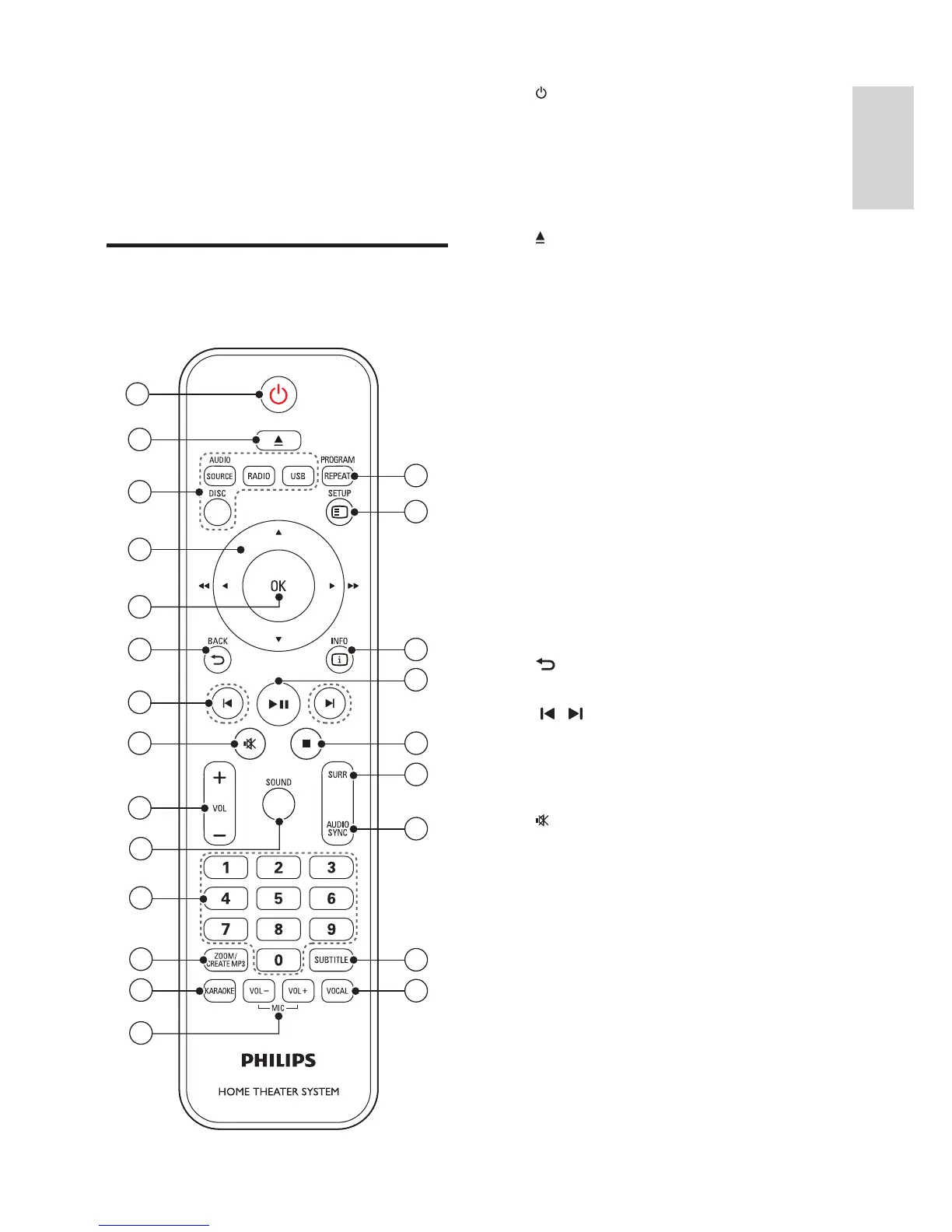
a ( Standby-On )
• Switch the home theater on or to
standby.
• When EasyLink is enabled, press and hold
for at least three seconds to switch all
connected HDMI CEC compliant devices
to standby.
b ( Open/Close )
Open or close the disc compartment, or
eject the disc.
c Source buttons
• DISC : Switch to disc source. Access or
exit the disc menu when you play a disc.
• AUDIO SOURCE : Select an audio input
source.
• RADIO : Switch to FM radio.
• USB : Switch to USB storage device.
d Navigation buttons
• Navigate menus.
• In video mode, press left or right to fast
backward or fast forward; press up or
down to slow backward or slow forward.
• In radio mode, press left or right to
search a radio station; press up or down
to fi ne tune a radio frequency.
e OK
Confi rm an entry or selection.
f BACK
Return to a previous menu screen.
g / ( Previous/Next )
• Skip to the previous or next track,
chapter or fi le.
• In radio mode, select a preset radio
station.
h ( Mute )
Mute or restore volume.
i VOL +/-
Increase or decrease volume.
j SOUND
Select a sound mode.
k Numeric buttons
Select an item to play.
l CREATE MP3 / ZOOM
• Access the create MP3 menu.
• Zoom into a video scene or picture.
Press the Navigation buttons (left/right)
to select a zoom factor.



 To Next Page