11
User manual
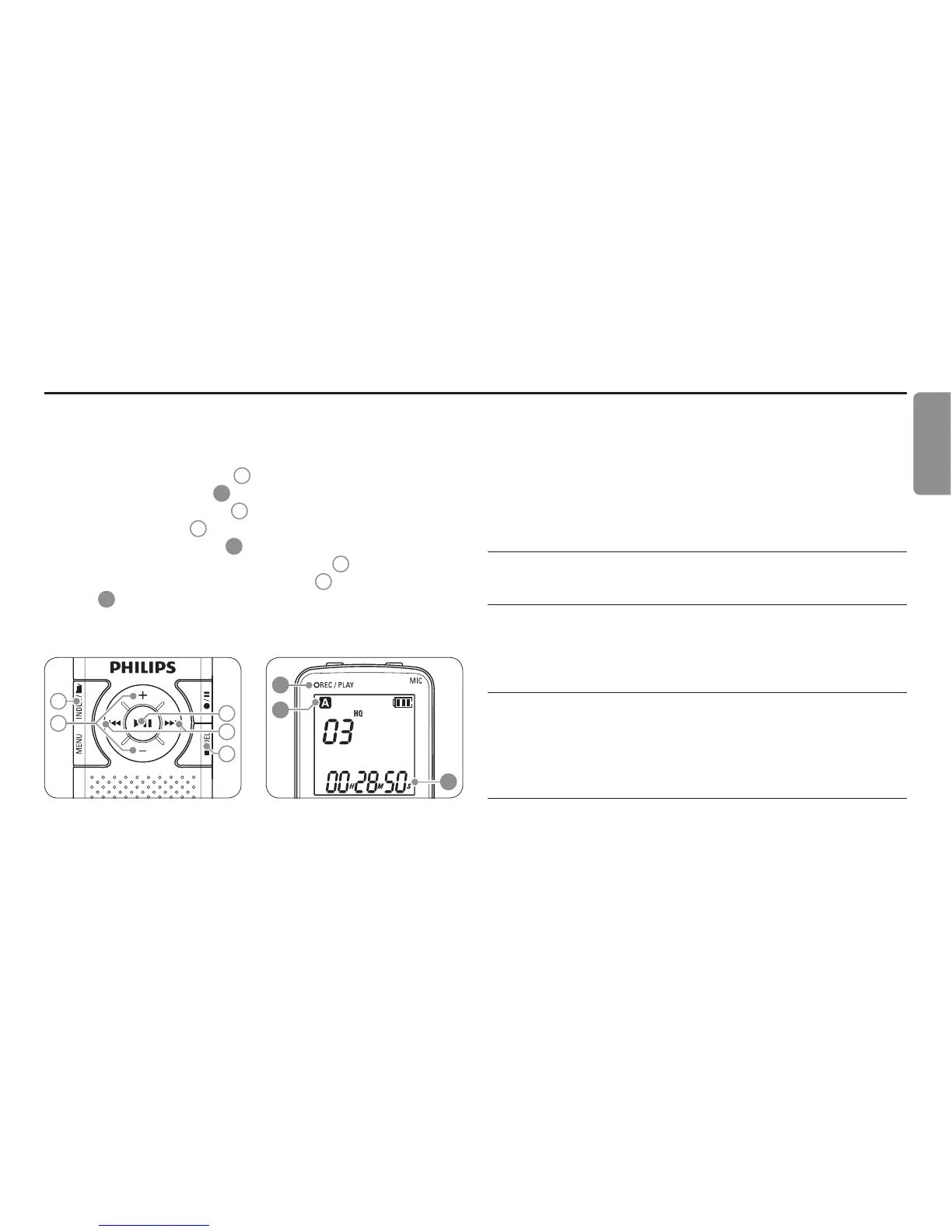
Press the1 INDEX / a button
1
while the recorder is stopped to
select the desired folder
A
.
Press the 2
h or b button
2
to select the file to play back.
Press the 3
f button
3
. The playback time will be shown on the
display, and the green LED
B
will light.
Adjust the volume using the 4 + and – buttons
4
.
To stop playback, press the 5
j / DEL button
5
. The total playback
time
C
of the current file will be shown on the display.
Press the 6
f button again to continue playback from the previous
position.
1
3
2
4
5
C
B
A
D Note
When headphones are connected to the
EAR jack, the recorder
speaker will be switched o.
Playback functions7.1
Slow, fast, normal playback7.1.1
Press and hold the
f button for 1 second or longer to switch
between normal, slow and fast playback.
Search7.1.2
Press and hold the
h or b button during playback to scan backward
or forward in the current file at a fast speed. Release the button to
resume playback at the selected speed.
Rewinding and forwarding7.1.3
Press the
h or b button during playback to rewind to the beginning
Playback7
ENGLISH








 To Next Page