13
User manual
Delete8
Press the1 INDEX / a button while the recorder is stopped to select
the desired folder.
Press and hold the 2
j / DEL button for 1 second or longer. DELETE
appears on the screen.
Press the 3
h or b button to select a delete option:
Icon Meaning
FILE
Delete a single file
FOLD
Delete all files in a folder
Delete all index marks in a file
Press the 4
f button.
Press the 5
h or b button to select the file, the folder or the file
containing the index marks to be deleted.
Press the 6
f button again. N (No) is displayed.
Press the 7
h or b button to select Y (Yes).
Press the 8
f button to confirm.
D Note
Sequential file numbers are reassigned automatically.
Update the firmware9
Your Voice Tracer is controlled by an internal program called firmware.
Regularly check www.philips.com/dictation for new firmware updates.
Download the firmware update for your Voice Tracer model from 1
www.philips.com/dictation > Support Center > Software Downloads and
save the file in the root directory of the Voice Tracer.
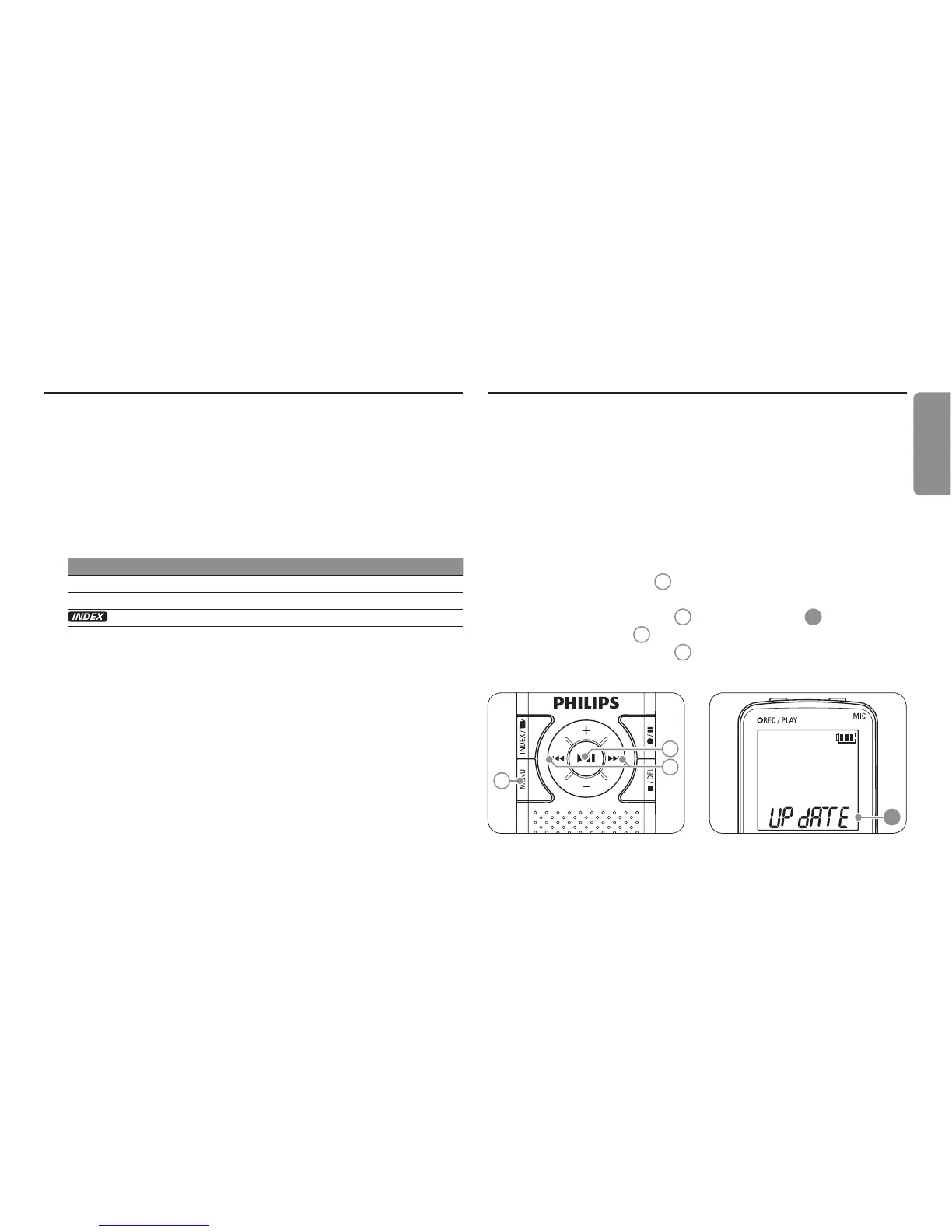
Press the 2
MENU button
1
while the recorder is stopped to open
the menu.
Press the 3
h or b button
2
to select UPDATE
A
.
Press the 4
f button
3
. N (No) is displayed.
Press the 5
h or b button
2
to select Y (Yes).
Press the 6
f button again to install the new firmware.
1
3
2
A
ENGLISH





 To Next Page