Get started 7
Table of contents
4Get started
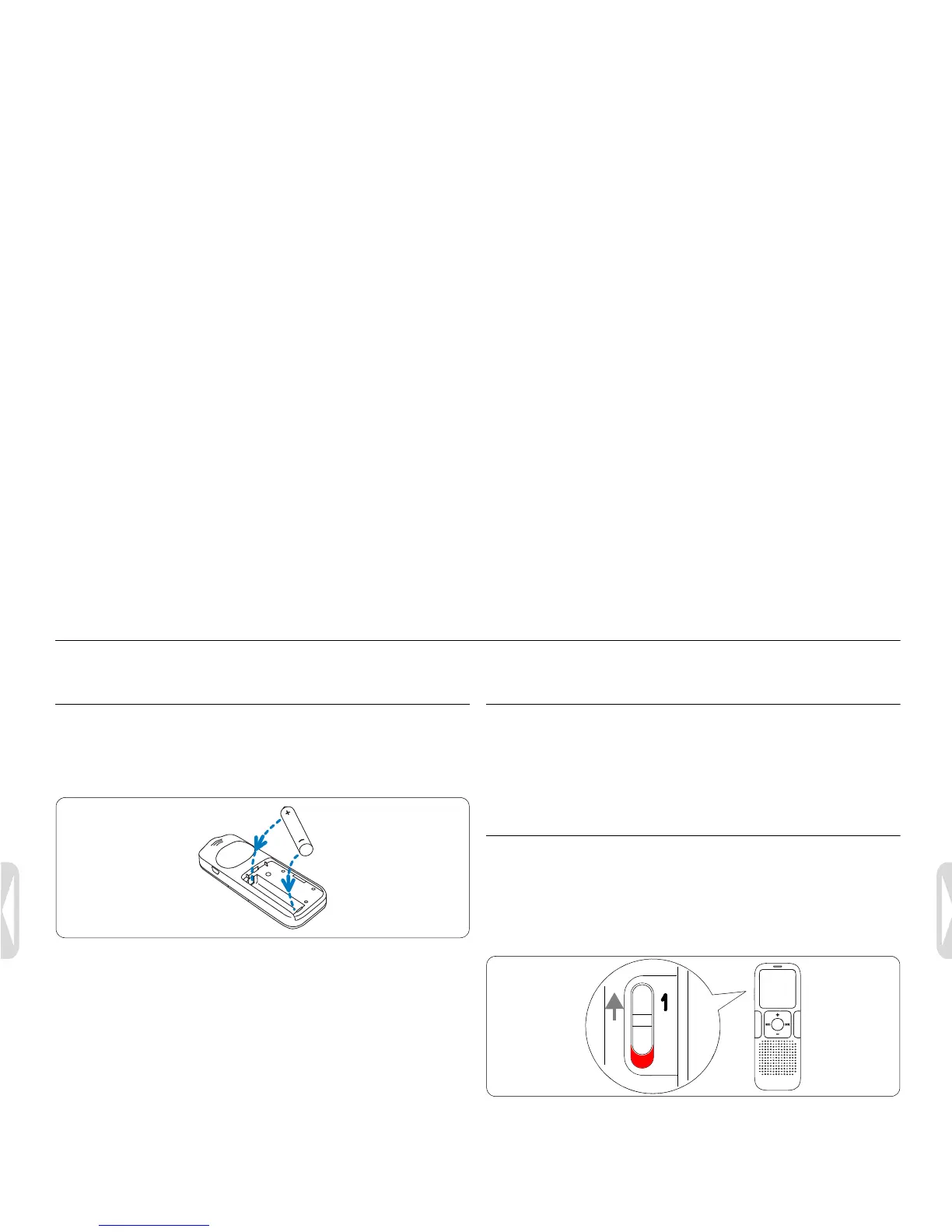
Insert the battery
1 Slide open the battery cover.
2 Insert the battery as indicated. Make sure the polarity is correct.
3 Close the cover again.
D Notes
• Remove the battery if you will not be using the Voice Tracer for an
exte
nded period. The Voice Tracer could be damaged by a leaking
battery.
• If the Voice Tracer does not function properly, remove the battery
and r
e-insert it again.
• Stop the Voice Tracer before replacing the battery. Removing the
batter
y while the recorder is in use may corrupt the file.
• When the battery is nearly empty, the battery indicator blinks.
Power on/off
1 To power on, press the f button until the display shows a short
animation [ ].
2 To power off, press the f button while the recorder is stopped
until the
display shows BYE.
Keypad lock (HOLD function)
1 Slide the HOLD switch up into the Hold position to lock the
keypad of the recorder.
• The display briefly shows ‘On Hold’ and turns off.
2 Slide the HOLD sw
itch down to the Off position to disengage the
keypad lock.









 To Next Page