1.3
1 INTRODUCTION
1.1 Unpacking
Check for the following items:
• verify the model number
• power cord
• Installation Instructions
1.2 Monitor
The LTC 2821/90 is a multi-standard color monitor housed in
a metal cabinet for rugged reliability. It has a large 21-inch tube
(viewable picture area 51 cm (20")). The monitor offers simple
adjustments to meet particular requirements, with default
parameters set at the factory.
With a built-in loudspeaker and inputs able to accept NSTC,
PAL and S-video standards, the monitor offers a flexible
solution for a wide variety of surveillance application.
1.3 Power
Model No. Rated Voltage Power at Sync
Voltage range (VAC)Rated V. Format
LTC 2821/90 100/240 VAC, 90 to 260 75 W NTSC/PAL
50/60 Hz
The monitor is delivered with a 2-pole Euro cord and a 3-pole
US cord.
2 CONTROLS AND FEATURES
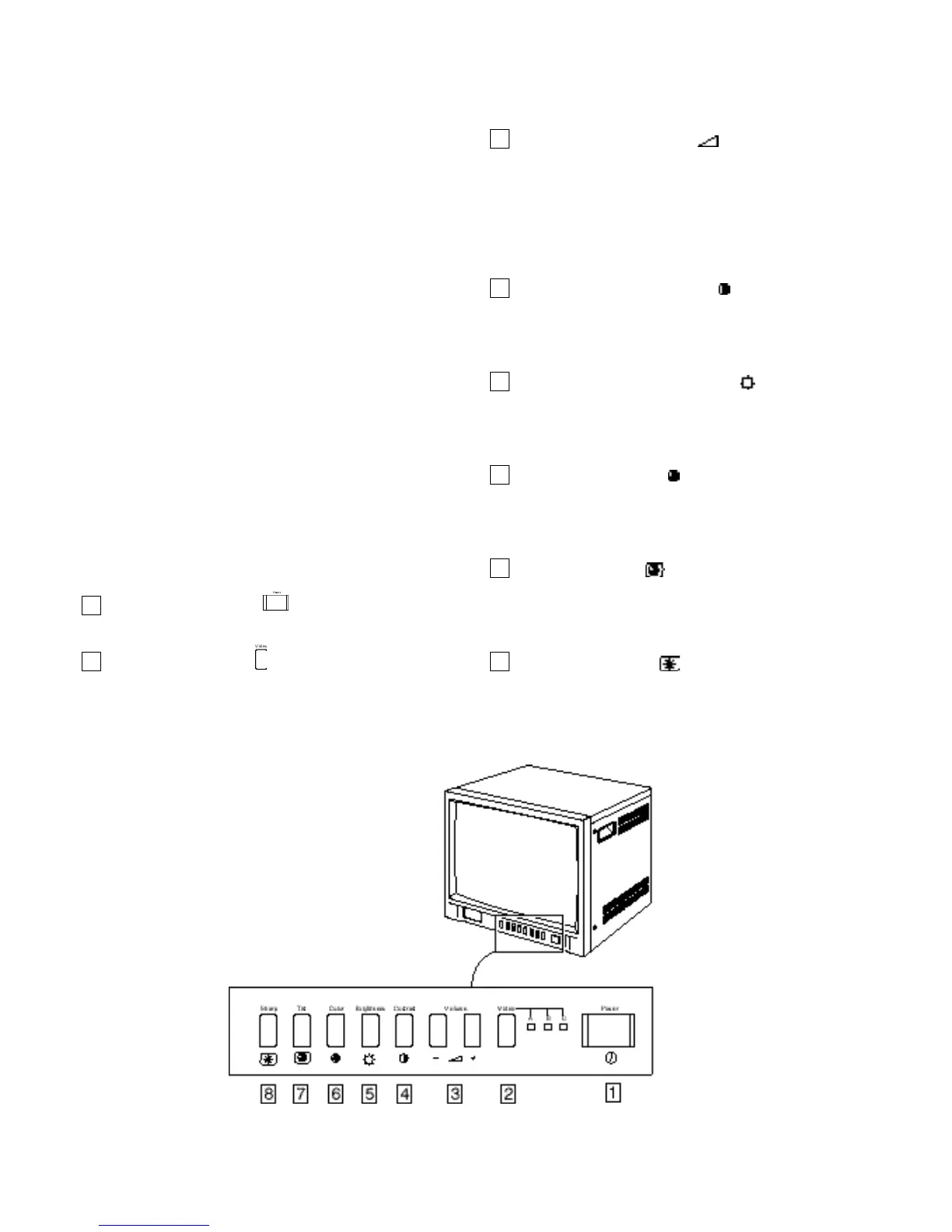
2.1 Front Panel
Power switch [POWER ]
Press this switch to turn the power ON or OFF.
Video button [VIDEO ]
Selects the video signal inputs to the VIDEO A, VIDEO B
(composite video BNC connectors) and VIDEO C (Y/C
mini DIN 4 pin connector) terminal and the audio signal
input to the AUDIO A, AUDIO B and AUDIO C
terminals (RCA connector) on the rear panel. When
selected, the respective indicator lights.
Volume buttons [VOLUME ]
These buttons have two functions:
Volume control: Press the + or - buttons as required to
adjust the speaker volume.
Data controls: When the SHARP, TINT, COLOR,
BRIGHTNESS and CONTRAST buttons are pressed,
used to change the value of the selected function.
Contrast button [CONTRAST ]
Press this button to adjust picture contrast. Adjust the value
with the VOLUMEbuttons to control the image contrast
(Default is 100).
Brightness button [BRIGHTNESS ]
Press this button to adjust picture brightness. Adjust the
value with the VOLUMEbuttons to control the image
brightness (Default is 50).
Color button [COLOR ]
Press this button to adjust the picture color intensity.
Adjust the value with the VOLUMEbuttons to control the
image color (Default is 50).
Tint button [TINT ] (NTSC)
Press this button to control the picture color to be close to
natural color. Adjust the value with the VOLUMEbuttons
to control the color tint (Default is 50).
Sharp button [SHARP ]
Press this button to adjust the picture image. Adjust the
value using the VOLUMEbuttons to control the sharpness
of the image (Default is 50).
8
7
6
5
4
3
2
1
Front panel







 To Next Page