12
English
3139 115 22872
Connections (Optional)
Connecting a VCR or
Cable/Satellite Box
L
R
L
R
FM/MW ANTENNA
AUDIO
OUT
S-VIDEO
IN
VIDEO IN
SCART IN
2
4
1
~ AC MAINS
3
VCR or Cable/
Satellite Box
Viewing and listening to the
playback
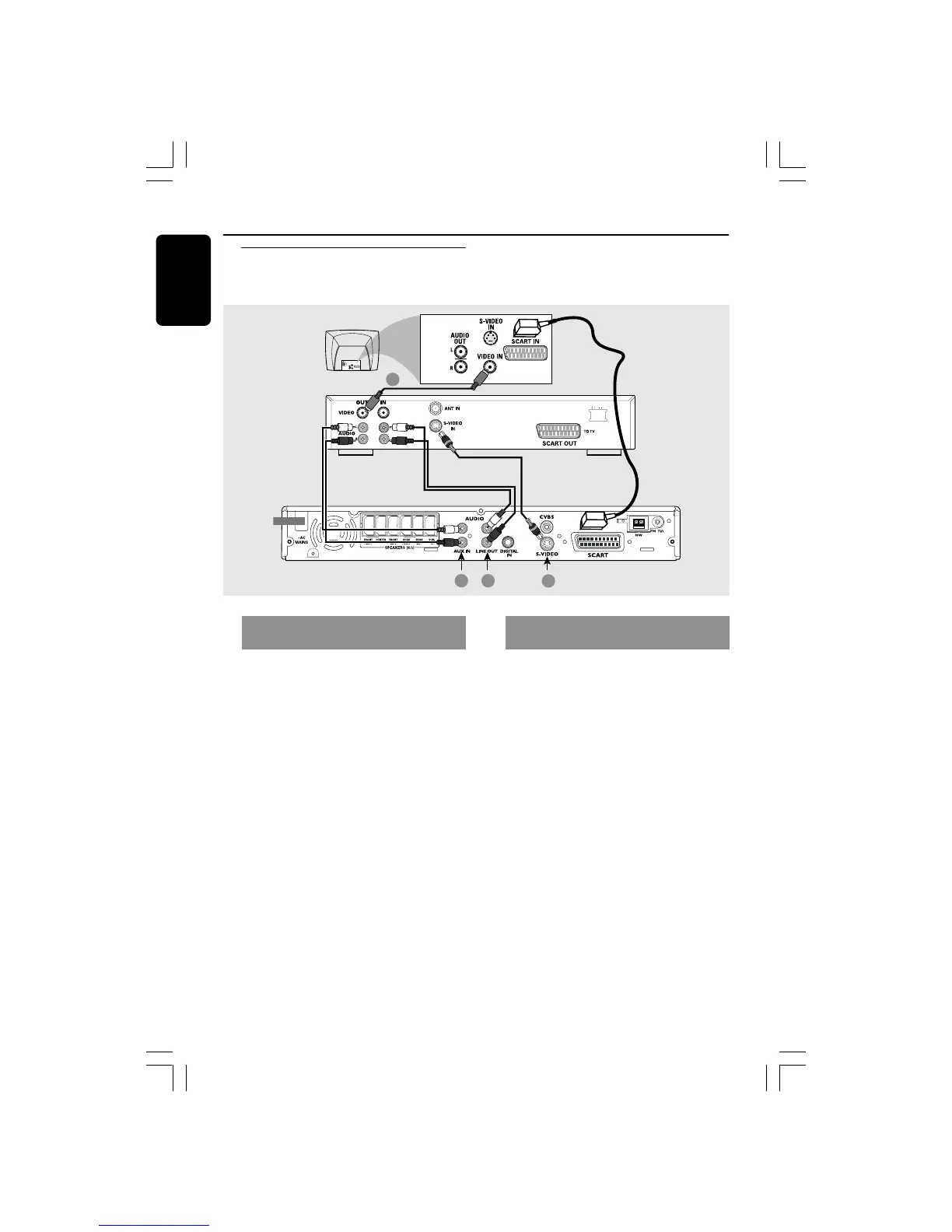
1 Connect the VCR or Cable/Satellite Box
to the TV as shown.
2 Connect the DVD system’s AUX IN
(R/L) jacks to the AUDIO OUT jacks on
the VCR or cable/satellite box.
Before starting operation, press AUX/DI
on the remote to select “AUX” in order
to activate the input source.
Using the VCR for recording DVD
playback
Some DVDs are copy-protected. You
cannot record or dub protected discs
using a VCR.
3 Connect the DVD system’s S-VIDEO
jack to the S-VIDEO IN jack on the VCR.
4 Connect the DVD system’s LINE OUT
(R/L) jacks to the AUDIO IN jacks on
the VCR.
This will allow you to make analogue
stereo (two channel, right and left)
recordings.
To view DVD playback while
recording,
you must connect the DVD system to
your TV using SCART (as shown above)
connection.
001-041-LX39-22-Eng2 3/15/04, 6:10 PM12



 To Next Page
 Loading...






