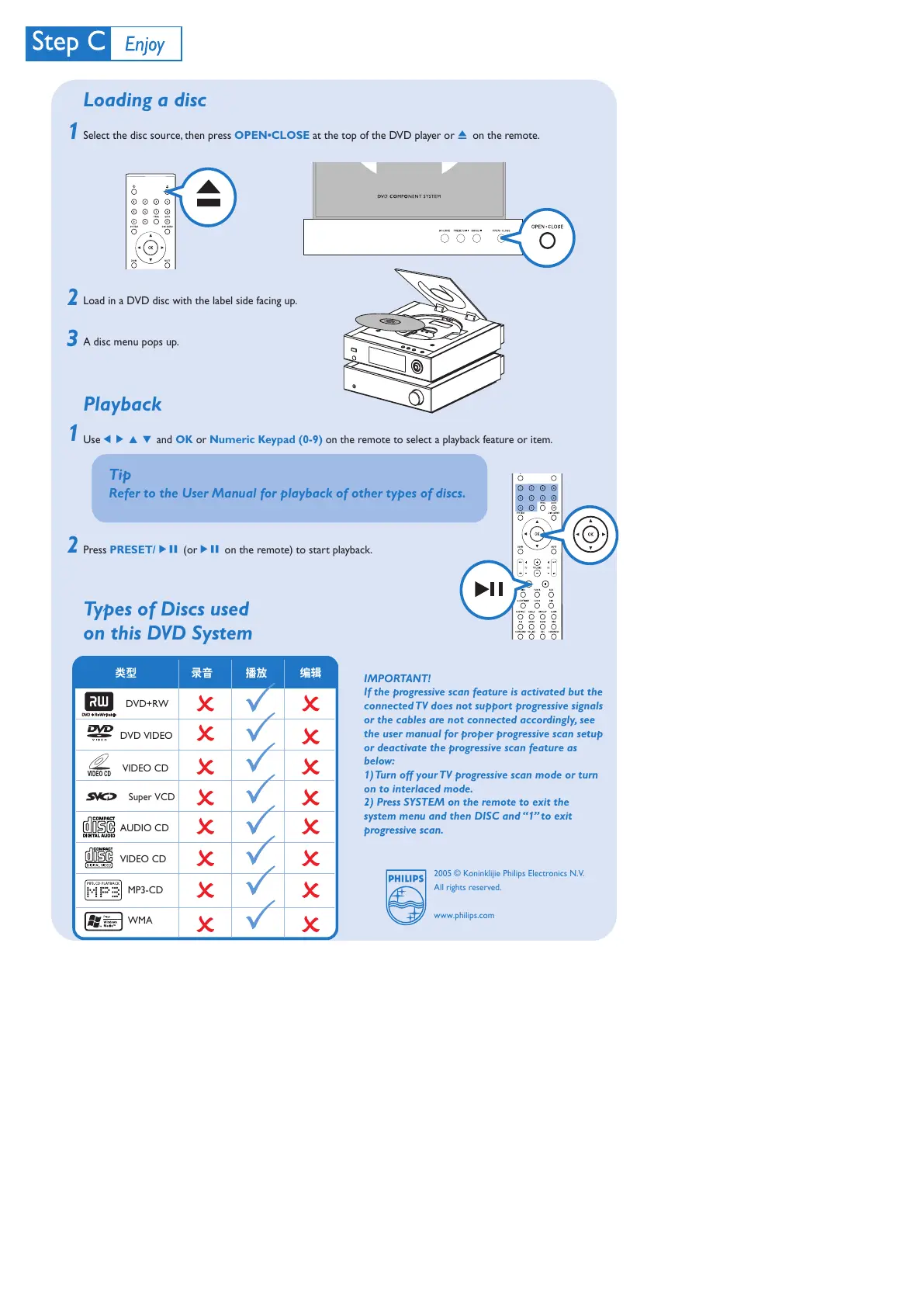
Loading a disc
Select the disc source, then press OPEN•CLOSE at the top of the DVD player or 0 on the remote.
Load in a DVD disc with the label side facing up.
A disc menu pops up.
Playback
Use 1 2 3 4 and OK or Numeric Keypad (0-9) on the remote to select a playback feature or item.
Press PRESET/ÉÅ (orÉÅ on the remote) to start playback.
Types of Discs used
on this DVD System
2
1
3
Tip
Refer to the User Manual for playback of other types of discs.
2
1
类型 录音 播放 编辑
DVD VIDEO
AUDIO CD
VIDEO CD
MP3-CD
WMA
DVD+RW
Super VCD
VIDEO CD
2005 © Koninklijie Philips Electronics N.V.
All rights reserved.
www.philips.com
IMPORTANT!
If the progressive scan feature is activated but the
connected TV does not support progressive signals
or the cables are not connected accordingly, see
the user manual for proper progressive scan setup
or deactivate the progressive scan feature as
below:
1) Turn off your TV progressive scan mode or turn
on to interlaced mode.
2) Press SYSTEM on the remote to exit the
system menu and then DISC and “1” to exit
progressive scan.
未命名-2 2006.9.29, 13:494



 To Previous Page