Setting up the TV
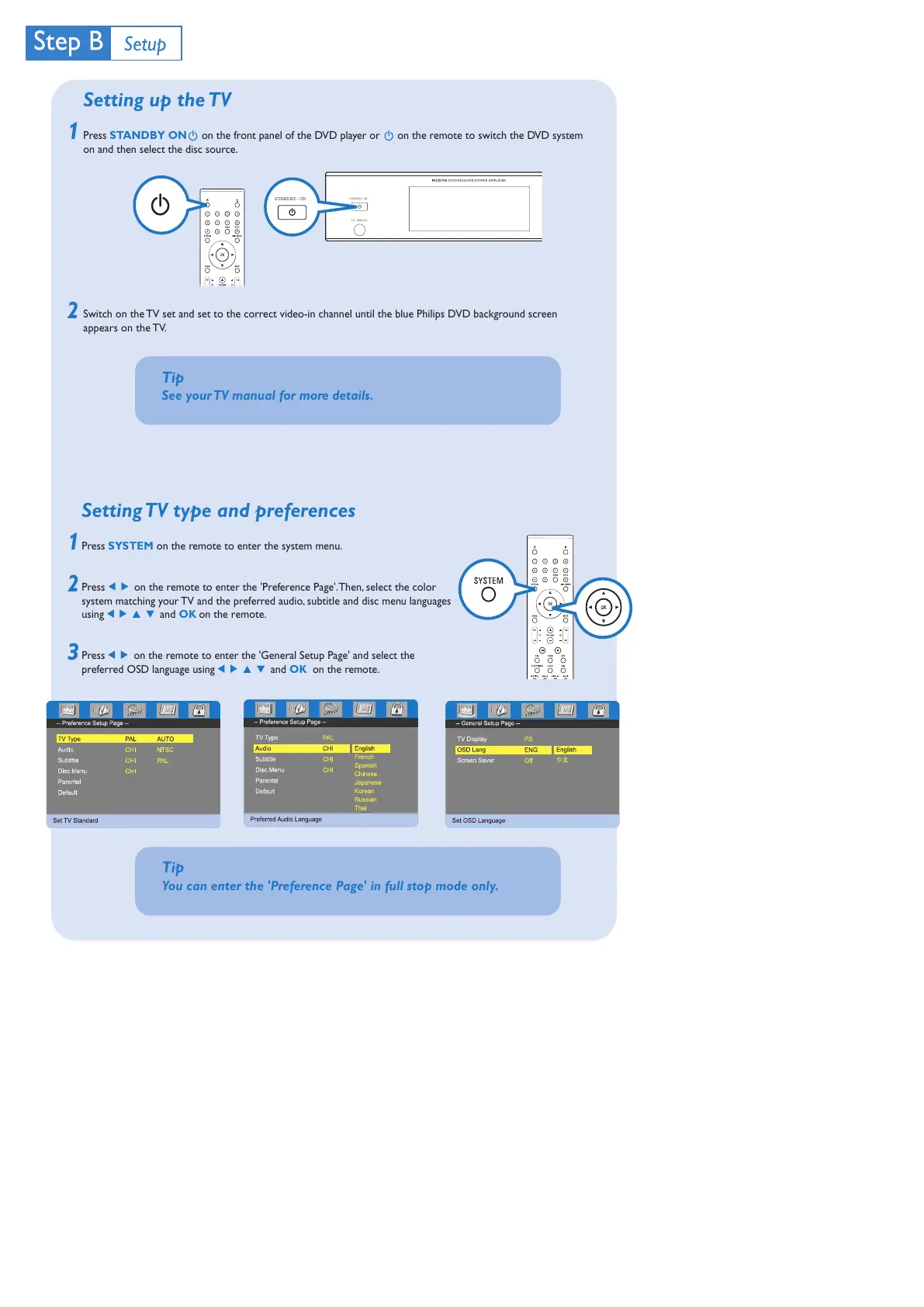
Press STANDBY ONB on the front panel of the DVD player or B on the remote to switch the DVD system
on and then select the disc source.
Switch on the TV set and set to the correct video-in channel until the blue Philips DVD background screen
appears on the TV.
2
1
2
1
Tip
See your TV manual for more details.
3
Setting TV type and preferences
Press SYSTEM on the remote to enter the system menu.
Press 1 2 on the remote to enter the 'Preference Page'. Then, select the color
system matching your TV and the preferred audio, subtitle and disc menu languages
using 1 2 3 4 and OK on the remote.
Press 1 2 on the remote to enter the 'General Setup Page' and select the
preferred OSD language using 1 2 3 4 and OK on the remote.
IR SENSOR
MCD700
DVD/RECEIVER/POWER AMPLIFIER
STANDBY-ON
STANDBY-ON
Tip
You can enter the 'Preference Page' in full stop mode only.
未命名-2 2006.9.29, 13:493



 To Next Page