EasyManua.ls Logo

Philips OccuSwitch DALI LRM2070 - User Manual

Philips OccuSwitch DALI LRM2070
15 pages
Print Icon
To Next Page IconTo Next Page
Loading...
LRM2070, LRM2080, LRM2090 Datasheet
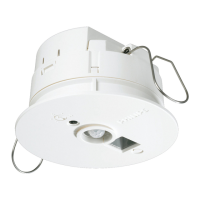
OccuSwitch DALI sensor/controller
General description
The OccuSwitch DALI is a combined sensor and controller. It will dim
and switch on the lights in a room or area on occupancy and available
daylight, with options for local override, parallel operation and network
links to Building Management Systems (BMS).
Savings of up to 75% can be achieved with functions like daylight
depending dimming, occupancy control and over dimension correction.
The OccuSwitch DALI is designed for an office area of 20 to 25 m
2
,
or a classroom of around 40 m
2
but the area can be doubled, or even
tripled, with the extension sensor LRM8118. Up to 15 drivers (usually
luminaires) can be controlled.
A detachable wiring connector enables easy installation and mounting
in the ceiling. Separate Wieland cables are available for an even easier,
faster, trouble-free installation.
It is possible to link up to 22 (advanced only) OccuSwitch DALI units in
parallel to cover larger areas with a specific “open plan” mode to ensure
maximum comfort and savings.
The LRM2090 can be linked to most BMS or other control systems that
have standard DALI interfaces (up to 64). This makes simple yet very
effective control scenarios possible in a building.
The OccuSwitch DALI family exists of:
LRM2070 Basic functionality
LRM2080 Parallel operation
LRM2090 DALI interface for BMS or other network
LCC2070 Wieland cable for LRM2070
LCC2080 Wieland cable for LRM2080 and LRM2090
LRH2070 Ceiling mounting box
LCU2070 Push-button Unit for 4 switches
IRT9090 Extended IR programming tool
1/15
52
95
80
2
Dimensions in mm
LCC2070
cable set
LCC2080
cable set
7-pole
STELVIO
plug MRT3
P 5,08/07
V01 VE

500
GST18i3
BST14i2 female
7-pole
STELVIO
plug MRT3
P 5,08/07
V01 VE

L N
DA
X
BST14i2 female
GST18i3
BST14i2 female
DA
X
BST14i2 male
L N
Ø 95 mm
60 mm
40 mm
60 mm
52 mm
2 inch
Question and Answer IconNeed help?

Do you have a question about the Philips OccuSwitch DALI LRM2070 and is the answer not in the manual?

Philips OccuSwitch DALI LRM2070 Specifications

General IconGeneral
BrandPhilips
ModelOccuSwitch DALI LRM2070
CategoryDimmer
LanguageEnglish

Summary

General Description of OccuSwitch DALI

Applications and Features

Window;Corridor and Dynamic Offset Control

Controls window and corridor luminaires separately for optimal energy savings based on daylight.

DALI Addressing and Extension Sensor

DALI Addressing

Supports standard DALI addressing, allowing up to 4 groups for control.

LRM2090 BMS Version Features

Smart Open Plan Control

Handles occupancy detection in open plan areas, setting background levels and adjusting based on occupancy.

Advanced Functions for BMS

Connects to BMS via DALI gateways (Lon, BACnet, KNX, DyNet) for enhanced control.

Mechanical Installation

Electrical Installation

Commissioning Procedures

Setting Desired Standard Light Level

Three methods for setting the light level: automated, manual with control, or manual with IRT9090.

IR Remote Control Settings

Error States and Precautions

Information on device error states and important operational precautions.

OccuSwitch DALI Operating Modes

Safety and Protection

Electrical Safety Precautions

Guidelines for safe wiring and isolation, treating DALI signals as FELV.

Short Circuit Protection

Information on protection mechanisms and risks of short circuits or mains connection.