14
Install remote control battery
Caution
Risk of explosion! Keep batteries away from heat, sunshine or fi re. Never discard •
batteries in fi re.
Risk of decreased battery life! Never mix different brands or types of batteries.
•
Risk of product damage! When the remote control is not used for long periods, •
remove the batteries.
Perchlorate Material - special handling may apply. See www.dtsc.ca.gov/
•
hazardouswaste/perchlorate.
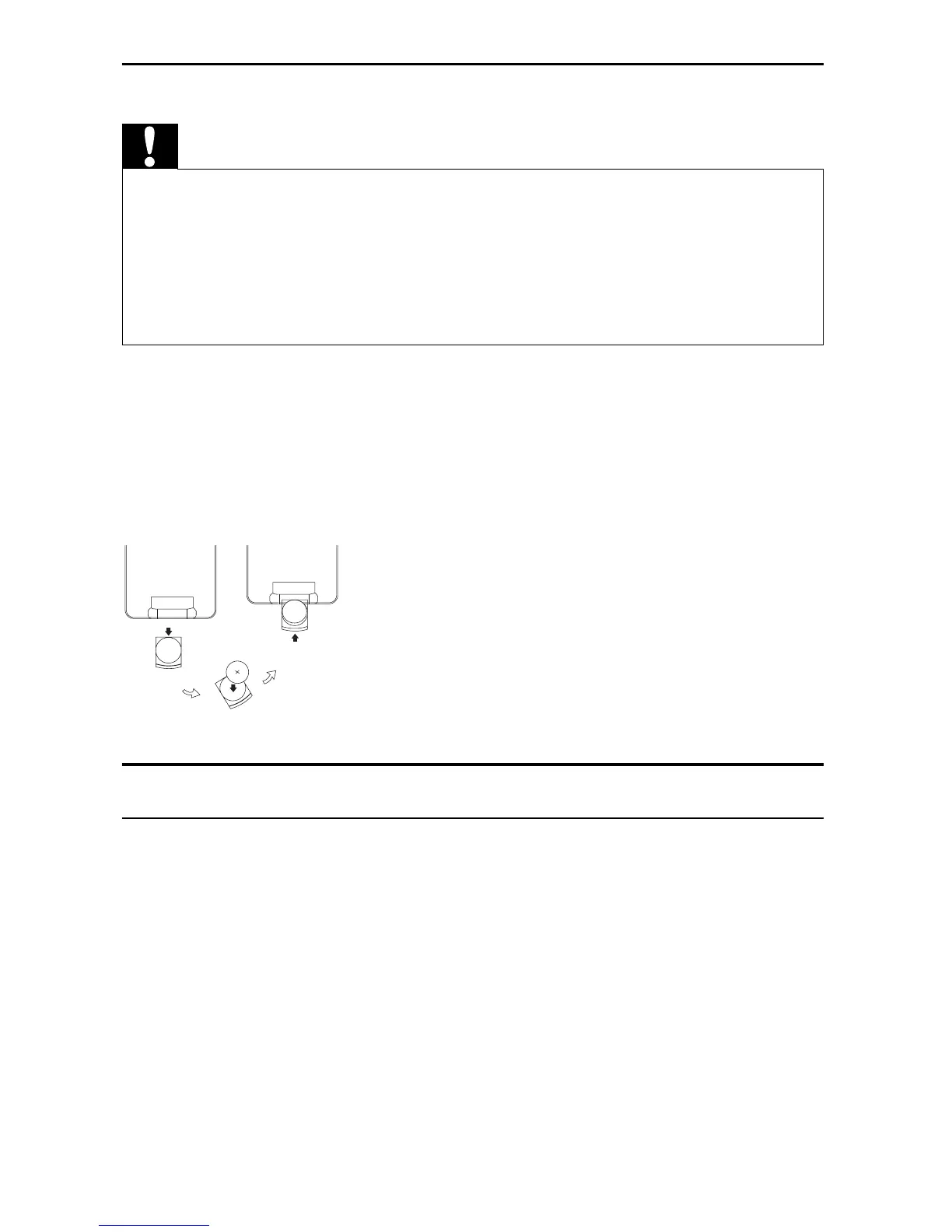
For fi rst-time use:
1 Remove the protective tab to activate the remote control battery.
To replace the remote control battery:
1 Open the battery compartment.
2 Insert 1 CR2025 battery with correct polarity (+/-) as indicated.
3 Close the battery compartment.
Connect additional equipment
Connect a TV
You can connect the player to a TV to enjoy DVD.
Match the color of the AV cables (not supplied) with the jacks: the yellow •
cable is for the yellow video jack, the red/white cable is for the red/white
audio jacks.
EN



 To Next Page