EasyManua.ls Logo

Philips PM 3266 - 3.3. DISMANTLING THE INSTRUMENT

Philips PM 3266
274 pages
Print Icon
To Next Page IconTo Next Page
To Previous Page IconTo Previous Page
Loading...
140
3. 3
.
3. 3
. 1 .
3
.
3. 2.
3
. 3. 3.
3.3.3.
1.
33.3.2.
3.33.3.
DISMANTLING
THE
INSTRUMENT
General
information
Warning;
The
opening
of covers
or
removal
of
parts, except
those
to which
access
can
be gained
by
hand,
is
likely
to expose live
parts,
and
also accessible
terminals
may
be live.
The
instrument
shall
be
disconnected
from
all voltage
sources before
any
adjustment,
replacement
or
maintenance
and repair
during
which the
instrument
will be
opened.
If
afterwards
any adjustment,
maintenance
or repair
of the
opened
instrument
under
voltage
is
inevitable,
it shall
be carried
out only
by
a
skilled
person
who
is aware
of
the
hazard
involved.
Bear
in
mind that
capacitors
inside
the
instrument
may
still
be charged
even
if
the
instrument
has
been
separated
from
all
voltage
sources.
This
section
provides
the
dismantling
procedures
required
for
the
removal of
components
during
repair
operations.
All
circuit
boards
removed from
the
oscilloscope
should
be
adequately
protected
against damage,
and
all normal
precautions
regarding
the
use
of
tools must
be
observed.
During
dismantling
procedures,
a
careful
note
must
be made
of
all
disconnected
leads
so
that they
may
be reconnected
to
their
correct
terminals
during
assembly.
The
E.H.T.
cable
is
unbreakably
connected
to
the
c.r.t.
(disconnection
at
E.H.T.
voltage
multiplier
i.e.
unit
15).
When
the
E.H.T.
cable
to
the
post
-acceleration
anode of
the
c.r.t. is
disconnected
at the
E.H.T. unit
end,
the
E.H.T.
cable
must
be
discharged
immediately
by shortening
them
to earth.
Damage
may
result if
the
instrument
is switched
on when
a circuit
board
has
been removed,
or
if
a
circuit
board is removed
within
one
minute
after
switching
off
the
instrument.
Removing
the
cabinet
plates
and the
screen
bezel
Both upper
and
lower
cabinet
plate
can be removed
after
slackening
one
or
two turns
the
four
quick-release
fasteners
at the
corners of
each
plate.
Do not
slacken the
fasteners
more
than
two turns,
otherwise
they may
come
apart.
The
screen
bezel
can
be
detached
by
pressing
the longer
edges and
pulling
out.
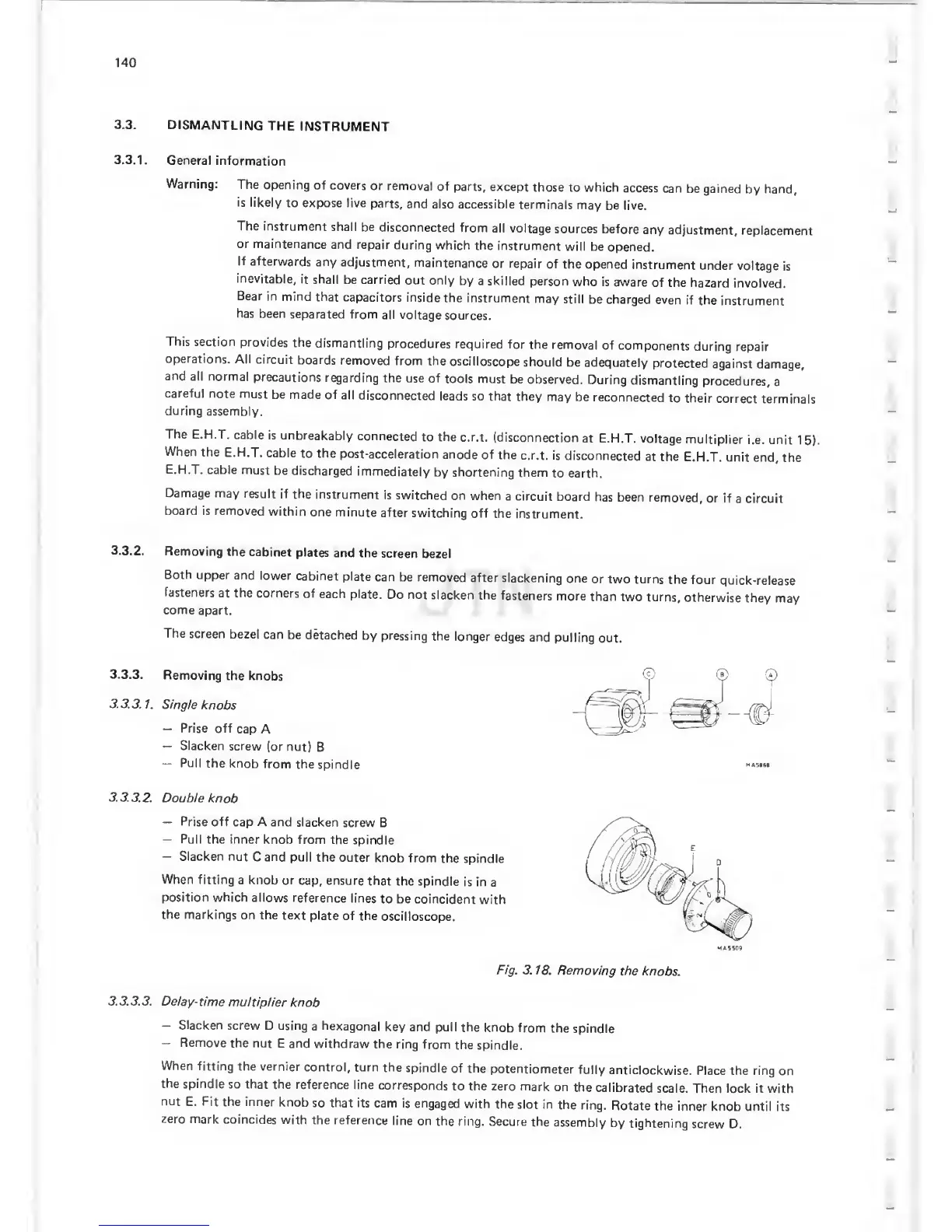
Removing
the knobs
Single
knobs
Prise off
cap A
Slacken
screw
(or nut)
B
Pull
the
knob
from
the
spindle
Double
knob
Prise off
cap A and slacken
screw B
Pull
the inner knob from
the
spindle
Slacken
nut
C and pull
the outer
knob
from
the
spindle
When fitting
a knob
or
cap, ensure
that
the spindle
is in a
position which
allows
reference
lines
to be coincident
with
the markings
on the
text plate
of the
oscilloscope.
MA5I6I
Fig. 3.
18. Removing
the
knobs.
Delay-
time
muitiplier
knob
Slacken
screw D using
a
hexagonal
key and pull
the
knob from
the
spindle
Remove
the nut
E and withdraw
the
ring
from
the
spindle.
When
fitting
the vernier
control, turn
the
spindle
of the
potentiometer
fully
anticlockwise.
Place the ring
on
the
spindle
so that
the reference
line
corresponds
to the zero
mark
on
the
calibrated
scale. Then lock it with
nnt
E. Fit the inner
knob
so that its
cam is
engaged
with
the
slot in
the
ring.
Rotate
the
inner
knob until its
zero
mark
coincides
with
the reference
line on
the
ring. Secure
the
assembly
by
tightening
screw D.

Related product manuals