EasyManua.ls Logo

Philips PM2519 - Page 44

Philips PM2519
126 pages
Print Icon
To Next Page IconTo Next Page
To Previous Page IconTo Previous Page
Loading...
3-2
3.1.
GENERAL
ATTENTION:
Before
checking
and
adjusting,
the
PRESET
values,
which
are
stored
in
RAM
must
be
reset.
To
do
this,
shortcircuit
Tp1001
and
Tp1002,
for
one
second
in
position}!
KE
<
102.
If
the
instrument
is
closed,
shortcircuit
spots
via
hole
2
and
5
in
positiondt
KE
<
100.
The
adjusting
procedure
consists
of
two
parts:
A
and
B.
The
first
part
(A)
and
the
second
part
(B)
of
the
procedure
only
should
be
used
when
the
OO
0063
or
the
OO
0068
have
been
replaced.
In
all
other
cases
it
is
possible
to
start
direct
with
part
B.
If
a
calibration
cannot
be
made
it is
recommended
to
start
first
with
part
A.
If
the
software
there
are
subroutines
which
are
used
to
adjust
the
PM
2519.
To
call
these
subroutines
short-
circuit
TP1001
and
TP1002
for
one
second
in
position
Hz,
if
the
instrument
is
opened.
tf
only
calibration
part
B
must
be
done,
it is
not
necessary
to
open
the
instrument.
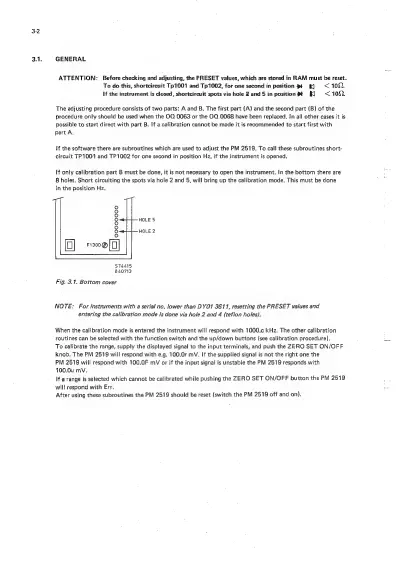
In
the
bottom
there
are
8
holes.
Short
circuiting
the
spots
via
hole
2
and
5,
will
bring
up
the
calibration
mode.
This
must
be
done
in
the
position
Hz.
8
8
8
°
(o]
F1300@[(]]
HOLE
5
HOLE
2
ST4415
840713
Fig.
3.1,
Bottom
cover
NOTE:
For
instruments
with
a
serial
no.
lower
than
DYO1
3611,
resetting
the
PRESET
values
and
entering
the
calibration
mode
is
done
via
hole
2
and
4
(teflon
holes).
When
the
calibration
mode
is
entered
the
instrument
will
respond
with
1000.c
kHz.
The
other
calibration
routines
can
be
selected
with
the
function
switch
and
the
up/down
buttons
(see
calibration
procedure).
ae
To
calibrate
the
range,
supply
the
displayed
signal
to
the
input
terminals,
and
push
the
ZERO
SET
ON/OFF
knob.
The
PM
2519
will
respond
with
e.g.
100.0r
mV.
If
the
supplied
signal
is
not
the
right
one
the
PM
2519
will
respond
with
100.0F
mV
or
if
the
input
signal
is
unstable
the
PM
2519
responds
with
100.0u
mV.
If
a
range
is
selected
which
cannot
be
calibrated
while
pushing
the
ZERO
SET
ON/OFF
button
the
PM
2519
will
respond
with
Err.
After
using
these
subroutines
the
PM
2519
should
be
reset
(switch
the
PM
2519
off
and
on).

Related product manuals