EasyManua.ls Logo

Philips PM2519 - 3.2. ADJUSTING THE PM 2519 WITH THE AID OF A CONTROLLER (for PM 2519;51 only)

Philips PM2519
126 pages
Print Icon
To Next Page IconTo Next Page
To Previous Page IconTo Previous Page
Loading...
3.2.
3-3
ADJUSTING
THE
PM
2519
WITH
THE
AiD
OF
A
CONTROLLER
(for
PM
2519/51
only}
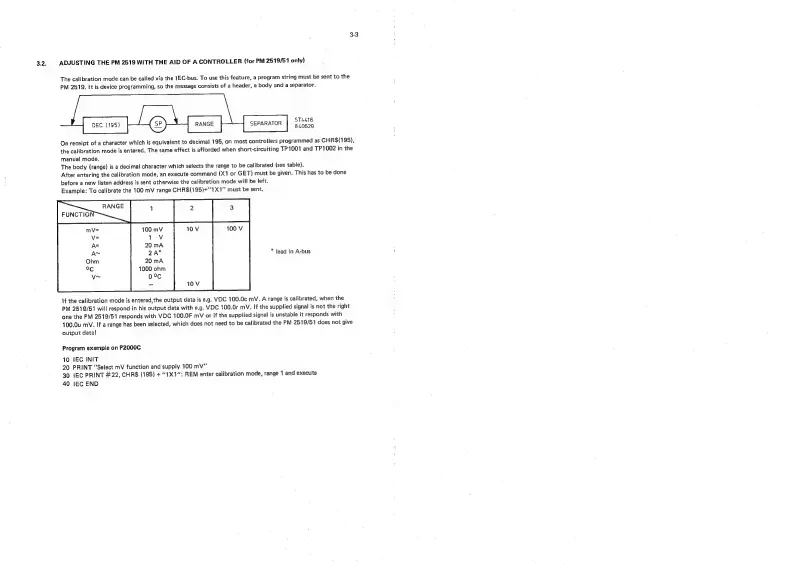
The
calibration
mode
can
be
called
via
the
JEC-bus.
To
use
this
feature,
a
program
string
must
be
sent
to
the
PM
2519.
It
is
device
programming,
so
the
message
consists
of
a
header,
a
body
and
a
separator.
ST4416
840629
DEC
(195)
SEPARATOR
On
receipt
of
a
character
which
is
equivalent
to
decimal
195,
on
most
controllers
programmed
as
CHR$(195},
the
calibration
mode
is
entered.
The
same
effect
is
afforded
when
short-circuiting
TP1001
and
TP1002
in
the
manual
mode.
The
body
(range)
is
a
decimal
character
which
selects
the
range
to
be
calibrated
(see
table).
After
entering
the
calibration
mode,
an
execute
command
(X1
or
GET)
must
be
given.
This
has
to
be
done
before
a
new
listen
address
is
sent
otherwise
the
calibration
mode
will
be
left.
Example:
To
calibrate
the
100
mV
range
CHR$(195)+''1X1"
must
be
sent.
100
mV
1
Vv
20
mA
2A"
*
lead
in
A-bus
20
mA
1000
ohm
0°C
If
the
calibration
mode
is
entered,
the
output
data
is
e.g.
VDC
100.0c
mV.
A
range
is
calibrated,
when
the
PM
2519/51
will
respond
in
his
output
data
with
e.g.
VDC
100.0r
mV.
If
the
supplied
signal
is
not
the
right
one
the
PM
2519/51
responds
with
VDC
100.0F
mV
or
if
the
supplied
signal
is
unstable
it
responds
with
100.0u
mV.
If
a
range
has
been
selected,
which
does
not
need
to
be
calibrated
the
PM
2519/51
does
not
give
output
data!
Program
example
on
P2000C
10
tEC
INIT
20
PRINT
“Select
mV
function
and
supply
100
mV”
30
IEC
PRINT
#22,
CHR$
(195)
+
1X1":
REM
enter
calibration
mode,
range
1
and
execute
40
!EC
END

Related product manuals