Need help?
Do you have a question about the Philips PN402 and is the answer not in the manual?
Guidelines for safe listening volumes and preventing hearing damage from excessive sound pressure.
Precautions to avoid damage or malfunction, including heat, dropping, water, and cleaning agents.
Lists the items included with the Philips TAPN402 Bluetooth headphones.
Describes compatible mobile phones or devices that support Bluetooth for connection.
Identifies and explains the functions of buttons, charging slots, LED indicators, and the microphone.
Instructions on how to charge the headphones using the USB cable and charging case.
Step-by-step guide on pairing the headphones with a mobile device via Bluetooth.
Instructions on how to establish a Bluetooth connection between the headphones and a mobile device.
Details on controlling music playback, adjusting volume, and managing calls using the headphone buttons.
Explains how to use the headphones with an audio cable for a wired connection.
Explains the meaning of different LED light patterns indicating headphone status like connection, pairing, and battery level.
Lists key technical specifications including music/talk time, battery, Bluetooth version, profiles, and operating range.
States compliance with EU directives and provides a link to the Declaration of Conformity.
Provides guidance on recycling old products and batteries according to European directives.
Instructions on how to safely remove the integrated battery before disposing of the headphones.
Confirms the product adheres to regulations concerning electromagnetic field exposure.
Information on the environmental impact of packaging and how materials can be recycled.
Details FCC compliance, conditions for operation, and measures to correct interference.
Information regarding Canadian compliance, including license-exempt transmitters and ICES-3(B)/NMB-3(B) standards.
Covers FCC and IC compliance with radiation exposure limits for uncontrolled environments.
Explains the Bluetooth word mark and logos as registered trademarks.
Identifies Siri as a trademark of Apple Inc.
Addresses frequent user questions regarding power issues, pairing, audio quality, and volume control.
This document describes the Philips 4000 Series In-Ear Bluetooth headphones, model PN402, providing a user manual for their operation, maintenance, and troubleshooting.
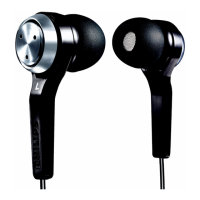
The Philips In-Ear Bluetooth headphones are designed for convenient wireless audio, allowing users to enjoy music and manage calls hands-free. The device consists of two in-ear earpieces connected by a neckband, featuring integrated controls and a microphone. The earpieces are marked with "L" and "R" for left and right, and the neckband is flexible for comfortable wear. The headphones are primarily used for listening to audio from a Bluetooth-enabled device and making/receiving phone calls wirelessly.
To turn the headphones on or off, press and hold the power button (marked with a circle and a vertical line) for 5 seconds. When turning on, a blue LED will flash. For initial pairing with a mobile phone or other Bluetooth device, ensure the headphones are fully charged and turned off. Then, press and hold the power button for 5 seconds until the blue and red LEDs flash alternately, indicating pairing mode. The headphones will remain in pairing mode for 2 minutes. On your mobile phone, activate Bluetooth, search for "Philips PN402," and select it. If prompted, enter the password "0000" (four zeros), though for Bluetooth 3.0 or higher, a password may not be required. The headphones can store up to 8 paired devices and will automatically reconnect to the last connected device when turned on. If the last device is unavailable, they will attempt to reconnect to the second-to-last connected device. If no Bluetooth device is connected within 8 minutes, the headphones will automatically power off to save battery.
The headphones feature volume and track control buttons. To play or pause music, press the on/off/music/call control button once. To adjust the volume, press the +/- buttons once. To skip to the next track, long press the "+" button. To go back to the previous track, long press the "-" button.
When a call comes in, you can pick up or hang up by pressing the on/off/music/call control button once. If you need to switch between callers during a call, press the on/off/music/call control button twice.
In addition to wireless use, the headphones can also be used with the provided audio cable. Ensure the headphones are turned on before connecting the audio cable to the headphones and an external audio device. When using line-in mode, the function keys on the headphones will be disabled.
The LED indicator provides visual feedback on the headphone's status:
Before first use, it is recommended to charge the headphones for 3 hours to ensure optimum battery capacity and lifetime. To charge, connect the supplied USB charging cable to the micro USB charging slot on the headphones and to a charger or a computer's USB port. The LED will turn red during charging and turn off once the headphones are fully charged. A full charge typically takes 2 hours. It is important to use only the original USB charging cable to prevent damage. If you are on a call, finish it before connecting the headphones for charging, as connecting them will power them off.
The product is designed with high-quality, recyclable materials and components. Packaging materials (cardboard, polystyrene foam, polyethylene) are easy to separate for recycling. The product contains a built-in rechargeable battery covered by European Directive 2013/56/EU, which should not be disposed of with normal household waste. It is advised to take the product to an official collection point or a Philips service center for professional battery removal. Proper disposal of old products and rechargeable batteries helps prevent negative environmental and health consequences. If no collection/recycling system is available in your country, you can protect the environment by removing and recycling the battery before disposing of the headphones. Ensure the headphone is disconnected from the charging case before removing the battery.
 General
| Connectivity | Wired |
|---|---|
| Driver Unit | 40mm |
| Impedance | 32 Ohm |
| Cable Length | 1.2 m |
| Connector | 3.5mm |

 To Next Page