This document provides a user guide for the RC4284504/01RP(K) remote control, detailing its functions, pairing process, voice control, and power-saving features. It also includes an FCC compliance statement.
Remote Control Overview
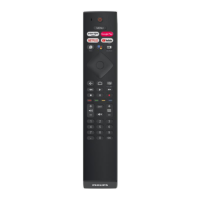
The remote control is designed for intuitive navigation and control of various smart TV functions. It features a standard layout with dedicated buttons for common streaming services, navigation, media playback, and system controls.
-
Power and Menu Controls:
- Power (000.012): Turns the TV on or off.
- MENU (000.191): Accesses the main menu of the TV.
- INFO (000.015): Displays information about the current content or system status.
- Source (000.056): Selects the input source (e.g., HDMI 1, HDMI 2).
-
Streaming Service Shortcuts:
- prime video (Amazon - 000.186): Direct access to Amazon Prime Video.
- Google Play (000.137): Direct access to Google Play services.
- NETFLIX (000.118): Direct access to Netflix.
- YouTube (000.121): Direct access to YouTube.
-
Navigation and Selection:
- Directional Arrows (< 000.090, > 000.091, ^ 000.088, V 000.089): Navigate through menus and content.
- OK (000.092): Confirms a selection or action.
- Back (000.010): Returns to the previous screen or menu.
- Home (000.084): Returns to the TV's home screen.
- EXIT (000.159): Exits the current application or menu.
-
Media Playback Controls:
- Rewind (000.043): Rewinds media playback.
- Play (000.044): Starts or resumes media playback.
- FFwd (000.040): Fast-forwards media playback.
- Stop (000.049): Stops media playback.
- Pause (000.048): Pauses media playback.
- Record (000.055): Initiates recording (if supported by the TV/device).
-
Volume and Channel Controls:
- Vol + (000.016): Increases the volume.
- Vol - (000.017): Decreases the volume.
- MUTE (000.013): Mutes or unmutes the audio.
- CH+ (000.032): Changes to the next channel.
- CH- (000.033): Changes to the previous channel.
- CC (000.070): Toggles Closed Captions.
-
Numeric Keypad:
- Buttons 0-9 (000.000 to 000.009) for direct channel input or other numerical entries.
-
Color-Coded Function Buttons:
- RED (0.109), GREEN (0.110), YELLOW (0.111), BLUE (0.112): These buttons typically serve context-sensitive functions within applications or menus, often indicated on-screen.
-
Voice Control:
- Voice (BLE key - 000.088): Activates the voice control function for issuing commands to the TV.
Pairing the Remote Control with the TV
The remote control uses RF (Radio Frequency) for communication, requiring a pairing process with the TV.
- Step 1: Battery Installation: Insert two AAA batteries into the battery compartment of the remote control.
- Step 2: Initiate Pairing Mode: Press and hold the Source key for 3 seconds.
- Step 3: LED Indication: After 3 seconds, a blue LED on the remote will blink, indicating that the remote is in pairing mode. The LED will continue to blink while in this mode.
- Step 4: RF Pairing: Release the Source key. The RF pairing process will begin, and the blue LED will continue to blink.
- Successful Pairing: If pairing is successful, the blue LED will turn off, confirming the connection.
Important Note on Pairing: If any key (except cursor keys and OK key) is pressed before successful pairing while the remote is in pairing mode, the pairing process will be canceled and exited.
Voice Function
The remote control supports voice commands for enhanced user interaction.
- Activation: Press and release the Voice key to activate the voice function.
- Transmission: The remote will transmit voice data.
- Deactivation: Voice transmission will automatically stop upon receiving a "stop" command from the host device (TV) or after a 20-second timeout.
- LED Indicator: The blue LED on the remote will remain illuminated for the entire duration of the audio sample transmission, indicating active voice input.
Sleeping Mode (Power Saving)
To conserve battery life, the remote control enters a sleeping mode when inactive.
- Activation: The remote automatically enters sleeping mode when no activity is detected for a period.
- Behavior in Sleeping Mode:
- All LEDs on the remote will turn off.
- Both IR (Infrared) and RF (Radio Frequency) communications will cease.
- Waking Up the Remote: Pressing any key on the remote control will wake it up from sleeping mode, restoring full functionality.
FCC Compliance Statement
This device adheres to Part 15 of the FCC Rules, ensuring its operation under specific conditions:
- Interference Prevention: The device is designed not to cause harmful interference to other electronic equipment.
- Interference Acceptance: The device must accept any interference it receives, including interference that might lead to undesired operation.
FCC Caution: Users are advised that any changes or modifications to the device not explicitly approved by the party responsible for compliance could void their authority to operate the equipment. This ensures that the device continues to meet regulatory standards and operates as intended without causing or experiencing undue interference.

 Need help?
 General





 To Next Page