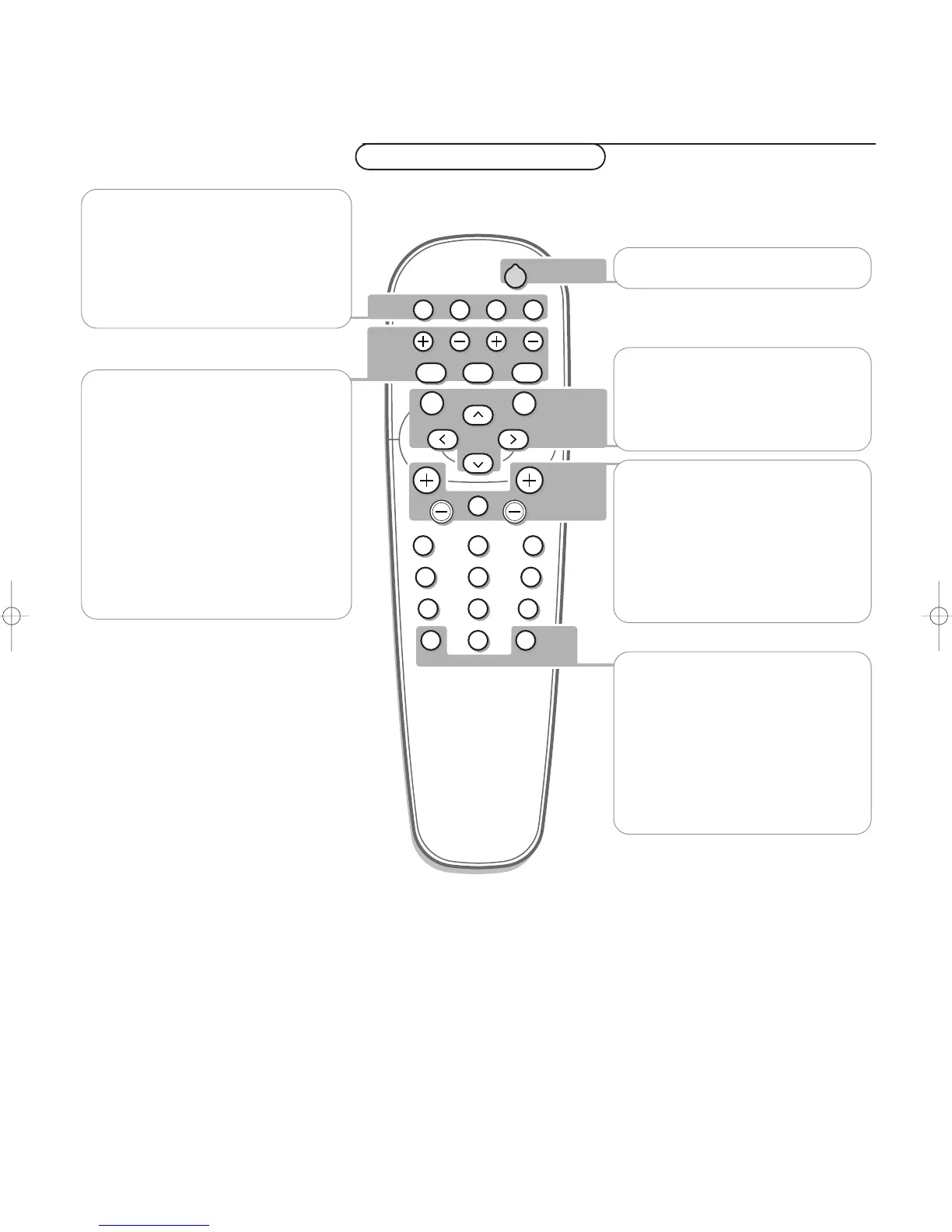
VGA
press repeatedly to select your computer
connected to the
VGA 1 or 2 connector.
AV1, AV2, AV3
press to select the peripherals connected
to the connector indicated on the monitor.
V no function (except when in
combination with an electronic receiver
box.
¬ no function (except when in
combination with an electronic receiver
box.
CH/PR Program selection
To browse through the sources selected.
B to switch to standby or on again
MENU to switch the menu on/off
cursor buttons to select your choice and
to alter a selected adjustment.
OK to activate your choice
AV MUTE to mute the picture or restore
it (if the monitor is used in monitor
mode).
When activated a green indicator starts
blinking in front of the monitor.
q Picture format
See Picture 2 menu, p. 5.
Press the q key to switch between the
different picture formats.
BRIGHTNESS +/-
to adjust the brightness level of the
picture
CONTRAST +/-
to adjust the contrast level of the picture
ZOOM ON/OFF
to activate/de-activate the zoom function.
See p. 5.
ZOOM IN/OUT
to adjust the zoom factor and to change
the magnification of the picture when
zoom is activated. See p. 5.
Use of the remote control











 To Next Page