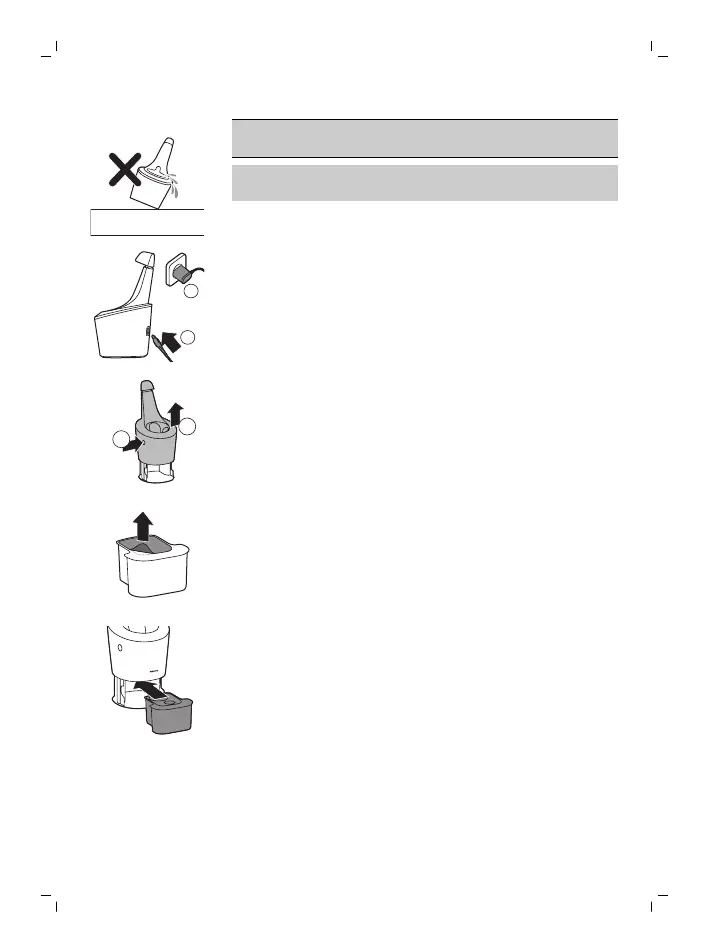
Caution: Do not tilt the SmartClean system to
prevent leakage.
Note: Hold the SmartClean system while you
prepare it for use.
1 Put the small plug in the back of the
SmartClean system.
2 Put the supply unit in the wall socket.
3 While holding the SmartClean system with one
hand, press the button on the side of the
SmartClean system and lift the top part of the
SmartClean system.
4 Pull the seal off the cleaning cartridge.
5 Place the cleaning cartridge in the SmartClean
system.
24
English



 To Next Page