
 Need help?
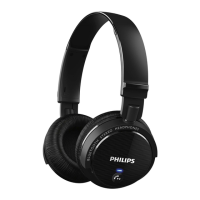
Do you have a question about the Philips shb1700 and is the answer not in the manual?
Ensure Bluetooth is active and searching on your mobile device for pairing.
Turn off the headset and place it within 1 meter of your mobile phone.
Press and hold the headset button until a signal tone is heard and LED flashes blue/red.
On your mobile phone, select 'Philips SHB1700' to establish the connection.
Enter PIN code 0000 if prompted and confirm successful pairing.
Guidance on how to properly fit the headset for optimal comfort and performance.
Instructions for turning the headset on (3s) and off (4s).
Manage calls: answer/hang up (press once), reject (hold 3s), redial (press twice), switch/transfer calls.
Activate voice dialing (press once) and adjust volume levels.
Mute or unmute the microphone during a call by pressing and holding for 2 seconds.
Details on Bluetooth version, frequency, profiles, range, talk/standby time, charge time, dimensions, and weight.
Information regarding FCC rules, interference, and potential modifications.
Details on FCC radiation exposure limits and minimum safe distance.
Information regarding Industry Canada licence-exempt RSS standards and interference.
Details on Canada radiation exposure limits for uncontrolled environments.
 General
| Connectivity | Wireless |
|---|---|
| Bluetooth Version | 4.1 |
| Bluetooth profiles | A2DP, AVRCP, HFP, HSP |
| Maximum range | 10 meters |
| Frequency Response | 20 - 20, 000 Hz |
| Driver Size | 32 mm |
| Sensitivity | 106 dB |
| Microphone | Yes |
| Foldable | Yes |
| Acoustic system | Closed |
| Charging time | 2 hours |
| Impedance | 32 ohms |

 To Next Page