Need help?
Do you have a question about the Philips SHB6250 and is the answer not in the manual?
Guidelines for safe listening practices to prevent hearing damage from high volume.
Instructions to avoid damage or malfunction, including handling heat, liquids, and cleaning agents.
Lists the items included with the Philips Bluetooth wireless headphones.
Identifies compatible mobile phones or devices that support Bluetooth.
Provides a visual guide and labels for the parts of the Bluetooth wireless headphones.
Instructions on how to charge the headphones, including initial charging time and indicator status.
Guides on pairing the headphones with a mobile phone via manual or NFC methods.
Steps to connect the headphones to a Bluetooth device, including re-connection logic.
Details on controlling music playback and managing calls using the headphone buttons.
Instructions on how to adjust the headband for a comfortable and proper fit.
Statement of compliance with essential requirements of Directive 1999/5/EC.
Guidance on environmentally responsible disposal of the product and its battery.
Confirms product adherence to standards for exposure to electromagnetic fields.
Information on ownership and licensing of trademarks like Bluetooth, Siri, and Google.
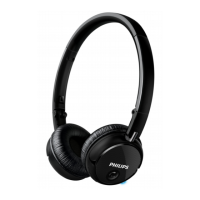
The Philips SHB6250 are wireless on-ear headphones designed for convenient, hands-free communication and music enjoyment. These headphones connect wirelessly to compatible Bluetooth devices, allowing users to manage calls and control music playback without being tethered by cables.
The primary function of the Philips SHB6250 headphones is to provide a wireless audio experience for both calls and music. They utilize Bluetooth technology to establish a connection with mobile phones, notebooks, PDAs, Bluetooth adapters, MP3 players, and other compatible devices. This wireless capability allows for freedom of movement, making them suitable for various activities where wired connections might be inconvenient.
For communication, the headphones feature an integrated microphone, enabling users to make and receive calls wirelessly. Call management functions include picking up, hanging up, and rejecting calls, as well as muting/unmuting the microphone during a conversation. The headphones also support voice control features like Siri/Google Now, allowing users to interact with their smartphone's virtual assistant directly through the headset.
In terms of music playback, the SHB6250 allows users to play, pause, skip forward, and skip backward through tracks. Volume control is also integrated, providing a comprehensive set of controls directly on the headphones, eliminating the need to constantly interact with the connected device. The ability to switch seamlessly between calls and music enhances the user experience, making it a versatile accessory for daily use.
The headphones are designed for on-ear wear, with an adjustable headband to ensure a comfortable and secure fit for different users. The design also incorporates a twist feature for easy storage after use, making them portable and convenient to carry.
The SHB6250 headphones offer several user-friendly features to enhance their usability:
Maintaining the Philips SHB6250 headphones involves simple practices to ensure their longevity and optimal performance:
 General
| Impedance | 32 Ω |
|---|---|
| Driver unit | 40 mm |
| Magnet type | Neodymium |
| Ear coupling | Supraaural |
| Headphone frequency | 8 - 22000 Hz |
| Maximum input power | 50 mW |
| Headphone sensitivity | 106 dB |
| Quantity | 1 |
| Cables included | USB |
| Quick start guide | Yes |
| Battery type | Built-in battery |
| Standby time | 200 h |
| Package type | Blister |
| Package depth | 45 mm |
| Package width | 170 mm |
| Package height | 225 mm |
| Package weight | 235 g |
| Wireless range | 10 m |
| Bluetooth version | 3.0+HS |
| Bluetooth profiles | A2DP, AVRCP, HFP, HSF |
| Connectivity technology | Wireless |
| Headset type | Binaural |
| Product type | Headset |
| Product color | Black |
| Wearing style | Head-band |
| Volume control | Digital |
| Recommended usage | Calls/Music |
| Microphone type | Built-in |
 Weight and Dimensions
| Depth | 57 mm |
|---|---|
| Width | 160 mm |
| Height | 169 mm |
| Weight | 120 g |

 To Next Page