Need help?
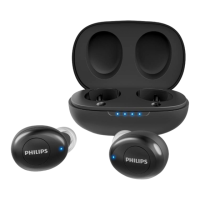
Do you have a question about the Philips TAT1225 and is the answer not in the manual?
Listen at reasonable volumes for limited periods to prevent hearing damage.
Avoid excessive heat, dropping, liquids, and improper cleaning agents.
Instructions for charging the earpieces and the charging case.
Steps for initial pairing, including power on and connecting to a device.
Steps to pair a single earpiece and switch to dual mode.
Steps to pair with a new device after previous pairings.
How earpieces automatically reconnect to paired devices.
Operations for answering, rejecting calls, and activating voice assistants.
Controls for play/pause, backward, and forward music playback.
Step-by-step guide to reset earpieces for pairing or connection issues.
Details on battery life, charging, Bluetooth, and audio features.
Details FCC part 15 compliance and conditions for operation.
Troubleshooting steps for earpieces not powering on.
Troubleshooting steps for pairing failures and device not finding earpieces.
Addresses music playback on phone speaker and poor audio quality.
 General
| Brand | Philips |
|---|---|
| Model | TAT1225 |
| Category | Wireless Headphones |
| Language | English |


 To Next Page