English
5
English
Removing the rechargeable battery
The built-in rechargeable battery can be removed for disposal. If you are not
comfortable disassembling electronics, please seek professional assistance at
your local electronics recycling or repair shop.
Take any necessary safety precautions when you handle tools to open the
appliance and when you dispose of the rechargeable battery.
Be sure to protect your eyes, hands, fingers, and the surface on
which you work.
When you handle batteries, make sure that your hands, the toothbrush, and
the batteries are dry.
To avoid accidental short-circuiting of batteries after removal, do not let
battery terminals come into contact with metal objects (e.g. coins, hairpins,
rings). Do not wrap batteries in aluminum foil. Tape battery terminals or put
batteries in a plastic bag before disposal.
Do not reinstall battery once it has been removed for recycling. Consumer
installation of battery may increase risk of fire or other potential safety
hazards.
If batteries are damaged or leaking, avoid contact with the skin or
eyes. If this occurs, immediately rinse well with water and seek
medical care.
Removing the rechargeable battery
- Tools: T8 TORX screwdriver, #2 Phillips-head screwdriver, and plastic pry
tool (or guitar pick).
1
When possible, deplete the rechargeable battery of any charge. To do this,
remove the toothbrush from the charger, turn on the toothbrush and let it
run until it stops. Repeat this step until you can no longer turn on the
Philips Sonicare toothbrush.
2
Remove the brush head from the toothbrush.
3
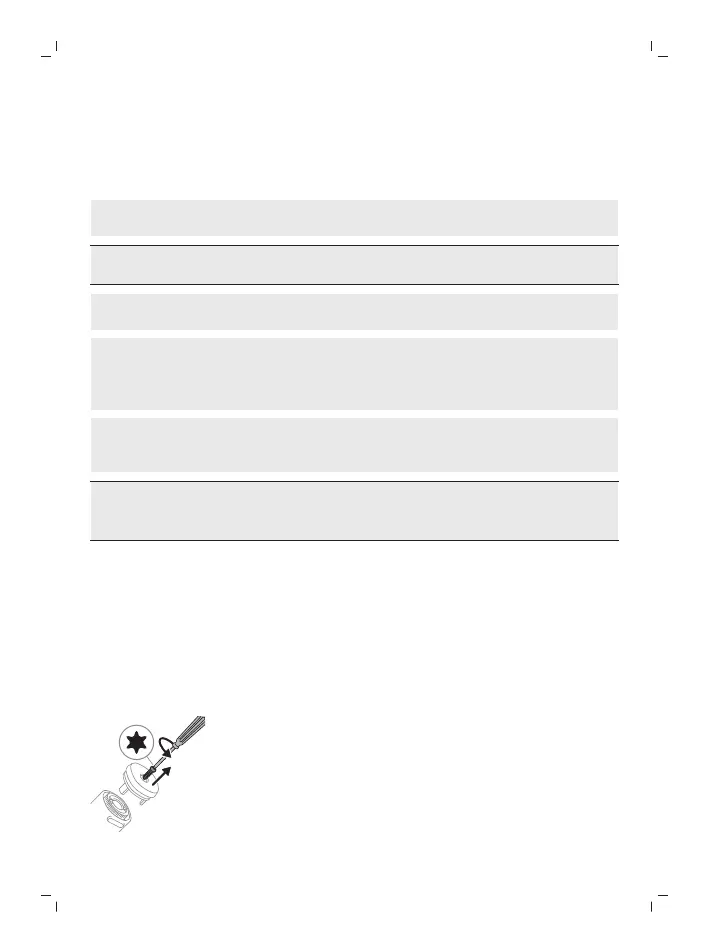
Using a T8 TORX screwdriver, unscrew and remove (counterclockwise) the
screw from the base of the toothbrush handle.





 To Next Page