-
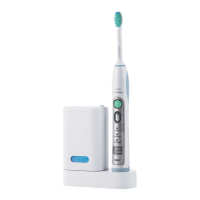
Not shown: Protective screen for UV light bulb
Note: The content of the box may vary based on the model
purchased.
Preparing for use
Attaching the brush head
1 Align the brush head so the bristles point in the same direction as
the front of the handle (Fig. 2).
2 Firmly press the brush head down onto the metal shaft until it
stops.
Note: When the brush head is attached, it is normal that there is a
small gap between the brush head and the handle.
Charging your Philips Sonicare
1 Plug the charger in a wall socket.
2 Place the handle on the charger (Fig. 3)
-
The flashing light of the battery level indicator indicates that the
toothbrush is charging.
Deluxe recharge gauge:
Indicates amount of charge left in battery
-
3 green LEDs: 75-100%
-
2 green LEDs: 50-74%
-
1 green LED: 25-49%
-
1 flashing yellow LED: less than 25%
Note: If the battery charge of your Philips Sonicare is low, you hear 3
beeps and 1 LED on the recharge gauge flashes yellow for 30
seconds after the 2-minute brushing cycle.
9
English






 To Next Page