1
EN
Prepare
1
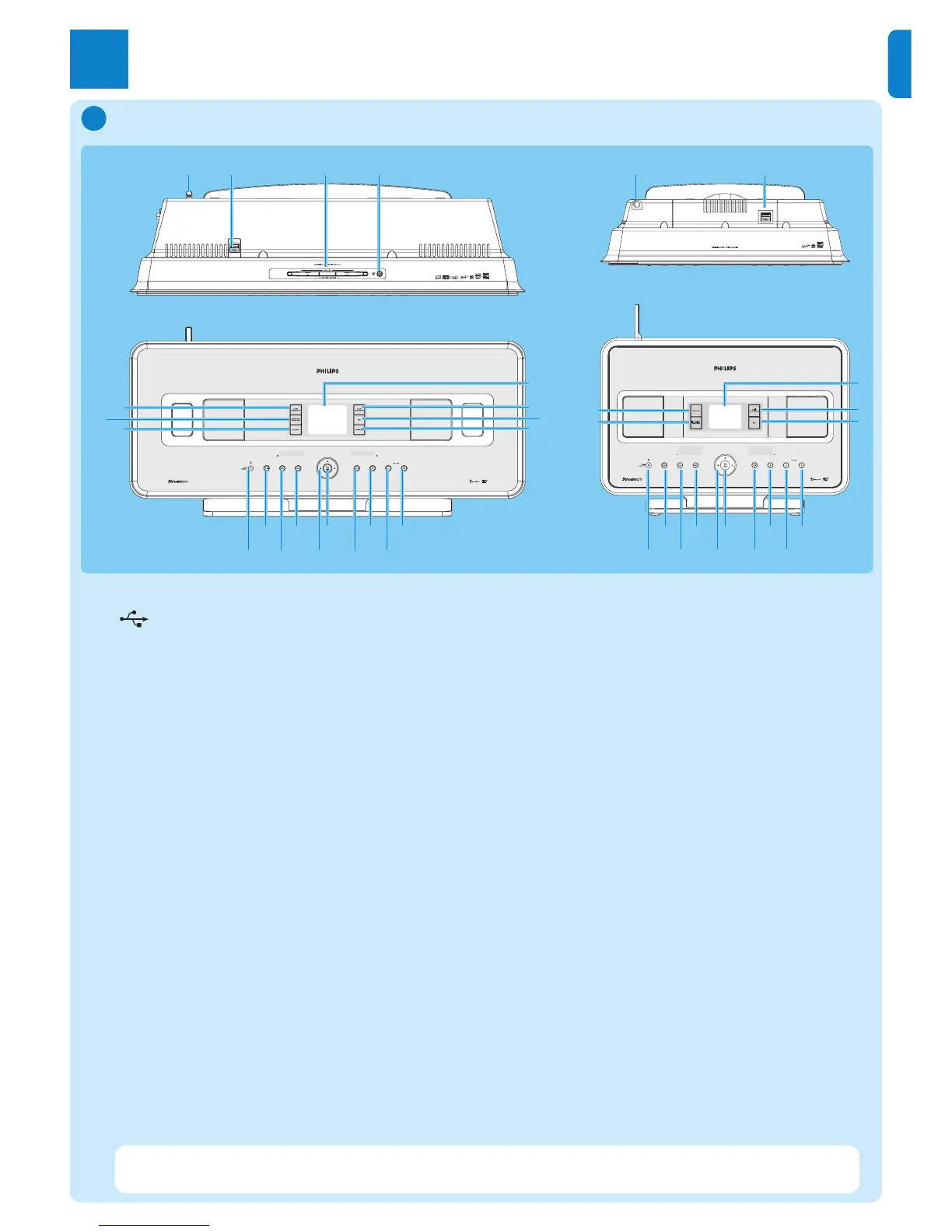
1 Antenna
2 USB jack
3 Disc slot (loader)
Insert discs with graphics facing you
4
/ Disk eject
5 LCD
6
MUSIC FOLLOWS ME
7 DBB (Dynamic Bass Boost)
8 SMART EQ
9 VOLUME +
10 VOLUME -
11 9 Stop
12 )K Skip forward
13 OK / 2; OK/ Play/pause
14 1 / 2 / 3 / 4 Navigation left / right / up / down
15 J( Skip back
16
MENU
17 HOME
18 y ON / STANDBY / ECO STANDBY
• Press briefly to toggle between modes Standby and ON.
• Press & hold to toggle power modes between ON and Eco Standby (power-saving mode).
19
0 RECORD
20 INCR.SURR. Incredible Surround sound
21 MUSIC BROADCAST or
SMART EQ
2143
6
5
7
8
21
20
19
9
10
11
12
13
14
15
16
17
18
21
6
5
7
21
20
9
10
11
12
13
14
15
16
17
18
Controls on Center & Station
A
Note The illumination of one corner of the casing is a design element.















 To Next Page