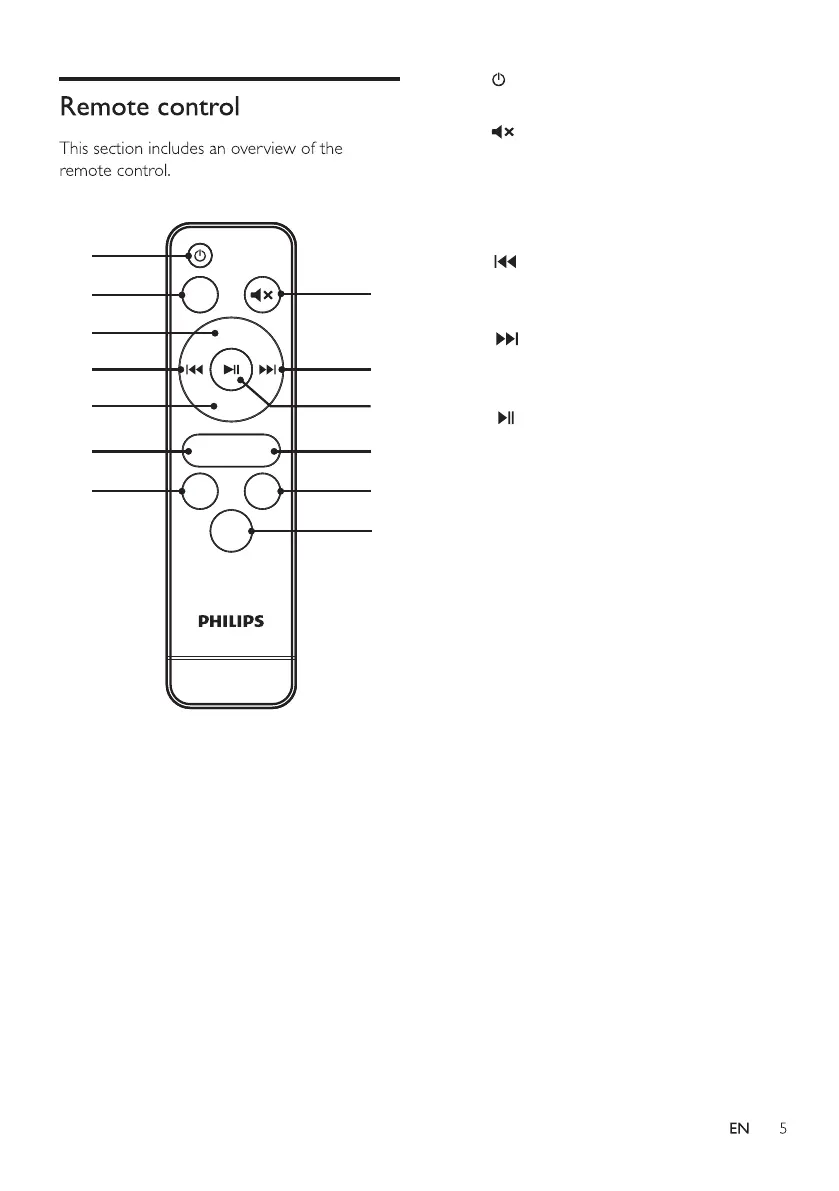
1.ST-BY
2.MUTE
3.Input
4.VOL+
5.PREVIOUS
6.NEXT
7.PLAY/PAUSE
8.VOL-
9.TRE-
10.TRE+
11.BASS-
12.BASS+
13.EQ
Input
Vol
+
Vol-
Tre
-
Bass
-
Bass
+
EQ
Tre+
1
3
4
5
8
9
11
2
6
7
10
12
13
1. :Switch the SoundBar on or to
standby
2. :Mute or restore volume
3. Input: Source Switch, nou for Audio in, bt
for Bluetooth, USb for USB, ArC for
HDMI
4. VOL+:Volume up.
5. : In BT/USB mode, press to previous
track. In USB mode, long press to
rewind.
6. : In BT/USB mode, press to next
track. In USB mode, long press to
rewind.
7. : In BT/USB mode, Play, Pause or
resume play.
8. VOL-: Volume down.
9. Tre-: Decrease treble
10. Tre+: Increase treble
11. Bass-: Decrease bass
12. Bass+: Increase bass
13.EQ: Select EQ,
"OIL":Movie,
"USIC":Music,
"OICE" : Voice,
"StAd" : Stadium



 To Next Page