Need help?
Do you have a question about the Philips TAH8505 and is the answer not in the manual?
Guidance on listening at reasonable volumes and avoiding distractions for hearing protection.
Details on avoiding damage, operating conditions, and storage temperatures for the headset.
Lists all the items included with the Philips Bluetooth over-ear headphones.
Information on mobile phones or devices compatible with the headset.
Details touch control panel, power button, and LED indicators for operation and status.
Describes audio jack, charging port, and microphone for connectivity and input.
Instructions on how to charge the headset battery using the charging case or USB port.
Step-by-step guide to pair the headphones with a mobile phone via Bluetooth.
Steps to turn on the headset and automatically connect to a Bluetooth device.
Guides on controlling music playback and managing phone calls using headset buttons.
Details on activating and controlling Active Noise Cancellation and Voice Assistant.
Lists key technical specifications including music/talk time, battery, Bluetooth version, and range.
Statement of compliance with essential requirements and relevant EU directives.
Instructions for environmentally responsible disposal of the product and its rechargeable battery.
Confirmation of compliance with standards regarding exposure to electromagnetic fields.
Details FCC and Canada regulations, including interference and radiation exposure statements.
Information regarding the ownership and usage of Bluetooth and Siri trademarks.
Answers to common questions regarding power, pairing, music control, and audio quality.
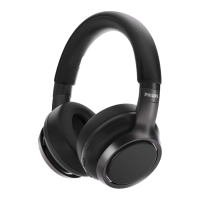
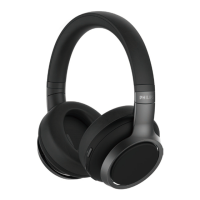
The Philips TAH8505 are over-ear Bluetooth headphones designed to provide a convenient and high-quality audio experience. These headphones offer wireless hands-free calling, wireless music control, the ability to switch between calls and music, and noise cancellation. They are part of the Philips 8000 Series, indicating a focus on advanced features and performance.
The primary function of the Philips TAH8505 headphones is to deliver audio wirelessly via Bluetooth technology. They can connect to various Bluetooth-enabled devices such as mobile phones, notebooks, PADs, Bluetooth adapters, and MP3 players. The headphones support both audio playback and call management, making them versatile for different daily activities. The integrated noise cancellation feature helps to reduce ambient sound, allowing for a more immersive listening experience. Additionally, an ambient sound mode is available, which allows users to hear their surroundings when needed. The headphones also feature a voice assistant function, enabling users to interact with their device's default voice assistant. For situations where wireless connectivity is not desired or available, the headphones can be used with a wired audio cable, connecting to an external audio device.
The Philips TAH8505 headphones are designed for ease of use with several intuitive features.
Proper maintenance ensures the longevity and optimal performance of the Philips TAH8505 headphones.
 General
| Control type | Touch |
|---|---|
| Product type | Headset |
| Product color | Black |
| Wearing style | Head-band |
| Recommended usage | Calls/Music |
| USB connector | Micro-USB |
| Frequency band | 2.402 - 2480 GHz |
| Wireless range | 10 m |
| 3.5 mm connector | - |
| USB connectivity | Yes |
| Bluetooth version | 5.0 |
| Bluetooth profiles | A2DP, AVRCP, HFP |
| Connectivity technology | Wireless |
| Impedance | 16 Ω |
| Driver unit | 40 mm |
| Magnet type | Neodymium |
| Diaphragm material | Polyethylene terephthalate (PET) |
| Headphone frequency | 7 - 40000 Hz |
| Noise canceling type | Active |
| Headphone sensitivity | 90 dB |
| Microphone type | Built-in |
| Battery type | Built-in battery |
| Standby time | 200 h |
| Charging source | USB |
| Continuous audio playback time | 30 h |
| Quantity | 1 |
| Package depth | 70 mm |
| Package width | 215 mm |
| Package height | 250 mm |
| Package weight | 750 g |
| Master (outer) case width | 229 mm |
| Master (outer) case height | 260 mm |
| Master (outer) case length | 237 mm |
| Master (outer) case weight | 2608 g |
| Harmonized System (HS) code | 85183000 |
| Quantity per master (outer) case | 3 pc(s) |
| Master (outer) case packaging type | Carton |
 Weight and Dimensions
| Weight | 278 g |
|---|

 To Next Page