Need help?
Do you have a question about the Philips TAH9505 and is the answer not in the manual?
Guidelines for listening at reasonable volumes and avoiding hearing damage.
Precautions to avoid damage or malfunction, including heat, water, and cleaning.
Lists all accessories included with the Philips Bluetooth headphones TAH9505.
Details compatible mobile phones and devices for headphone connection.
Identifies and explains the different parts and buttons of the wireless headphone.
Instructions on how to charge the headphone battery for optimal performance and lifetime.
Step-by-step guide to connect the headphones to a mobile device via Bluetooth.
Guides on establishing a Bluetooth connection between the headphones and a mobile device.
Explains the process of quick device pairing with Android smartphones.
Details on connecting to two devices and switching between them.
Instructions for connecting the headphones using the provided audio cable.
How to control music playback, adjust volume, and handle calls using the headphones.
Explains the meaning of different LED light patterns for headphone status.
Lists specifications like music/talk time, charging time, battery, Bluetooth version, and profiles.
Statement declaring the product's compliance with essential EU requirements.
Guidance on environmentally responsible disposal of the product and its battery.
Instructions on how to safely remove the built-in battery for recycling.
Confirms the product's adherence to standards regarding electromagnetic field exposure.
Information about packaging materials and their recyclability.
Details compliance with FCC and Canadian regulations for interference and operation.
Information about the Bluetooth word mark and logos being registered trademarks.
States that Siri is a trademark of Apple Inc.
Confirms Google is a trademark of Google LLC.
Troubleshooting steps when the headphone does not power on.
Steps to resolve issues with pairing the headphone to a Bluetooth device.
Procedure to reset the headphone's Bluetooth pairing settings.
Troubleshooting when music playback controls are not working.
Addressing issues with low volume, including volume sync problems.
Troubleshooting why a Bluetooth device cannot detect the headphones.
Resolving issues where music plays on the mobile phone instead of headphones.
Troubleshooting steps for poor audio quality or crackling noise.
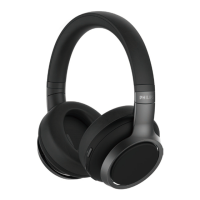
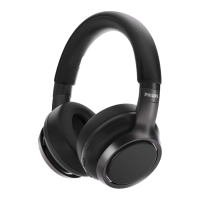
The Philips TAH9505 are over-ear Bluetooth headphones from the 9000 Series, designed to provide a comprehensive audio experience with convenient wireless functionality. These headphones allow users to enjoy high-quality music, manage calls hands-free, and benefit from noise cancellation.
The Philips TAH9505 headphones offer a versatile audio solution, primarily functioning as wireless headphones that connect to mobile phones and other Bluetooth-enabled devices. They support convenient wireless hands-free calls, allowing users to answer, reject, and switch between calls with ease. The headphones also enable wireless music enjoyment and control, including play, pause, volume adjustment, and track navigation. A key feature is the integrated noise cancellation (ANC) mode, which helps to reduce ambient noise for a more immersive listening experience. Additionally, an "Awareness Mode" allows users to hear their surroundings when needed, and a "Quick Conversation" feature can be activated by placing a palm over the right ear cup. The headphones also support Google Assistant and other smartphone voice assist functions, providing quick access to information and controls through voice commands. For situations where wireless connectivity is not preferred or available, the headphones can be used with a wired connection via the supplied audio cable. The device incorporates a multi-point connection feature, enabling it to be paired with two devices simultaneously, such as a mobile phone and a notebook, facilitating seamless switching between audio sources and calls.
The headphones are designed for ease of use, starting with a straightforward pairing process. After an initial charge, users can put the headphones into pairing mode, and they will store up to 8 previously paired devices. For Android users, Google Fast Pairing simplifies the connection process, automatically detecting the headphones. Once connected, the headphones automatically reconnect to the last paired device when powered on.
Music control is intuitive, with a touch pad on the ear cup allowing users to play/pause music with a single tap, adjust volume by swiping up or down, and navigate tracks by swiping front or back. Call management is equally simple: a single tap on the touch pad picks up or hangs up a call, a 1-second touch rejects a call, and a tap can answer a new call during an ongoing one or switch between two calls.
The ANC Mode button allows users to cycle through ANC ON, Awareness Mode, and ANC OFF, providing control over their listening environment. The "Awareness Mode" can also be activated by pressing the ANC Mode button until "Awareness" is heard, while "Quick Conversation" is activated by covering the right ear cup with a palm. The Voice Assistant button enables users to wake up Google Assistant or other smartphone voice assistants, and can also be used for playback notifications or to cancel notifications.
For wired listening, simply connect the provided audio cable to the headphones and an external audio device. However, it's important to note that the function keys are disabled when using line-in mode. The multi-point connection feature enhances usability by allowing simultaneous pairing with two devices, enabling users to listen to music from one device while being ready to receive calls from another, with automatic pausing and routing of calls.
Maintaining the Philips TAH9505 involves proper charging and cleaning. The headphones are charged via a USB Type-C port using the supplied USB charging cable. For optimal battery capacity and lifetime, it is recommended to charge the battery for 4 hours before first use. An indicator LED turns white during charging and turns off when fully charged. It's advised to use only the original USB charging cable to prevent damage and to finish any calls before charging, as connecting for charging will power the headphones off.
For cleaning, a soft cloth, dampened with a minimum amount of water or diluted mild soap if necessary, should be used. Harsh cleaning agents containing alcohol, ammonia, benzene, or abrasives should be avoided. The headphones should not be exposed to excessive heat, dripping, or splashing, and should never be submerged in water.
The integrated battery is designed to be removed and recycled responsibly at the end of the product's life, in accordance with local regulations, to protect the environment. Philips provides guidance on how to remove the integrated battery for proper disposal, emphasizing that the headphone should be disconnected from the charging case before removal. The product is designed with high-quality materials and components that can be recycled and reused, aligning with environmental information and compliance standards.
 General
| Control type | Buttons, Touch |
|---|---|
| Headset type | Binaural |
| Product type | Headset |
| Product color | Black |
| Wearing style | Head-band |
| Country of origin | China |
| Recommended usage | Calls/Music |
| Impedance | 32 Ω |
| Driver unit | 40 mm |
| Ear coupling | Circumaural |
| Headphone frequency | 20 - 40000 Hz |
| Maximum input power | 30 mW |
| Headphone sensitivity | 103 dB |
| Microphone type | Built-in |
| USB connector | USB Type-C |
| Wireless range | 10 m |
| Bluetooth version | 5.0 |
| Bluetooth profiles | A2DP, AAC, AVRCP, HFP, HSP, SBC |
| Connectivity technology | Wired & Wireless |
| Battery type | Built-in battery |
| Charging source | USB |
| Continuous audio playback time | 20, 27 h |
| Continuous audio playback time (with ANC) | 27 h |
| Package depth | 65 mm |
| Package width | 208.5 mm |
| Package height | 253 mm |
| Package weight | 766 g |
| Charging time | 240 min |
| Master (outer) case width | 212 mm |
| Master (outer) case height | 251 mm |
| Master (outer) case length | 223 mm |
| Master (outer) case weight | 2600 g |
| Harmonized System (HS) code | 85183000 |
| Quantity per master (outer) case | 3 pc(s) |
| Master (outer) case packaging type | Carton |
 Weight and Dimensions
| Depth | 189.2 mm |
|---|---|
| Width | 170.1 mm |
| Height | 90 mm |
| Weight | 250 g |

 To Next Page