EasyManua.ls Logo

Philips TAM8905 - User Manual

Philips TAM8905
23 pages
Print Icon
To Next Page IconTo Next Page
Loading...
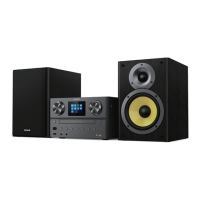
Micro Music System
8000 Series
TAM8905
User manual
Register your product and get support at
www.philips.com/support
Question and Answer IconNeed help?

Do you have a question about the Philips TAM8905 and is the answer not in the manual?

Summary

Important Safety and Information

Safety Precautions

Read and understand all instructions before use; failure to follow may void warranty.

Notice on Modifications

Unauthorized modifications may void user authority to operate equipment.

Compliance Declaration

Product complies with essential requirements of EU Directive 2014/53/EU.

Environmental Care

Instructions for proper disposal of old products and batteries.

Your Micro Music System

System Introduction

Welcome to Philips! Benefit from support by registering your product at www.philips.com/support.

Package Contents

List of items included in the product package.

Getting Started

Connect Speakers

Step-by-step guide to connect speakers to the main unit.

Connect Power

Instructions for safely connecting the unit to a power source.

Connect Radio Antenna

Connect the radio antenna for radio listening.

Prepare Remote Control

Instructions for inserting batteries into the remote control.

Internet Radio Operations

Use Menu in Internet Radio Mode

How to navigate and use the menu in Internet radio mode.

Store Internet Radio Stations

Procedure to save favorite Internet radio stations.

Select Preset Internet Radio Station

How to retrieve saved Internet radio stations.

Show Internet Radio Information

View detailed information about the current Internet radio station.

Listen to Podcasts

Podcasts Mode Operation

Guide to selecting and listening to podcasts.

Listen to Spotify

Spotify Integration Guide

Instructions for using Spotify with the unit.

FM Radio Operations

Tune to FM Radio Stations

Methods for tuning into FM radio stations.

Store FM Radio Stations

Procedure to save favorite FM radio stations.

Store FM Stations Automatically

Automatically save all available FM radio stations.

Select Preset FM Radio Station

How to retrieve saved FM radio stations.

Use Menu in FM Mode

Navigating and using the FM mode menu.

Show RDS Information

Displaying Radio Data System information.

System Settings Menu

Adjust Network Settings

Steps to adjust and establish network settings.

Set Time and Date

Procedure to set the unit's time and date.

Set System Language

How to change the system language.

Reset All Settings

Instructions for resetting the device to factory defaults.

Check Software Update

How to check for and manage software updates.

Know Software Version

Displaying the current software version.

Adjust Backlight Settings

Settings to customize display backlight.

Main Menu Operations

Set Alarm

How to set and manage alarms.

Set Sleep Timer

Guide to setting the sleep timer.

Other Features

Play Audio via Bluetooth

Steps for playing audio via Bluetooth connection.

Adjust Volume

How to adjust audio volume levels.

Mute Sound

Function to temporarily silence audio output.

Play from Disc

Instructions for playing audio from a CD.

Play from USB

Guide to playing audio files from a USB device.

Charge Your Devices

How to use the unit to charge external devices.

Listen to External Device

Instructions for connecting and listening to external audio sources.

Product Information

Technical Specifications

Technical specifications of the product.

Troubleshooting

No Power Issues

Steps to resolve no power issues.

Sound Problems

Troubleshooting steps for sound issues.

Unit Unresponsive

Steps to resolve unit unresponsiveness.

Poor Radio Reception

Tips for improving radio reception.

Weak Wi-Fi Signal

Solutions for weak Wi-Fi signals.

Wi-Fi Connection Errors

Steps to resolve Wi-Fi connection problems.

Station Availability Issues

Reasons why some stations may not work.

Disappearing Station List

Explanation for stations disappearing from the list.

Alarm Malfunction

Troubleshooting for alarm functionality.

Summary

Important Safety and Information

Safety Precautions

Read and understand all instructions before use; failure to follow may void warranty.

Notice on Modifications

Unauthorized modifications may void user authority to operate equipment.

Compliance Declaration

Product complies with essential requirements of EU Directive 2014/53/EU.

Environmental Care

Instructions for proper disposal of old products and batteries.

Your Micro Music System

System Introduction

Welcome to Philips! Benefit from support by registering your product at www.philips.com/support.

Package Contents

List of items included in the product package.

Getting Started

Connect Speakers

Step-by-step guide to connect speakers to the main unit.

Connect Power

Instructions for safely connecting the unit to a power source.

Connect Radio Antenna

Connect the radio antenna for radio listening.

Prepare Remote Control

Instructions for inserting batteries into the remote control.

Internet Radio Operations

Use Menu in Internet Radio Mode

How to navigate and use the menu in Internet radio mode.

Store Internet Radio Stations

Procedure to save favorite Internet radio stations.

Select Preset Internet Radio Station

How to retrieve saved Internet radio stations.

Show Internet Radio Information

View detailed information about the current Internet radio station.

Listen to Podcasts

Podcasts Mode Operation

Guide to selecting and listening to podcasts.

Listen to Spotify

Spotify Integration Guide

Instructions for using Spotify with the unit.

FM Radio Operations

Tune to FM Radio Stations

Methods for tuning into FM radio stations.

Store FM Radio Stations

Procedure to save favorite FM radio stations.

Store FM Stations Automatically

Automatically save all available FM radio stations.

Select Preset FM Radio Station

How to retrieve saved FM radio stations.

Use Menu in FM Mode

Navigating and using the FM mode menu.

Show RDS Information

Displaying Radio Data System information.

System Settings Menu

Adjust Network Settings

Steps to adjust and establish network settings.

Set Time and Date

Procedure to set the unit's time and date.

Set System Language

How to change the system language.

Reset All Settings

Instructions for resetting the device to factory defaults.

Check Software Update

How to check for and manage software updates.

Know Software Version

Displaying the current software version.

Adjust Backlight Settings

Settings to customize display backlight.

Main Menu Operations

Set Alarm

How to set and manage alarms.

Set Sleep Timer

Guide to setting the sleep timer.

Other Features

Play Audio via Bluetooth

Steps for playing audio via Bluetooth connection.

Adjust Volume

How to adjust audio volume levels.

Mute Sound

Function to temporarily silence audio output.

Play from Disc

Instructions for playing audio from a CD.

Play from USB

Guide to playing audio files from a USB device.

Charge Your Devices

How to use the unit to charge external devices.

Listen to External Device

Instructions for connecting and listening to external audio sources.

Product Information

Technical Specifications

Technical specifications of the product.

Troubleshooting

No Power Issues

Steps to resolve no power issues.

Sound Problems

Troubleshooting steps for sound issues.

Unit Unresponsive

Steps to resolve unit unresponsiveness.

Poor Radio Reception

Tips for improving radio reception.

Weak Wi-Fi Signal

Solutions for weak Wi-Fi signals.

Wi-Fi Connection Errors

Steps to resolve Wi-Fi connection problems.

Station Availability Issues

Reasons why some stations may not work.

Disappearing Station List

Explanation for stations disappearing from the list.

Alarm Malfunction

Troubleshooting for alarm functionality.

Philips TAM8905 Specifications

General IconGeneral
Internet radioYes
Supported radio bandsDAB, DAB+, FM
Preset stations quantity20
Internet radio services supportedSpotify
RMS rated power100 W
Number of speakers2
Subwoofer driver diameter (imperial)5.25 \
MP3 playbackNo
Playback modesFast forward, Fast reverse, Next, Previous, Program, Repeat, Shuffle
Channels quantity2 channels
Disc types supportedCD, CD-R, CD-RW
Audio formats supported-
TypeHome audio micro system
Product colorBlack
Country of originChina
Disc loading typeTray
Number of optical discs1 discs
Headphone connectivity3.5 mm
Bluetooth version4.2
Display typeTFT
Power sourceAC
Input voltage100 - 240 V
Input frequency50 - 60 Hz
Weight and Dimensions IconWeight and Dimensions
Depth262 mm
Width230 mm
Height145 mm
Weight8220 g
Package typeBox
Package depth606 mm
Package width328 mm
Package height304 mm
Package weight10150 g

Related product manuals