
 Need help?
Do you have a question about the Philips TAM8905/10 and is the answer not in the manual?
Read and understand all instructions before use, including warnings and cautions.
Step-by-step guide for connecting the audio speakers.
Procedure for safely connecting the unit to a power source.
Guides through basic configuration like Wi-Fi, time, and language.
How to use menus and options within Internet radio mode.
How to find, save, and access DAB+ radio stations.
Using the DAB+ menu and viewing station details.
Finding, saving, and selecting FM radio stations.
Configuring network connections and setting the system time and date.
Configuring alarm timers with various modes and sound sources.
Detailed technical data for amplifier, tuner, connectivity, and dimensions.
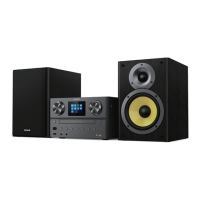
This document describes the Philips Micro Music System, 8000 Series, model TAM8905, a versatile audio system designed to provide a rich listening experience through various sources and connectivity options.
The Philips Micro Music System TAM8905 serves as a comprehensive audio hub, allowing users to enjoy music and radio from multiple sources. Its core function is to play audio from physical media like CDs, digital files from USB devices, and stream music wirelessly via Bluetooth. A significant feature is its Internet radio capability, offering access to thousands of stations and podcasts worldwide through a network connection. For traditional radio listening, it supports both FM and Digital Audio Broadcasting (DAB+) radio. The system also includes an auxiliary input for connecting external audio devices and a USB slot that can charge mobile devices.
The system is designed for ease of use with a combination of physical controls on the main unit and a remote control.
Upon first power-on, a "Setup wizard" guides the user through basic configurations, including Wi-Fi connection. The Wi-Fi setup supports Wi-Fi Protected Setup (WPS) methods (Push Button Configuration or PIN) for quick and secure connection to compatible routers, or manual key entry for others. Time synchronization can be set via DAB+, FM, or network, or manually. The setup also allows for selecting the display format for time (12/24 hour) and setting the time zone and daylight saving.
Users can easily switch between different audio sources using the "SOURCE" button on the main unit or remote control. Available sources include Internet radio, Podcasts, Spotify, DAB+ radio, FM radio, CD, USB, Bluetooth, and AUDIO IN.
Once connected to the Internet, the system can access a vast array of Internet radio stations and podcasts. Stations can be browsed by history, location, popularity, or through a search function. Users can store up to 40 preset stations (shared between Internet radio and Podcasts) for quick access. Information such as station description, genre, location, codec, sampling rate, playback buffer, and date can be displayed while listening.
For DAB+ radio, the system performs an automatic full scan to find and store available stations upon first use or if the station list is empty. Stations can be tuned manually or selected from a list. Up to 20 DAB+ radio stations can be stored as presets. The DAB+ menu offers options to scan for stations, manually tune, prune invalid stations, adjust Dynamic Range Control (DRC) for sound compression, and define station order. Detailed information like station name, Dynamic Label Segment (DLS), signal strength, program type (PTY), ensemble name, frequency, signal error rate, bit rate, audio status, codec, and time/date can be viewed.
FM radio stations can be tuned automatically by pressing and holding the skip buttons, or manually by turning the "SELECT" knob. The system can store up to 20 FM radio stations as presets, either individually or automatically by pressing and holding the "SELECT" knob in FM mode. The FM menu provides options for scan settings (strong signals only or all available stations) and audio settings (mono or stereo broadcast). RDS (Radio Data System) information, including station name, radio text messages, program type, frequency, and date, is displayed when available.
The system features a disc compartment for playing CDs. Users can open the compartment, insert a disc, and playback will start automatically.
Audio content from USB devices can be played by inserting the device into the USB socket. Playback typically starts automatically.
The system allows wireless audio streaming from Bluetooth-enabled devices. Users can pair their devices with the system (identified as "Philips TAM8905") and stream music. The Bluetooth icon on the display indicates connection status.
Volume can be adjusted using the "VOL" knob on the main unit or the "VOL+/-" buttons on the remote. A "MUTE" button is available on both the main unit and remote to temporarily silence the sound. The remote control also includes an "EQ" button to select preset sound effects.
A comprehensive "System settings" menu allows for customization of various aspects:
The system supports setting two independent alarms with customizable times, recurrence (daily, once, weekends, weekdays), modes (buzzer, Internet radio, DAB+, FM), and volumes. A sleep timer can be set for periods of 15, 30, 45, or 60 minutes, after which the unit will switch to standby.
The remote control provides full functionality, including power on/standby, source selection, menu navigation, volume control, track/station skipping, play/pause/stop, preset management, numeric keypad for direct input, EQ selection, info display, clock settings, random playback, open/close disc tray, back function, repeat mode, program tracks, and display brightness adjustment (DIM).
The system can check for and install software updates, ensuring optimal performance and access to new features. It's crucial to maintain a stable power connection during updates to prevent damage.
The manual includes a troubleshooting section to address common issues such as no power, no sound/poor sound, unit unresponsiveness, poor radio reception, Wi-Fi connectivity problems (insufficient signal, inability to connect), stations not working or disappearing, and alarm malfunctions. Solutions often involve checking connections, adjusting antenna position, reconfiguring Wi-Fi settings, or performing a reset.
The product is designed with high-quality, recyclable materials. Users are encouraged to dispose of old products and batteries according to local regulations to prevent negative environmental consequences. The manual also highlights the importance of respecting copyrights when using the equipment.
 General
| Product Type | Micro Music System |
|---|---|
| Brand | Philips |
| Model | TAM8905/10 |
| Bluetooth | Yes |
| CD Player | Yes |
| FM Radio | Yes |
| DAB+ | Yes |
| USB Playback | Yes |
| Wi-Fi | Yes |
| Spotify Connect | Yes |
| Disc Playback Modes | Fast forward/reverse, Next/previous track search, Repeat/shuffle/program |
| USB Direct Playback | Yes |
| Station Presets | 20 |
| RDS | Yes |
| Audio in (3.5mm) | Yes |
| Headphone jack | Yes |
| Display Type | LCD |
| USB Port | Yes |
| Audio Playback | MP3 |
| Tuner Bands | FM |
| Supported Audio Formats | MP3, FLAC, WMA |












 To Next Page