This document describes the Philips V Line/i Line series of monitors, specifically models 241V8, 242V8, and 241i8, including their variants. It serves as a user manual, providing essential information on setup, operation, maintenance, and troubleshooting.
Function Description
The Philips V Line/i Line monitors are flat-panel LCD displays designed for various uses, including general computing, internet browsing, gaming, and office applications. They feature On-Screen Display (OSD) for adjusting screen performance and selecting monitor functions. Key functionalities include image optimization through SmartImage and SmartContrast, and Adaptive Sync technology for smoother gaming experiences.
Important Technical Specifications
Picture/Display:
- Monitor Panel Type: IPS Technology for 241V8/241V8W/242V8A; VA for 241V8L/241V8LA/242V8LA/241i8L/241V8LB/241i8LB.
- Backlight: W-LED.
- Panel Size: 23.8" W (60.5 cm).
- Aspect Ratio: 16:9.
- Pixel Pitch: 0.275(H) mm x 0.275(V) mm.
- Contrast Ratio (typ.): 1000:1 for 241V8/241V8W/242V8A; 3000:1 for 241V8L/241V8LA/242V8LA/241i8L; 4000:1 for 241V8LB/241i8LB.
- Optimum Resolution: 1920 x 1080 @ 60 Hz.
- Viewing Angle: 178° (H) / 178° (V) @ C/R > 10 (typ.).
- Picture Enhancement: SmartImage.
- Display Colors: 16.7M.
- Vertical Refresh Rate:
- 241V8/241V8W/241V8L/241V8LA/241i8L: 48Hz - 60Hz (VGA), 48Hz - 75Hz (HDMI).
- 242V8A/242V8LA: 48Hz - 60Hz (VGA), 48Hz - 75Hz (HDMI, DP).
- 241V8LB/241i8LB: 48Hz - 60Hz (VGA), 48Hz - 100Hz (HDMI).
- Horizontal Frequency:
- 241V8/241V8W/241V8L/241V8LA/242V8A/242V8LA/241i8L: 30kHz - 85kHz.
- 241V8LB/241i8LB: 30kHz – 115kHz.
- sRGB, Flicker Free, LowBlue Mode, EasyRead, Adaptive Sync: All YES.
Connectivity:
- Signal Input/Output:
- 241V8/241V8W/241V8L/241V8LA/241V8LB/241i8L/241i8LB: VGA × 1, HDMI 1.4 x 1 (HDCP 1.4).
- 242V8A/242V8LA: VGA x 1, HDMI 1.4 x 1 (HDCP 1.4), DisplayPort 1.2 x 1 (HDCP 1.4).
- Audio In/Out:
- 241V8/241V8W/241V8L/241V8LB/241i8L/241i8LB: HDMI audio out.
- 241V8LA/242V8A/242V8LA: Audio-in, Earphone output.
- Input Signal: Separate Sync, Sync on Green.
Convenience:
- Built-in speaker: 2 Wx2 for 241V8LA/242V8A/242V8LA; Not specified for other models but HDMI audio out is available.
- OSD Languages: English, German, Spanish, Greek, French, Italian, Hungarian, Dutch, Portuguese, Brazil Portuguese, Polish, Russian, Swedish, Finnish, Turkish, Čeština, Українська, Simplified Chinese, Traditional Chinese, Japanese, Korean.
- Other Convenience: VESA mount (100x100mm), Kensington Lock, DDC/CI, sRGB, Windows 11/10/8.1/8, Mac OS X.
Stand:
Power Consumption (typical values):
- Normal Operation: Ranges from 18.2 W to 22.0 W depending on the model and input voltage.
- Sleep (Standby mode): 0.5 W.
- Off mode: 0.3 W.
- Power LED indicator: White (On mode), White (blinking for Standby/Sleep mode).
- Power Supply: Built-in, 100-240V AC, 50-60Hz.
Dimensions (WxHxD):
- Product with stand: 540 x 416 x 220 mm.
- Product without stand: 540 x 322 x 51 mm.
- Product with packaging: 608 x 415 x 121 mm.
Weight (with stand):
- 241V8/241V8W: 3.06 kg.
- 241V8L/242V8A/241i8L: 3.03 kg.
- 241V8LA: 2.97 kg.
- 242V8LA: 3.00 kg.
- 241V8LB/241i8LB: 2.90 kg.
Operating Condition:
- Temperature range (operation): 0°C to 40°C.
- Relative humidity (operation): 20% to 80%.
- Atmospheric pressure (operation): 700 to 1060hPa.
Environmental and energy:
- ROHS: YES.
- Packaging: 100% recyclable.
- Specific Substances: 100% PVC BFR free housing.
Usage Features
Installation:
The monitor is designed for easy setup. Users place the monitor face down on a soft surface, attach the base column until it clicks, and then firmly insert the base stand into the column. For VESA mounting, the base assembly can be removed by pressing release buttons.
Connecting to PC:
Users connect the power cord and signal cable (VGA, HDMI, or DisplayPort depending on the model) to the monitor and computer. The monitor supports various inputs, including AC power, HDMI, VGA, DP (for 242V8A/242V8LA), audio input, and earphone output. A Kensington anti-theft lock is also available.
Operating the Monitor (OSD Controls):
The monitor features control buttons for power ON/OFF, OSD menu access, OSD adjustment, speaker volume adjustment, signal input source change, return to previous OSD level, and SmartImage selection.
- SmartImage: This feature offers presets (Standard, Internet, Game, EasyRead, LowBlue Mode) that dynamically optimize display settings like brightness, contrast, color, and sharpness based on content type.
- Standard: Enhances text and dampens brightness for readability.
- Internet: Combines color saturation, dynamic contrast, and sharpness for vibrant images.
- Game: Optimizes response time, reduces jagged edges, and enhances contrast for gaming.
- EasyRead: Improves reading of text-based applications by increasing contrast and boundary sharpness.
- LowBlue Mode: Reduces harmful shortwave blue light for eye comfort.
- SmartContrast: This unique technology dynamically analyzes displayed content and optimizes the monitor's contrast ratio in real-time for maximum visual clarity, enhancing backlighting for brighter images or dimming for darker backgrounds.
- Adaptive Sync: This technology synchronizes the GPU's frame rate with the monitor's refresh rate, eliminating screen tearing and stuttering for smoother gaming. It is compatible with specific AMD Radeon graphics cards and A-Series Desktop and Mobility APUs running Windows 11/10/8.1/8.
- Resolution Notification: The monitor is optimized for 1920 x 1080 resolution. An alert is displayed if a different resolution is used, which can be turned off in the OSD.
- Physical Function (Tilt): The monitor can be tilted from -5° to +20°. Users are advised not to tilt downward beyond -5° to avoid panel damage and to grasp only the bezel when adjusting.
Power Management:
The monitor supports VESA DPM compliance, automatically reducing power consumption when not in use. It "wakes up" upon detection of input from a keyboard, mouse, or other input device.
Troubleshooting & FAQs:
The manual provides solutions for common problems such as no picture, non-functioning AUTO button, visible smoke/sparks, imaging problems (not centered, vibrates, blurred, distorted), and image sticking/burn-in. It also addresses FAQs regarding recommended resolution and refresh rate, driver installation, OSD adjustments, screen cleaning, color settings, PC/Mac compatibility, and Plug-and-Play functionality.
Maintenance Features
Safety Precautions and Maintenance:
- Operation: Keep the monitor away from direct sunlight, strong bright lights, and heat sources. Avoid oil contact with the display. Ensure ventilation holes are not blocked. Position the monitor for easy access to the power plug. Wait 6 seconds after detaching the power cable before reattaching. Use only Philips-approved power cords. Operate under specified power supply. Protect cables from pulling, bending, or heavy objects. Avoid severe vibration or high impact. Do not tilt the monitor downward by more than -5 degrees to prevent damage.
- Eye Comfort: Take short breaks, look at varying distances, blink consciously, gently close and roll eyes, reposition the screen, adjust brightness/contrast, and adjust environmental lighting to match screen brightness.
- Cleaning: Unplug the monitor before cleaning. Use a slightly damp cloth for cleaning; a dry cloth can be used when power is off. Never use organic solvents like alcohol or ammonia-based liquids.
- Storage: Do not store or use the monitor in locations exposed to heat, direct sunlight, or extreme cold. Optimal temperature range for operation is 0-40°C and humidity 20-80% RH.
- Burn-in/Ghost Image Prevention: Always activate a moving screen saver when unattended and a periodic screen refresh application if displaying static content. Failure to do so may result in severe "burn-in" symptoms not covered under warranty.
- Service: The casing should only be opened by qualified service personnel. Contact the local service center for repair or integration documents.
- Pixel Defect Policy: Philips monitors adhere to a strict pixel defect policy. A monitor qualifies for repair or replacement under warranty if the number of pixel defects exceeds specified acceptable levels (e.g., no more than 0.0004% of sub-pixels defective, specific tolerances for bright/dark dots and their proximity).
Customer Care and Warranty:
Warranty coverage information and support requirements are available on the Philips website or through local customer care centers. Extended warranty services may be available for purchase within 30 calendar days of the original purchase date.

 Need help?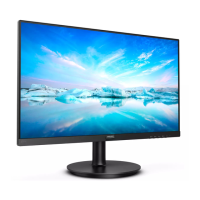










 To Next Page
 General