3
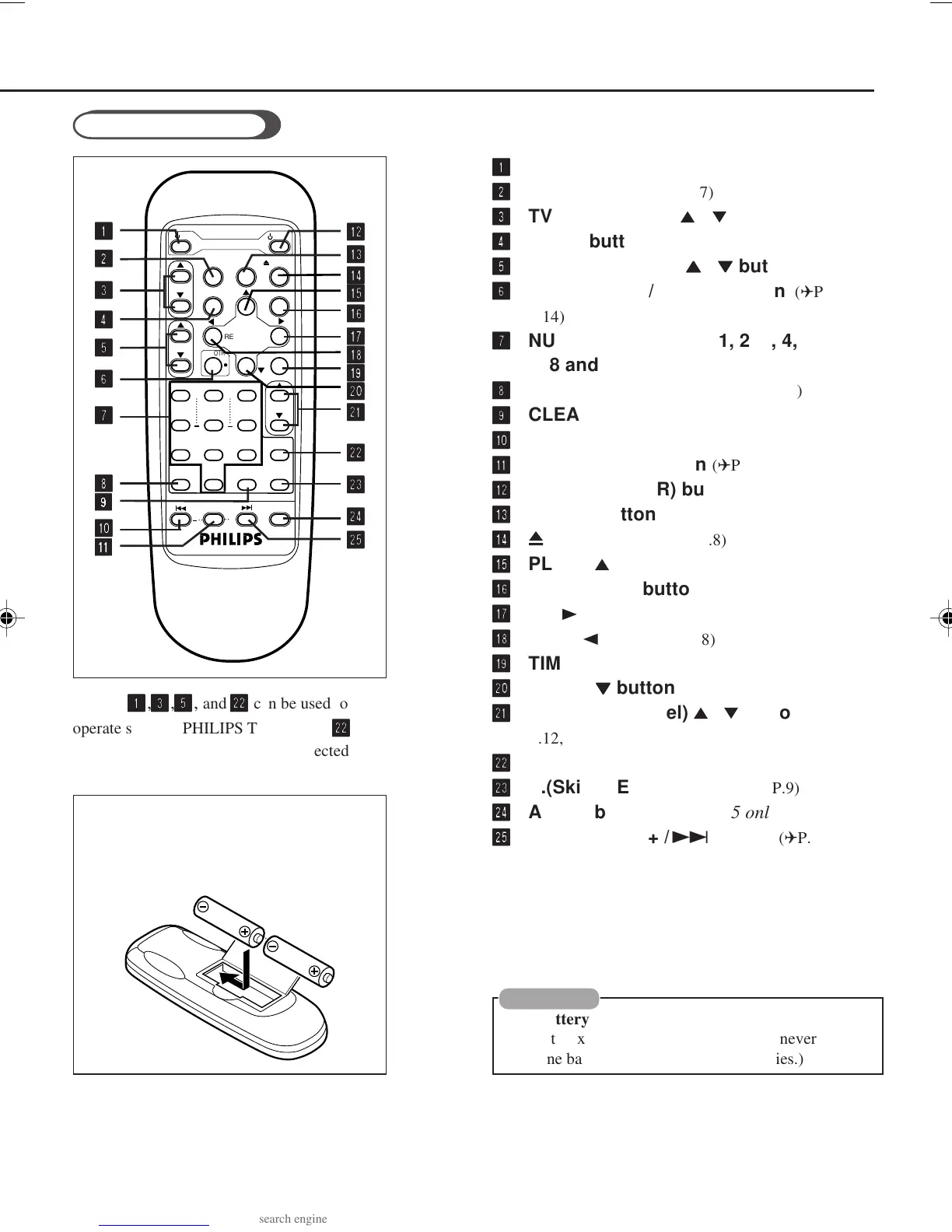
Buttons
1 1
1 1
1
,
3 3
3 3
3
,
5 5
5 5
5
, and
w w
w w
w
can be used to
operate some of PHILIPS TVs. Button
ww
ww
w
is
used to go back to the previously selected
channel on TV.
Remote Control
11
11
1
f f
f f
f TV (POWER) button
22
22
2
VCR/TV button
(✈P.7)
33
33
3
TV CH (channel)
5
/
∞
button
44
44
4
MENU button
55
55
5
TV VOL (volume)
55
55
5
/
∞∞
∞∞
∞
buttons
66
66
6
REC (record)/OTR ● button
(✈P.8, P.11,
P.14)
77
77
7
NUMBER buttons (0, 1, 2, 3, 4, 5, 6,
7, 8 and 9)
(✈P.12, P.13)
88
88
8
SMARTPICTURE button (✈P.12)
99
99
9
CLEAR button (✈P.14)
00
00
0
STILL/SLOW – /™ button (✈P.8)
!!
!!
!
STILL/SLOW button (✈P.8, P.9)
@@
@@
@
f f
f f
f VCR (POWER) button (✈P.13)
##
##
#
SPEED button (✈P.7, P.13)
$$
$$
$
0
EJECT button (✈P.8)
%%
%%
%
PLAY /
5
button (✈P.8)
^^
^^
^
OK/STATUS button
&&
&&
&
FF /
3
button
(✈P.8)
**
**
*
REW /
2
button (✈P.8)
((
((
(
TIMER button (✈P.13)
))
))
)
STOP /
∞∞
∞∞
∞
button (✈P.8)
qq
qq
q
VCR CH (channel)
5
/
∞
button (✈P.6, P.9,
P.12, P.13)
ww
ww
w
ALT button
ee
ee
e
S.(Skip) SEARCH button
(✈P.9)
rr
rr
r
AUDIO button (VR607/55 only) (✈P.11)
tt
tt
t
STILL/SLOW + /£ button (✈P.8)
CAUTION
On Battery Replacement
Do not mix old and new batteries. (Also never mix
alkaline batteries with manganese batteries.)
●
1
4
7
SMART
PICTURE
TV
VCR
TV CH
TV VOL
REC/OTR
REW
VCR/TV
STOP
PLAY
+
TIMER
FF
EJECT
SPEED
2
5
8
0
3
6
9
START STOP
DAILY
DATE
WEEKLY
CLEAR
VCR CH
S.SEARCH
STILL/SLOW
AUDIO
+ +
POWER
MENU
OK/STATUS
ALT
11
11
1
22
22
2
33
33
3
44
44
4
55
55
5
66
66
6
77
77
7
88
88
8
99
99
9
00
00
0
!!
!!
!
@@
@@
@
##
##
#
ww
ww
w
ee
ee
e
rr
rr
r
tt
tt
t
**
**
*
$$
$$
$
qq
qq
q
&&
&&
&
((
((
(
%%
%%
%
^^
^^
^
))
))
)
To insert the batteries:
Install two AA batteries R6 (SUM-3)/AA
- matching the polarity indicated inside
the battery compartment.
407/55A5 01.10.2, 8:56 AM3



 To Next Page