CONNECTING TO A TV SET WITH A SCART SOCKET ENGLISH
8
8
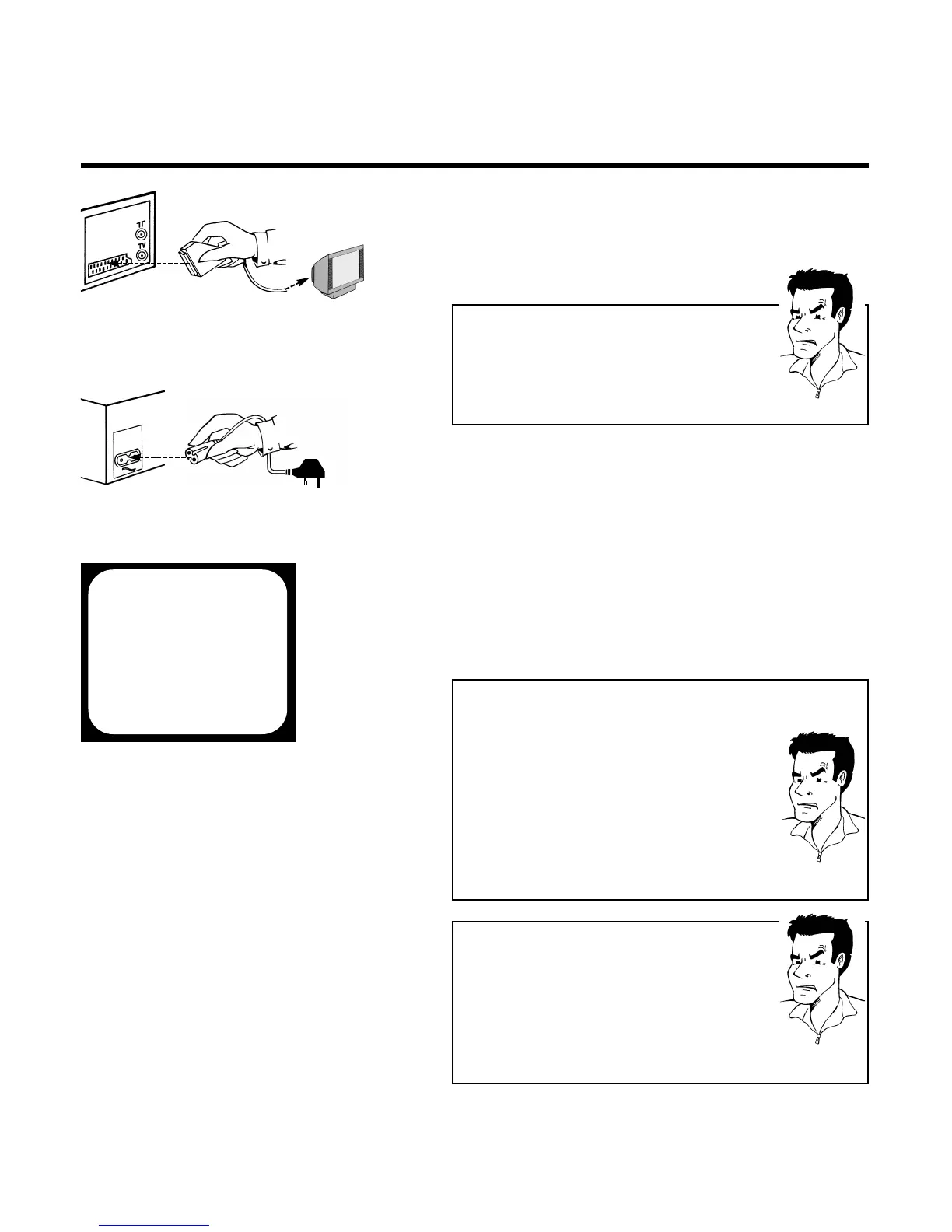
5 Take a scart cable and connect one end to the
scart socket on the back of your TV set and
the other to the scart socket
AAVV11 EEXXTT11
on
the back of the video recorder
PPRROOBBLLEEMM
88 MMyy TTVV sseett hhaass mmoorree tthhaann oonnee ssccaarrtt ssoocckkeett
44
Then you have a more modern TV set. Please
check first (with the aid of the operating
instructions for the TV set), which of the available
scart sockets is intended for use with the video
recorder.
6 Take the enclosed mains cable and connect
the appropriate end to the mains socket
44
on the back of the video recorder and the
other to the nearest free socket
8 You can find more details in the chapter
Initial Installation
7 Your set should automatically switch over to
the programme number allocated to video
recorder operation (usually: EXT, 0 or AV).You
will see the welcome screen.
CONGRATULATIONS
YOU NOW OWN A NEW
PHILIPS
VIDEO RECORDER
CONTINUEPOK
PPRROOBBLLEEMM
88 MMyy ssccrreeeenn iiss ssttiillll bbllaannkk
44
If a TV set receives a signal via the scart socket, it
usually switches automatically to the
corresponding programme number. This
automatic function might be adversely affected.
Please switch manually to the corresponding
programme number (usually: EXT, 0 or AV)
44
Check the cable connections
PPRROOBBLLEEMM
88 II ccaann nnoott sseeee tthhee wweellccoommee ssccrreeeenn,, oonnllyy tthhee
mmeessssaaggee
EEAASSYYLLIINNKK IISS LLOOAADDIINNGG DDAATTAA FFRROOMM TTVV
44
Congratulations! The TV set supports the Easylink
function. It automatically sends the settings for the
available TV channels and the time and date
information straight to the video recorder.As soon
as the transfer is complete, the current settings for
year, month, date and time appear on the screen.
Correct and/or confirm the settings with the arrow
buttons ;
PP++
, =
PP--
,
SS++ PP
or
QQSS--
the number
buttons
00--99
and confirm with
OOKK
.
AV1 EXT1


 To Next Page