EasyManua.ls Logo

Philips VR355/50 - Page 14

Philips VR355/50
29 pages
Print Icon
To Next Page IconTo Next Page
To Previous Page IconTo Previous Page
Loading...
T
o
set
the
VCR
(Video
Cassette
Recorder)
to
automatically
shut
off
after
recording
is
completed,
follow
steps
1-3
below.
OTR
lets
you
quickly
specify
how
long
you
want
recording
to
continue.
You
don’t
have
to
program
the
timer
with
this
function.
You
must
use
your
remote
control.
I
Make
sure-|
-
the
steps
in
“Hook
Up
Your
VCR”
are
done,
channels
are
programmed
into
the
VCR’s
memory,
and
the
TV
and
VCR
are
both
turned
on.
the
clock
is
set
to
the
correct
time.
the
desired
tape
speed
(SP,
SLP)
is
selected.
Use
the
tape
SPEED
button.
the
record
tab
is
in
place
on
the
cassette.
the
tape
is
long
enough
to
record
the
programs.
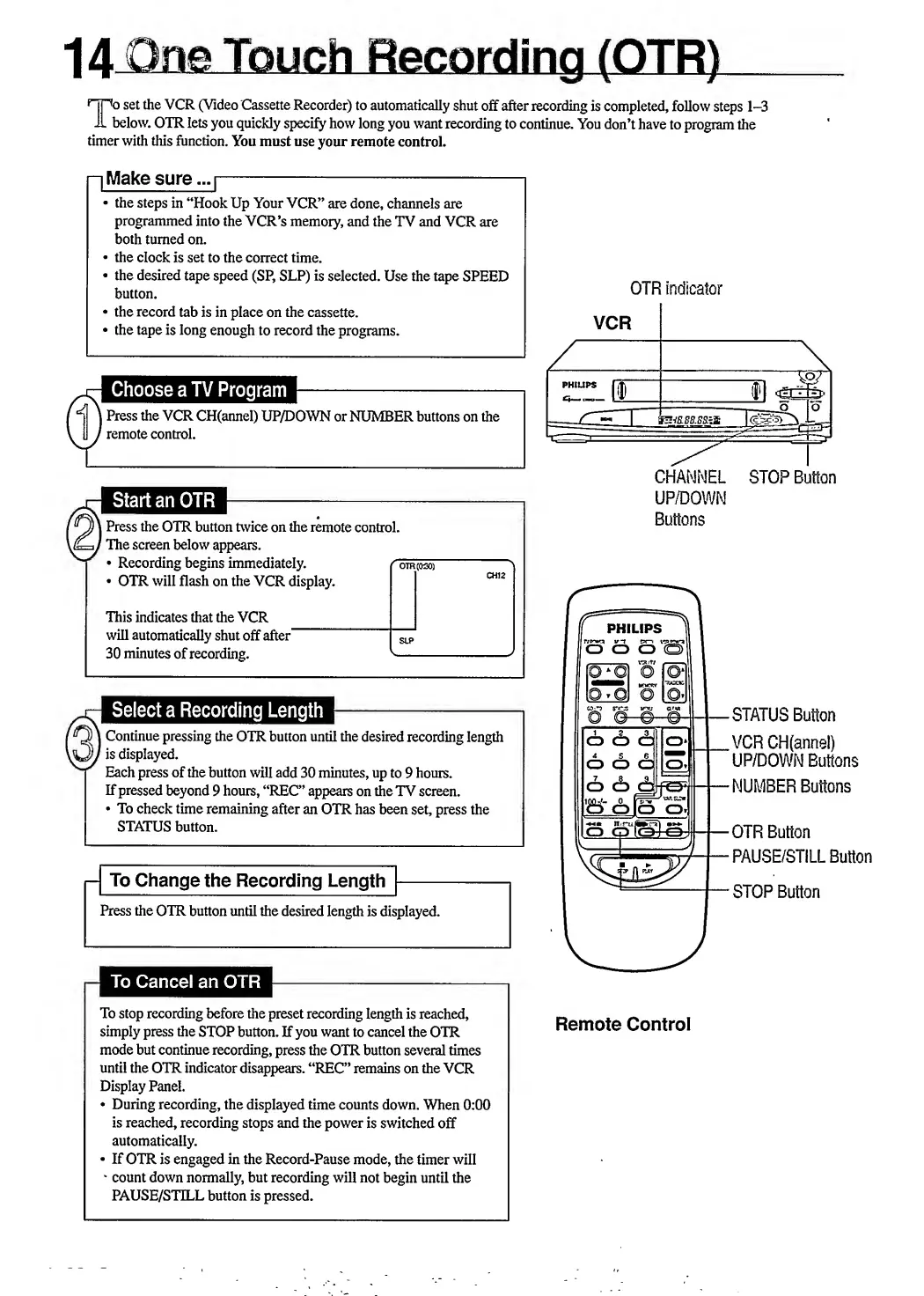
OTR
indicator
Choose
a
TV
Program
Press
the
VCR
CH(annel)
UP/DOWN
or
NUMBER
buttons
on
the
remote
control.
|
Press
the
OTR
button
twice
on
the
remote
control.
'
The
screen
below
appears.
Recording
begins
immediately.
r~o
OTR
will
flash
on
the
VCR
display.
I
CHANNEL
STOP
Button
UP/DOWN
Buttons
This
indicates
that
the
VCR
will
automatically
shut
off
after"
30
minutes
of
recording.
PHILIPS
T
yp'wa
ir-T
Pn
O
CD
CD
Q
|
Continue
pressing
the
OTR
button
until
the
desired
recording
length
'
is
displayed.
Each
press
of
the
button
will
add
30
minutes,
up
to
9
hours.
If
pressed
beyond
9
hours,
“REC”
appears
on
the
TV
screen.
To
check
time
remaining
after
an
OTR
has
been
set,
press
the
STATUS
button.
-
To
Change
the
Recording
Length
-
Press
the
OTR
button
until
the
desired
length
is
displayed.
O
Odg;
O
<f>
OtfO
1
I
«K<-
0
OOP
o.
n-ru(@cTl
lo
Q
l
oJ
oJ
-STATUS
Button
.VCR
CH(annel)
UP/DOWN
Buttons
-NUMBER
Buttons
-OTR
Button
-PAUSE/STILL
Button
-STOP
Button
To
stop
recording
before
the
preset
recording
length
is
reached,
simply
press
the
STOP
button.
If
you
want
to
cancel
the
OTR
mode
but
continue
recording,
press
the
OTR
button
several
times
until
the
OTR
indicator
disappears.
“REC”
remains
on
the
VCR
Display
Panel.
During
recording,
the
displayed
time
counts
down.
When
0:00
is
reached,
recording
stops
and
the
power
is
switched
off
automatically.
If
OTR
is
engaged
in
the
Record-Pause
mode,
the
timer
will
count
down
normally,
but
recording
will
not
begin
until
the
PAUSE/STILL
button
is
pressed.
Remote
Control

Related product manuals