6 7
Sky B-P, B-SP, B-UP
Sky B-M / B-RIC
1. Quick guide
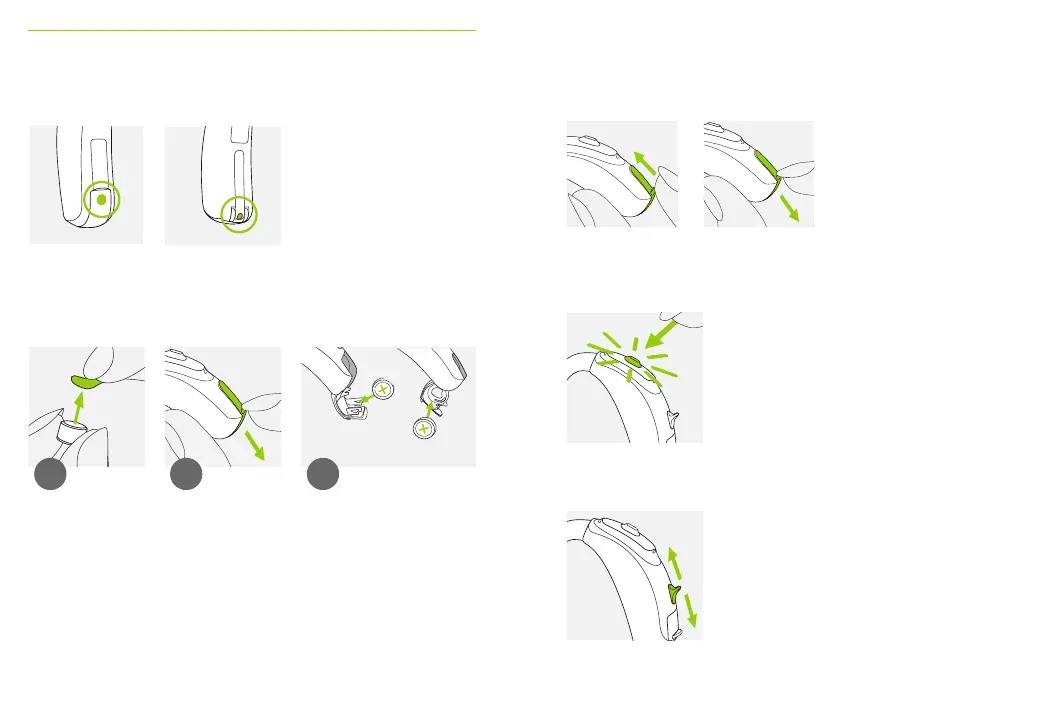
Left & right hearing aid markings On/O
Changing batteries
Push button with indicator light
Volume control
1 2
Blue marking for left
hearing aid.
Red marking for right
hearing aid.
Remove the sticker
from the new
battery and wait
two minutes.
Sky B-M Sky B-P, B-SP, B-UP,
B-RIC
3
Open the battery
door. For secured
battery doors refer
to chapter 5.2.
Place battery in the battery
door with the “+” symbol
facing upwards.
The push button on your hearing aid can have
various functions. For indicator light refer to
chapter 8.
For secured battery doors
instructions refer to chapter
5.2.
Sky B-P, B-SP, B-UP and B-RIC:
To increase the volume, press the volume
control upwards. To decrease the volume,
press the volume control downwards.
O
On




 To Next Page