A6500 USER’S MANUALPHONIC CORPORATION
Page 7
APPLICATIONS
This section presents two typical methods for connecting the OPTIMIZER to a mixer.
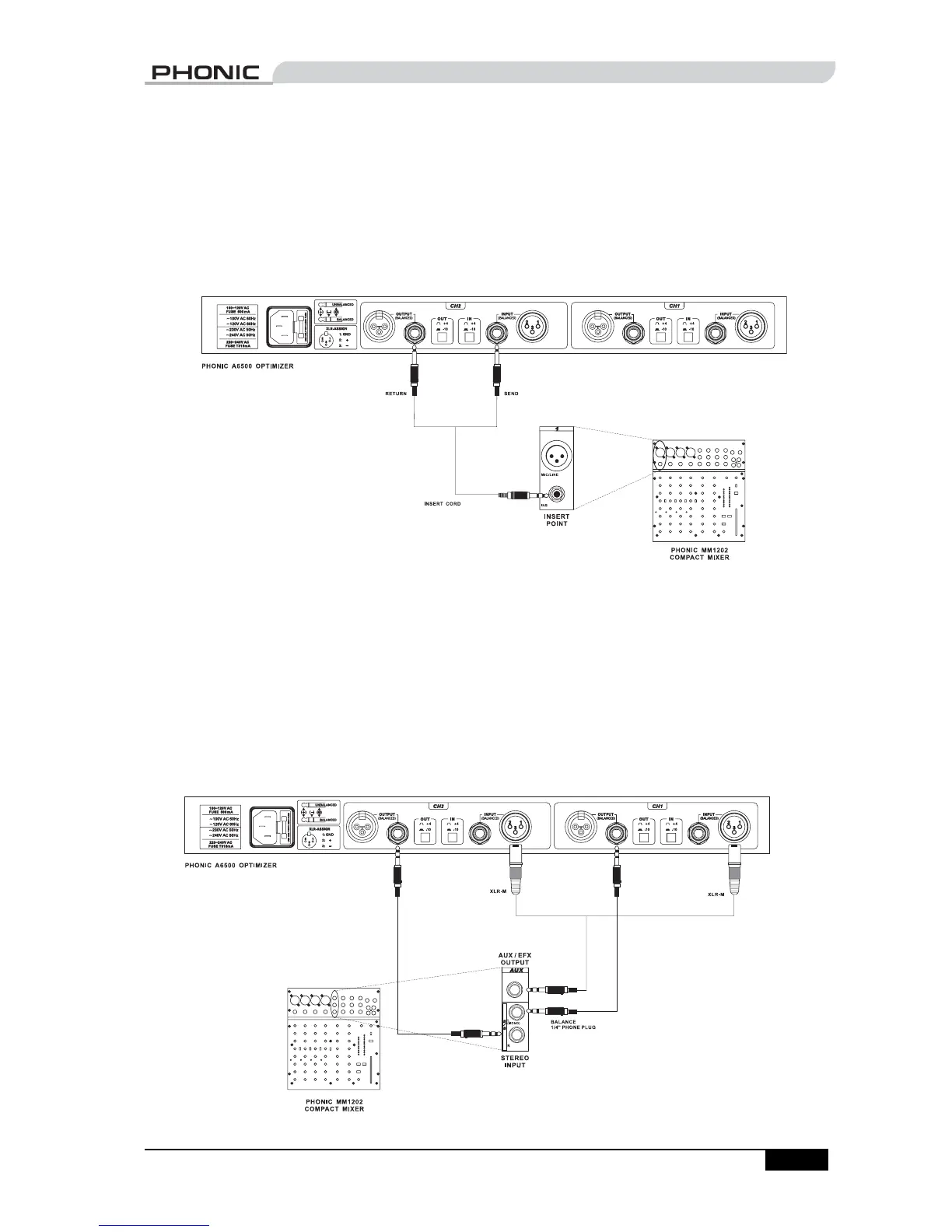
By using a insert point
If your mixer has a insert point, you can process the signal from that insert point by connecting the
OPTIMIZER to the insert point via an insert cord. See “Appendix: Typical Connectors” for an illustration of
some insert cords.
By using an input channel
If your mixer does not have an insert point, or if you have used all available insert points, you may use
one of the input channels as a return input. Follow these steps:
1. Connect the AUX (or EFX) output of your mixer to the input of the OPTIMIZER.
2. Connect the output of OPTIMIZER to one of the input channels of the mixer.
3. To prevent feedback, mute the AUX-send (or EFX-send) of the channel that is receiving its input
from the OPTIMIZER.
Through this routing, the original signal is sent from the mixer to the OPTIMIZER for processing. The
processed signal is then sent back to the mixer for mixing.
APPLICATIONS



 To Next Page