4
Riproduzione • Playback • Reproduction • Wiedergabe • Reproducción USB
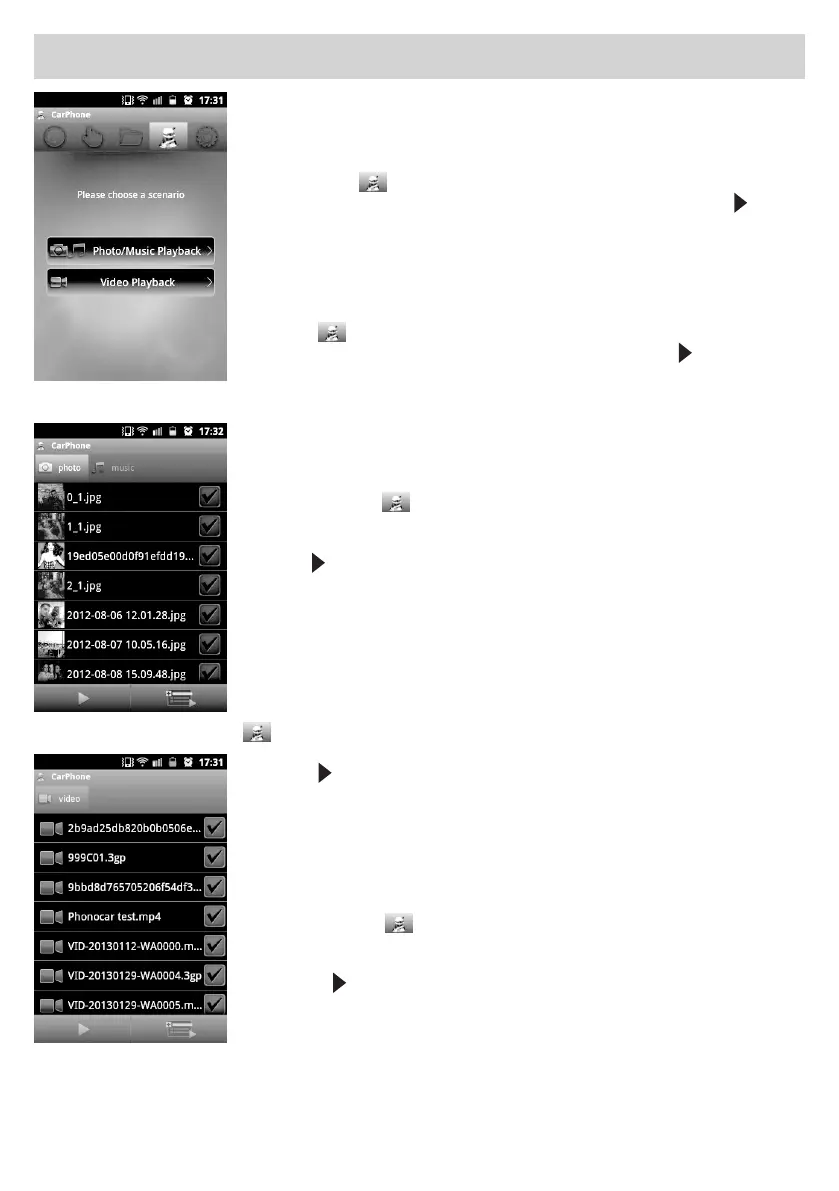
SISTEMA OPERATIVO “ANDROID”
•Scaricarel’applicazione“AIRFUN”(gratuita)daPLAYSTORE
ed installarla.
•Eseguirel’accoppiamentoWI-FIeattivarel’applicazione.
•Premereiltasto
persceglierelalibreriadesideratafraMUSICA/FOTO/VIDEO.
•Selezionareunoopiùledesideratièavviarelariproduzionepremendo
.
•Conl’inserimentodellaUSBinizieràlariproduzioneAUDIO/VIDEO.
ATTENZIONElariproduzionedeileaudioevideononsivisualizzasultelefono.
OPERATION-SYSTEM“ANDROID”
•Downloadthe“AIRFUN”-app (free-of-charge), from PLAYSTORE
•EffecttheWI-FI-couplingandactivatetheapp.
•Presskey
and choose between the libraries MUSIC/FOTO/VIDEO.
•SelectoneormoreFiles.ThenstartReproduction,bypressing
.
•ByinsertingtheUSB,theAUDIO/VIDEOreproductionbegins.
ATTENTION: The reproduction of Audio/Video-files will NOT be visible on
the phone
SYSTÈME D’EXPLOITATION “ANDROID”
•Téléchargezl’application“AIRFUN” (gratuite) à partir du PLAYSTORE
•FaireleparamétrageWI-FIetactiverl’application.
•Sélectionnerl’icône
pour choisir la librairie désirée entre
MUSIQUE/PHOTO - VIDEO.
•Sélectionnerunouplusieursfichiersdésirésetlancerlareproductionen
appuyant
.
•EnintroduisantlacléUSB,lareproductionAUDIO/VIDEOcommence.
ATTENTION la reproduction des fichiers audio et vidéo ne sera pas visible
sur le téléphone.
BETRIEBSSYSTEM “ANDROID”
•Die“AIRFUN”-app herunterladen, (gratis) auf unserer PLAYSTORE
•DieWI-FI-KoppelungvornehmenunddieAppaktivieren.
•JenachgewünschterListe,MUSIK/FOTO/VIDEO,dieentsprechendeIkone
drücken.
•EineodermehrereDateienwählen.DanndieWiedergabestarten,durch
Druck auf
.
•BeimEinlegenderUSB,startetdieAUDIO/VIDEO-Wiedergabe.
WICHTIG:dieWiedergabederAudio/Video-Dateienlässtsichleidernicht
auf dem Mobiltelefon verfolgen.
SISTEMA OPERATIVO “ANDROID”
•Descargarlaaplicación“AIRFUN”(gratis)desdePLAYSTORE
•EjecutarelemparejamientoWI-FIyactivarlaaplicación.
•Seleccionarelicono
para elegir el directorio deseado entre
MUSICA/FOTO - VIDEO.
•Seleccionarunoomásarchivosdeseadoseiniciarlareproducción
presionando
.
•IntroduciendounaUSBiniciarálareproducciónAUDIO/VIDEO.
ATENCIÓN la reproducción de los archivos audio y video no será visualizada en
el teléfono.


 To Next Page
 Loading...