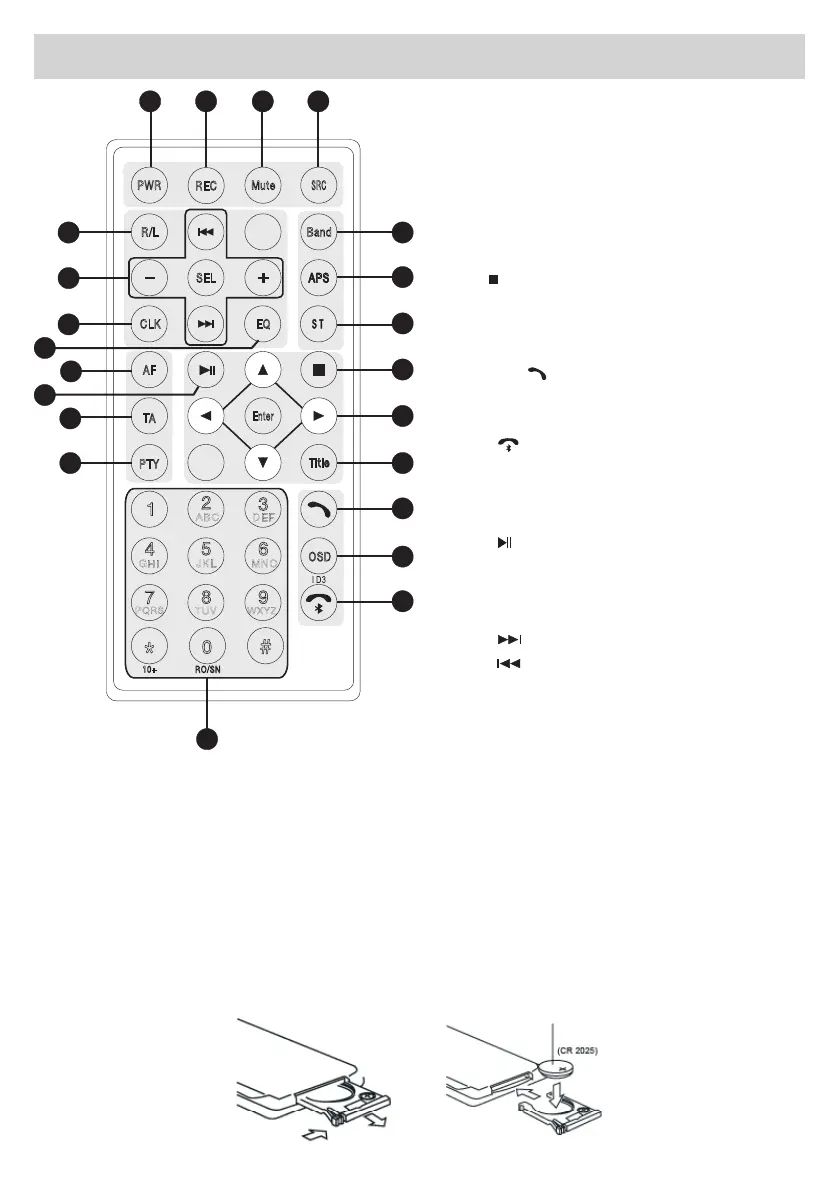
Replacingthebattery
•Eliminatetheisolationfromthebattery.
•TheRemote-Controlworkswithinfrared-signals(NOTwithradio-signals),sothattheRemote-control
needs to be pointed towards the Unit.
•Ifthebatteryremainsidleformorethan1month,pleaseremoveitfromtheRemote-Controlorintroduce
an Isolation.
•DoNOTplacetheRemote-Controlunderthedirectsunorinextremelyhotplaces.
•Undernormalconditions,theBatterywilllastforabout6months.
•AlwaysandexclusivelyuseCR-2025Lithium-batteries.
•Insertthebatterycorrectly,referringtothe+/-poles.
•Inordertoavoidaccidents,BatterieshavetobekeptoutofthereachofChildren.
Remote Control Functions
1 – Switch-ON
2 – Forward Call / Change Language
3 – MUTE
4 – Change Source
5 – Change Band
6 – Scrolling
7 – Stereo switch / Repeat
8 –
: Stop
9 – UP / DOWN / LEFT / RIGHT
CONFIRM
10 – Menu Titles
11 – key
Activate Call
12–InformationonReproduction/Touch-
Commands
13 –
Hang up – Bluetooth
14 - Radio-Scrolling
15 – Program-Style
16–Trafcbroadcast
17 –
: Play/Pause
18 – Search alternative Broadcast-Station
19–MenuforRadio-Setup
20 – Clock-Display
21 –
Fast Forward / Next Chapter
Fast Backward / Previous Chapter
[+/-] Increase / Reduce Volume
SETUP-Menu
22 – Change sound-Track
Mute
Band
APSAPSAPS
EQ
R/L
SRC
PWR
1
2
3
4
5
6
7
8
9
0
Ente
r
SEL
CLK
TitleTitle
AF
TA
PTY
RP
T
PBC
OSD
#
ABC
DEF
GHI
JKL
MNO
PQRS
TUV
WXYZ
RO/SN
10+
*
REC
29
14
18
16
15
17
19
20
21
1 2 3 4
5
6
7
8
9
10
11
12
13
22


 To Next Page