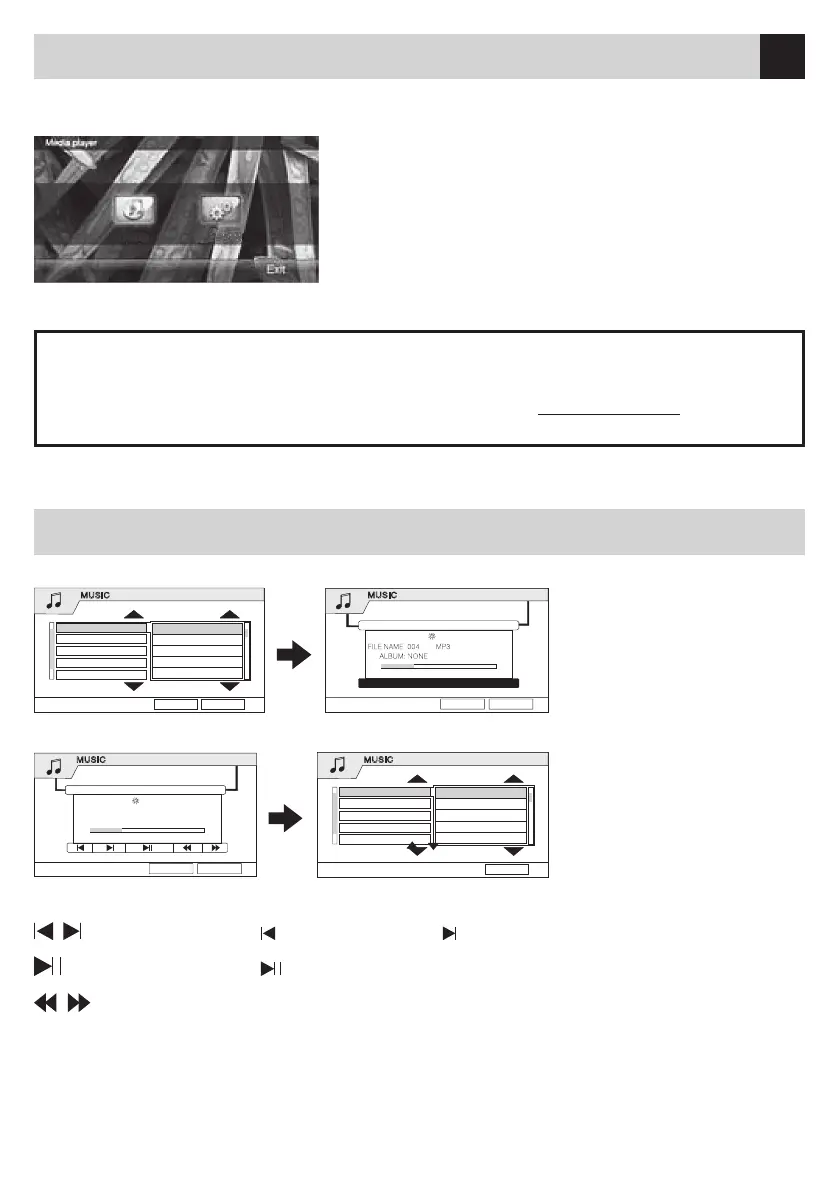
ByinsertinganMP3,theTouch-ScreenwillshowthefollowingMenu:
ByinsertingaCD,thetouch-ScreenwillshowthefollowingMenu:
Now select the requested Track, by using the keys .
TRACKS: select previous Track select next Track
PLAY/PAUSE: start playing / set a pause
SCROLLING: Fast Forward / Backward
REP
During reproduction, you can press REP-key to repeat a certain Track, Folder or the whole CD.
How To Use Cds / Mp3
MUSIC
NONE
••••
00:00:30/00:04:12
REPEAT BACK
PLAYING
001001 MP3•• ••
001
MUSIC
002002 MP3•• ••
003003 MP3•• ••
004004 MP3•• ••
005005 MP3•• ••
Back
Media
MUSIC
CDDA
TRACK12
00:00:30/00:04:12
REPEAT BACK
PLAYING
001001 MP3•• ••
001CD
MUSIC
002002 MP3•• ••
003003 MP3•• ••
004004 MP3•• ••
005005 MP3•• ••
Back
Set-up DVD / VCD / CD / CD-MP3
DISCSETUPDISC
SettingtheTouch-Screen: select LCD to enter the Set-up-Menu. Keep the Cursor-Center pressed
forawhileuntiltheCursorwillmove.Repeatthisoperationuntiltheinformation“SettingSuccessful”
will appear and the memorization is carried out automatically.
Shouldtheinformation“SettingFailed” appear, the settings have not been registered, and the
operation has to be repeated.
WhilereproducingaDVD,youcanpresstheIND-iconoftheOSD-Menuonthedisplay,toobtainthe
followingMenu:
Withinthe“DiscSetup”-Menu,youcaneffectthefollowing
settings:
•NTSC
•Modif:Sharpness,Contrast,Colour,Saturization,Brightness.
•TVRatio:4:3PS,4:3,LB,16:9
•OSDLang:English,Italian
•DefaultSetup,Restore
•LCD;screen-calibration
When using CDs, press IND-icon TWICE, to visualize the Menu.


 To Next Page