Instructions for Dvd / Vcd / Cd
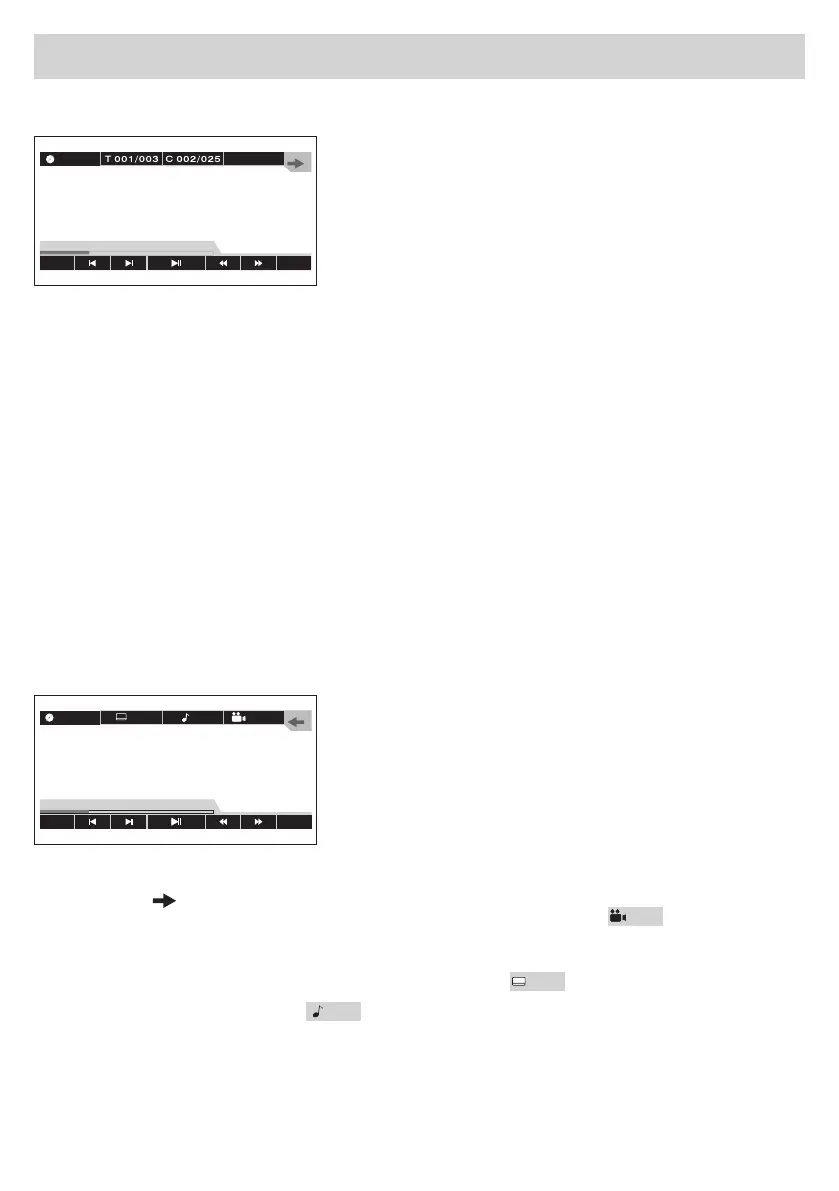
AfterhavingintroducedaDVD/VCD/CD,thetouch-Screenwillshowthefollowing:
TITLE-MENU
During reproduction, press TITLE on the Remote-Control or on the Screen, to return to the Main Menu.
REP
During reproduction, press REP, to repeat a certain Chapter or Title.
SELECTINGAREPERTOIRE
In DVD-mode, use the icon T 001/003 on the OSD-Menu, to select a certain Repertoire.. Digit the num-
beroftherequestedRepertoireandconfirmwithOK.
SELECTINGACHAPTER
In DVD-mode, use the icon C 002/005 on the OSD-Menu, to select a certain Chapter. Digit the number
oftherequestedChapterandconfirmwithOK.
Note:iftheDVDdoesNOThavethemulti-Chapterpossibility,thisfunctionwillnotbeactive.
CHOOSINGALANGUAGE
As long as the DVD contains various Languages, various languages can be chosen.
Note:iftheDVDdoesNOThavethemulti-Languagepossibility,thisfunctionwillnotbeactive.
VIEWING-ANGLE/SUB-TITLES/AUDIO-SYSTEM
Press the arrow to enter the Menu.
Viewing-Angle: as long as the DVD supports multi-angle-viewing, select icon
OFF
on the OSD-menu,
to choose among the various viewing-angles available.
Note:iftheDVDdoesNOTsupportmulti-angleviewing,thisfunctionwillnotbeactive.
Sub-Titles: as long as the DVD allows the sub-Titles, select icon
OFF
, to visualize them.
AudioSystem: by selecting the icon
1/2
thesoundshiftstotherightortotheleft.
TITLE
BACK
REP
00:33:11/01:45:44
DVD-V
OFF
1/2
BACK
REP
00:33:11/01:45:44
DVD-V
OFF


 To Next Page