19
FR/D
PARAMETRES DU SYSTEME • SYSTEM-EINSTELLUNGEN
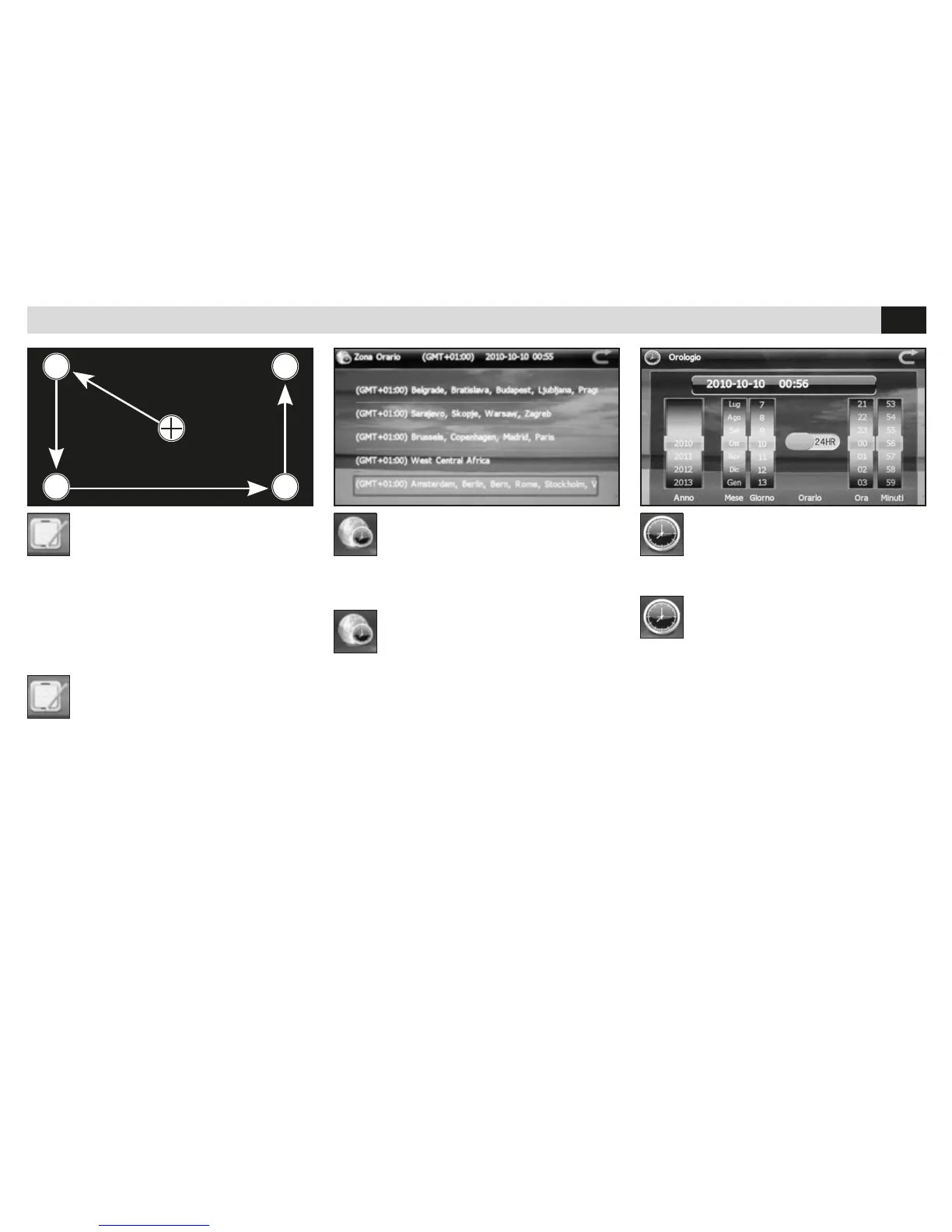
KALIBRIERUNG
• Für die Kalibrierung des Touch-Screens.
Mit dem beigelegen Stift, das Symbol “+”, im
Zentrum des Bildschirms, antasten.
Die Kalibrierungs-Prozedur nach und nach bis
zum Ende hin abwickeln.
CALIBRATION
• La fonction réalise la calibration du touch
screen.
Utiliser le stylo en dotation et toucher l’écran sur
le symbole “+” au centre du même.
Continuer la séquence jusqu’à la n de la cali-
bration.
ZEIT-ZONEN
• Zutreffende Zeit-Zone einstellen, um die korrek-
te Uhrzeit ausgewiesen zu bekommen.
ZONE HORAIRE
• Trace le fuseau horaire pour la correcte visuali-
sation de l’horaire.
UHRZEIT
• Einstellung von Datum und Uhrzeit.
HORLOGE
• Régulation date et horaire.
Dopo la calibrazione, cliccare sullo
schermo per uscire, alrtimenti la
calibrazione non verrà salvata.


 To Next Page