22
FR/D
PARAMÈTRE MODULE GPS
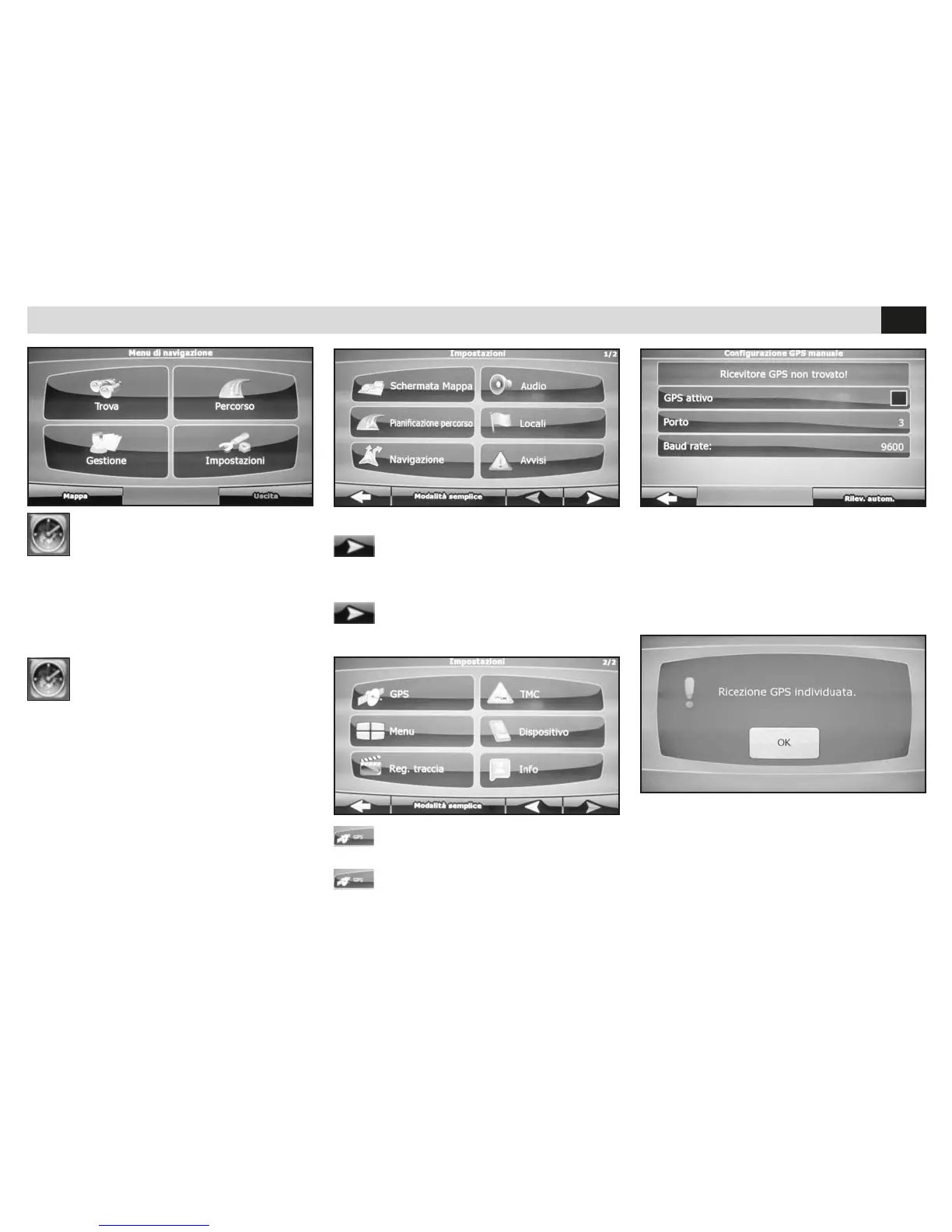
• Passer au second écran.
EINSTELLUNG DES GPS-MODULS
• Auf die zweite Seite gehen.
NAVIGATION
Bei der Erst-Aktivierung der iGO-Mappen (Op-
tional), die Betriebs-Datei mobilenavigator.exe
wählen und Einstellungen vornehmen.
• Das Software-Einstellungs-Menü betreten.
NAVIGATION
Quand on active pour la première fois la carte
iGo (optionnel), il faut sélectionner le fichier exé-
cutif mobilenavigator.exe dans les réglages.
• Accéder au menu paramètre du software.
• Appuyer GPS.
• GPS drücken
PARAMÈTRES GPS • GPS-EINSTELLUNGEN
• GPS-AKTIV drücken bzw. abhaken.
Dann auf AUTOMATISCHE ERKENNUNG drü-
cken.
• Appuyer sur le trait de GPS ACTIF,
Et après sur le RELÈVEMENT AUTOMATIQUE.
• Die Ermittlung der Daten abwarten und OK drücken.
• Die Anweisungen zur Navigations-Software sind dem
iGO-Handbuch zu entnehmen.
• Attendre l’acquisition des données et appuyer ok.
• Faire référence au manuel iGo pour les instruc-
tions sur le software de navigation.


 To Next Page