9
IT/GB
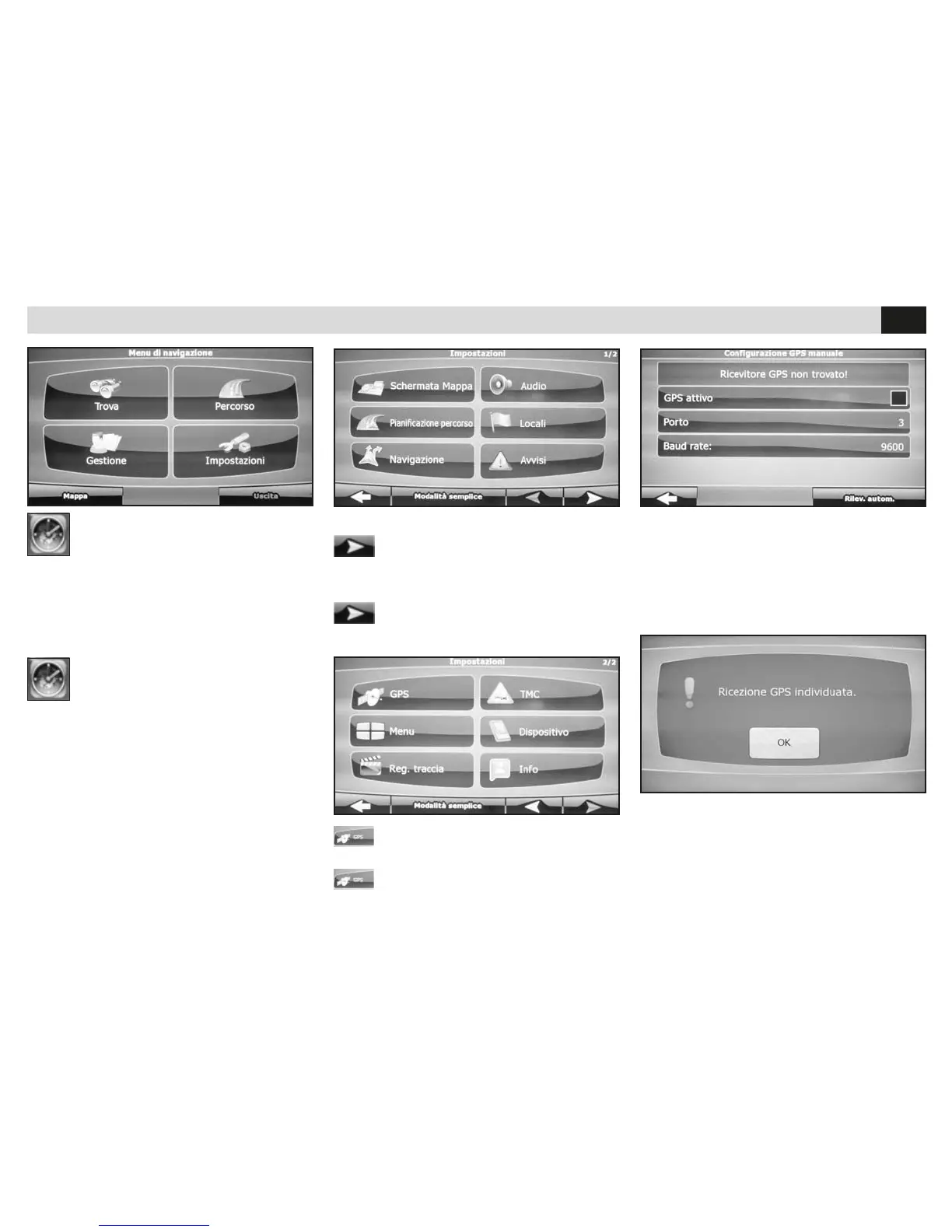
IMPOSTAZIONE MODULO GPS
• Passa alla seconda schermata
SETTING THE GPS-MODULE
• Go to the second panel
NAVIGAZIONE
Alla prima attivazione della mappa iGO (optional)
selezionare il file esecutivo mobilenavigator.exe
nei settaggi.
• Accedere al menu impostazioni del software.
NAVIGATION
When iGO-maps (Optional) are put into operation
for the first time, you have to select the executive
file mobilenavigator.exe and its settings.
• Enter the Software-Setup-Menu.
• Premere GPS.
• Press GPS.
IMPOSTAZIONI GPS • GPS-SETTINGS
• Premere sulla spunta di GPS ATTIVO
poi su RILEVAMENTO AUTOMATICO.
• Press to tick GPS-ACTIVE then press
AUTOMATIC REVEALING.
• Attendere l’acquisizione dei dati e premere ok.
• Riferirsi al manuale iGO per le istruzioni sul
software di navigazione.
• Wait for Data-collection and press ok.
• Check iGO-Manual and follow the related
navigation-software instructions.


 To Next Page