6. Pedal solenoid is binding
1. Check the ohm resistance of the pedal solenoid, if it is in spec (6.5 ohms +/- .5)
continue, but is out of spec, then replace it and send old one back.
2. Remove the plunger from the pedal solenoid.
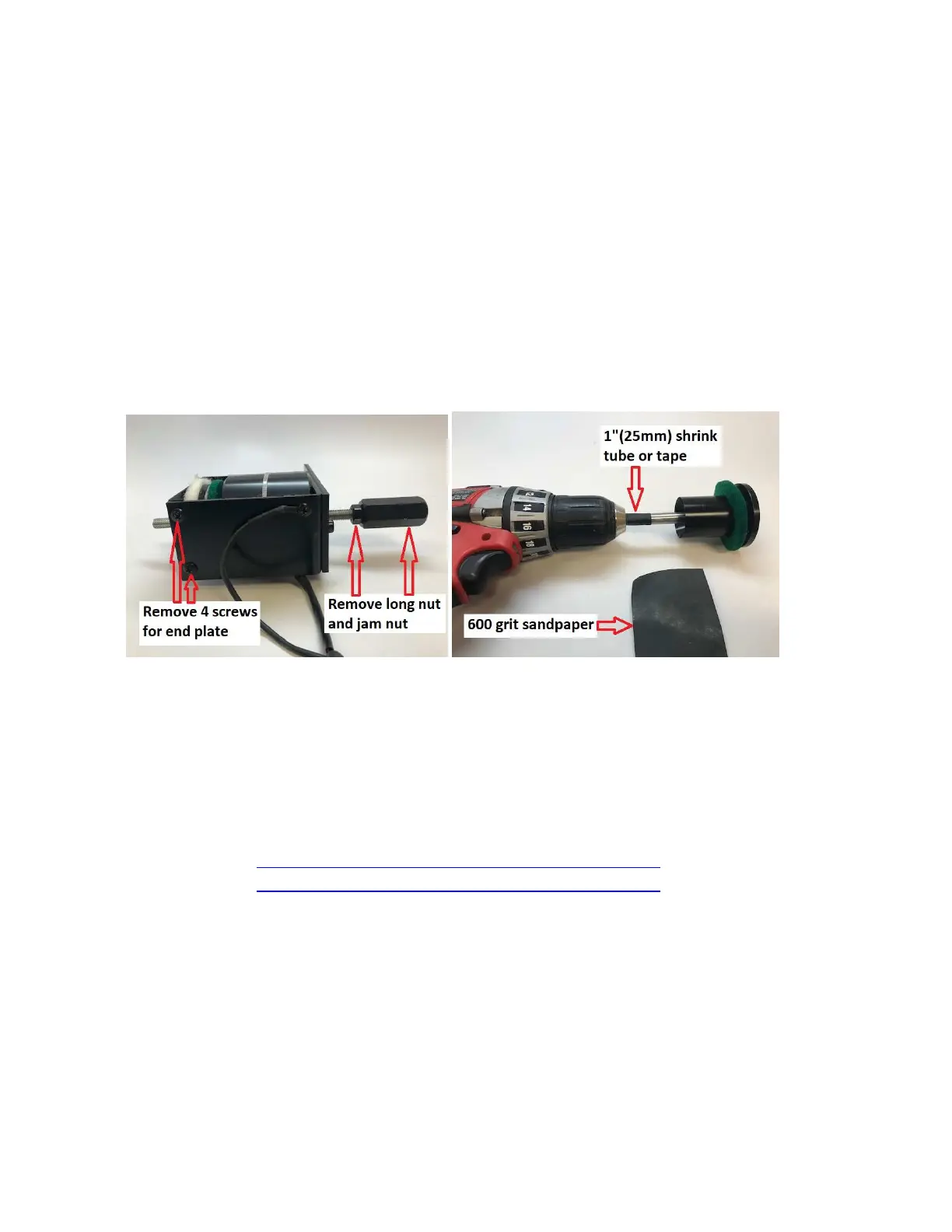
• Remove the 4 mounting screws. (see picture below)
• Remove the long nut and jam nut.
• Remove the plunger from solenoid housing.
• Use 1” shrink tube or masking tape to protect the threads.
• Place the plunger shaft into a drill and sand shank with 600 grit sandpaper.
(see picture below)
• Use a small amount of synthetic grease on the shaft upon assembly.
Removing plunger from solenoid Sand shaft with drill and sandpaper
7. Can not connect wirelessly to piano
(HD-iQ system)
1. Check plug connections from Airport Express to iQ box.
2. Replace stereo mini cable from Airport Express to iQ box.
3. Re-configure Airport Express. Here are two links, Apple or Windows.
• https://support.apple.com/kb/DL1664?locale=en_US for Mac
• https://support.apple.com/kb/DL1547?locale=en_US for windows
4. To verify that system is functioning properly, connect the iPad (headphone jack)
directly to the iQ box with a stereo mini cable and them test the system.


 To Next Page