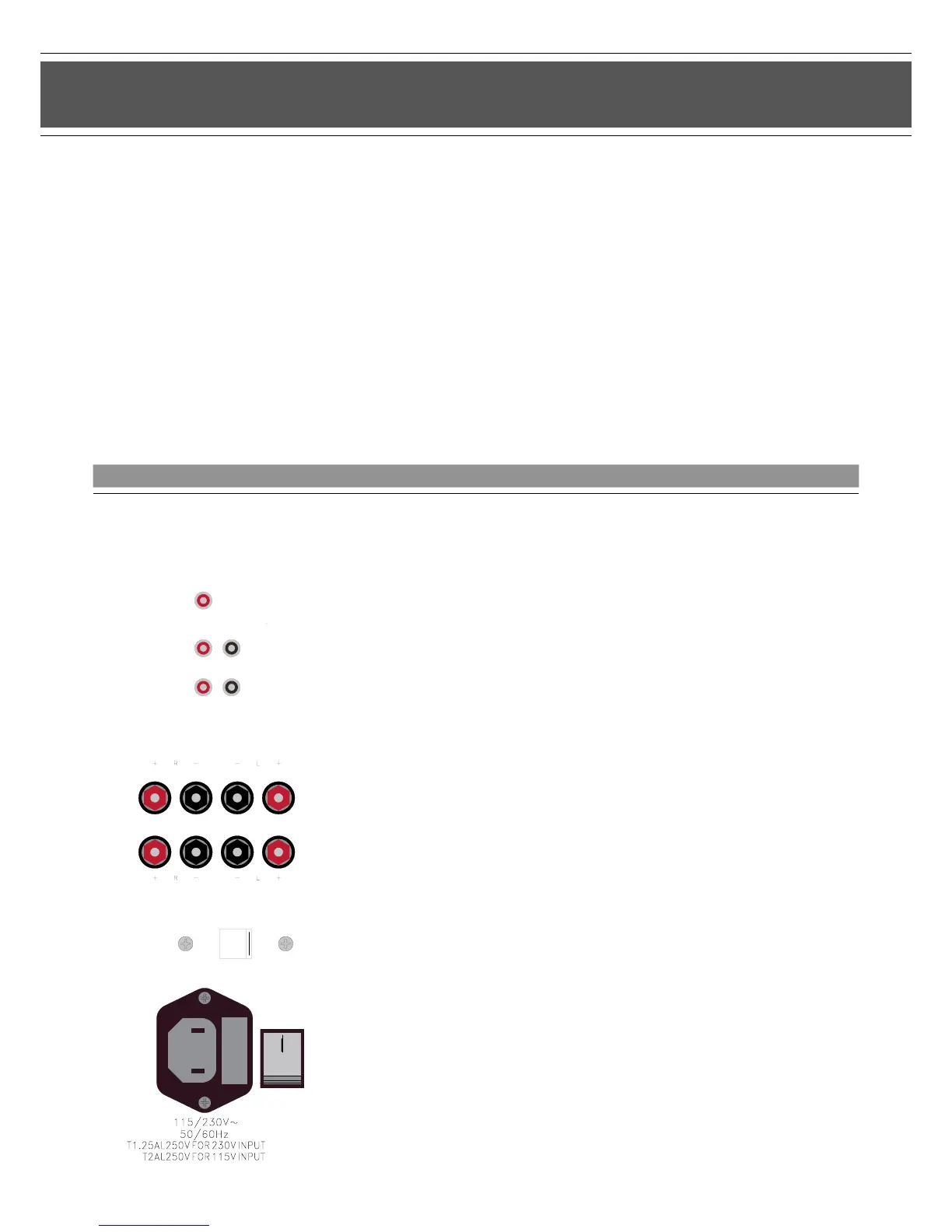
Its large range of connection options offers the P SUB 4 a large number of congurations both for stereo and for surround mode.
Refer to the appropriate user manual supplied for specic information on the loudspeakers used and components of your stereo or
surround system.
PIEGA P SUB 4
Connection terminal for different applications...
Connection Options
Note:
>The connection terminal of the P SUB 4 allows a number
of possible conguration options for stereo and surround mode
>Depending on the equipment in use, select the appropriate
conguration (see the following pages)
>The LFE/IN, INPUT, OUTPUT terminals for connecting to the
AV receiver or the stereo amplier require connection cables with
cinch plugs
>The HIGH LEVEL INPUT and HIGH LEVEL OUTPUT terminals
for connecting amplied music signals can be connected to
loudspeaker cables with or without banana plugs
Connecting the supply cable:
>Check whether the default switch position (230/115 V) of your
P SUB 4 corresponds to the standard supply voltage in
your country
>Plug the supply cable provided with the loudspeakers
into the appropriate socket
>Do not switch on the P SUB 4 (POWER ON) until all cable
connections have been made
7


 To Next Page