Connecting the System
PIEGA P SUB 4
Conguration example for stereo and surround mode
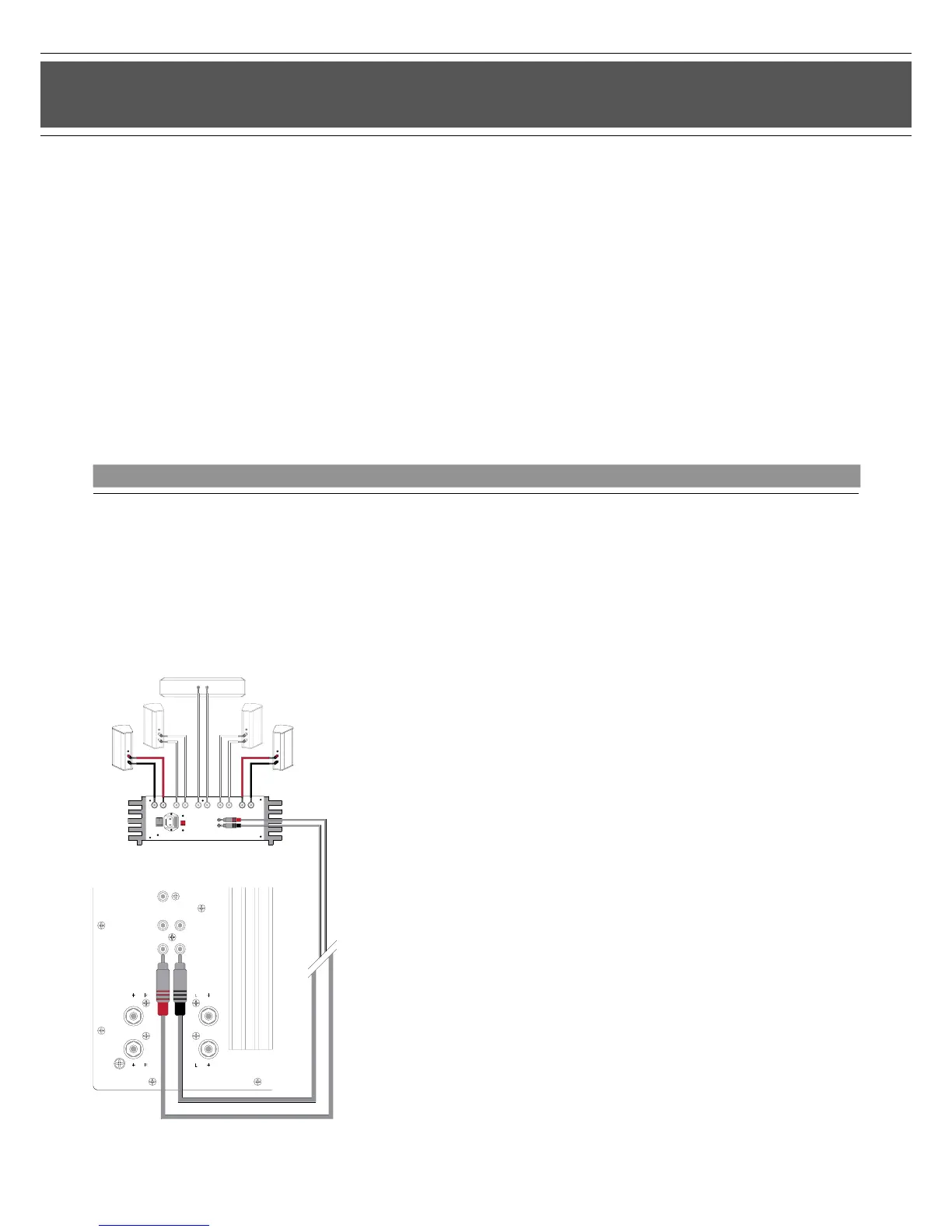
Dolby Digital System - Surround System with NF Out
The 5.1 receivers and power ampliers of some manufacturers have a separate NF Out socket for connecting a subwoofer. This
enables the signal to reach the subwoofer without any amplication. Refer to the appropriate manual for information about operation
and connection options for your AV receiver/power amplier.
Note:
Frequently used conguration
>Ideal conguration for stereo mode...!
Connection:
>Connect the P SUB 4 cable to the AV receiver
terminal marked PRE OUT (or similar)
>Connect the P SUB 4 cable to the subwoofer
terminal marked INPUT
>For this use connection cables with cinch plugs (not supplied)
>Connect the loudspeakers using the loudspeaker terminals
provided on your AV receiver/power amplier
9


 To Next Page