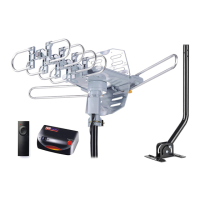
This document describes the Pingbingding WA-2900A Amplified Digital Outdoor HDTV Antenna, designed to enhance television reception.
Function Description
The Pingbingding WA-2900A is an amplified digital outdoor HDTV antenna that transforms existing television viewing experiences by providing better picture and sound quality. It enables broadcasters to offer television with multiple channels of programming. The antenna is compatible with both ATSC (Advanced Television Systems Committee) and HDTV (High-Definition Television) signals, making it suitable for receiving a wide range of digital broadcasts. It is designed to be mounted outdoors, allowing for optimal signal reception. The antenna includes a detachable amplifier with gain control, which helps to boost weak signals and improve overall reception quality. Users can connect the antenna directly to a TV with a built-in digital tuner or to a digital set-top box. The manual provides detailed instructions on how to connect the antenna, mount it, and scan for channels.
Important Technical Specifications
Antenna Model: WA-2900A
Frequency Range:
- VHF (Very High Frequency): 170-200MHz
- UHF (Ultra High Frequency): 470-860MHz
Gain:
- VHF gain: 23dB
- UHF gain: 25dB
- Gain adjustable range: VHF: 18-28dB, UHF: 20-30dB
Impedance: 75 Ω
Power Supply: via USB adapter
Noise Figure: ≤3dB
Package Contents:
The package includes a comprehensive set of components for assembly and installation:
- Reflector (2)
- UHF dipole (1)
- VHF dipole box (1)
- VHF dipole elements (2)
- Antenna bracket (1)
- Adaptor (1)
- USB cable (1)
- Detachable Amplifier with gain Control (1)
- Coaxial cable (1) - 39ft
- Reflector clip (2)
- Director clip (4)
- Bolt (6) - M5*35mm
- M5 Wing nut (6)
- Cable clip (1)
- Hexagonal screw (1) - M4*20mm
- M4 Wing nut (1)
- VHF dipole parts (2)
- Service card (1)
- Instruction manual (1)
Antenna Pole Specifications (Optional, for mounting):
- Diameter: 1 inch
- Height: 18.5 inches (11.18 inches from base to bend, 5.7 inches from bend to top)
- Base dimensions: 5.18 inches wide, T=0.07 inches thick
- Mounting hardware for antenna pole:
- M6x50mm wall screw (4)
- M6 nut (2)
- M6x40mm bolt (2)
- M6x40mm wood screw (2)
- Φ25 cap (1)
Usage Features
Connection and Setup:
The antenna can be connected to either a TV with a built-in digital tuner or a digital set-top box.
- Connect Antenna to TV with built-in digital tuner:
- Connect the coaxial cable from the antenna to the amplifier.
- Connect the amplifier to the TV's antenna input.
- Connect the amplifier's power adapter (AC 120V) to a power outlet.
- Ensure the gain control is set appropriately (Max or Min position, as improper setting may affect performance).
- Connect Antenna to a digital set-top box:
- Connect the coaxial cable from the antenna to the amplifier.
- Connect the amplifier to the SAT (Satellite) input on the set-top box.
- Connect the amplifier's power adapter (AC 120V) to a power outlet.
- Ensure the gain control is set appropriately.
Mounting the Antenna:
The manual provides a step-by-step visual guide for assembling and mounting the antenna components, including attaching reflectors, dipoles, and clips to the main antenna structure. It also details how to mount the antenna to an outdoor pole.
Scanning for Channels:
After connecting and positioning the antenna, users must perform a channel scan.
- Select MENU on the remote control.
- Select Channel Settings or Tuner Settings.
- Select Signal Source (Antenna or Air; not Cable).
- Select Channel Search or Channel Scan.
- Steps may vary depending on the TV's manual.
It is important to re-scan for channels whenever the antenna is moved.
Antenna Placement Options and Tips:
- Signal reception quality depends on the distance from the broadcast tower and surrounding geography.
- For improved reception, place the antenna in a higher location.
- Face the antenna towards the nearest broadcast tower.
- If fewer channels are received than expected, reposition the antenna and re-scan.
- Obstructions like buildings and tall trees can impact reception.
Maintenance Features
Troubleshooting:
The manual addresses common issues and provides solutions:
- No channels found or poor reception:
- Check connections between the antenna, TV, and set-top box.
- Re-scan for channels in the TV's setup menu, selecting 'Antenna' or 'Air' as the signal source.
- Refer to the TV manual for detailed instructions on channel scanning.
- Reposition the antenna to a different location, such as higher on a wall, and aim it towards the broadcast tower.
- Signal strength can vary based on surrounding conditions (buildings, trees). Always re-scan after moving the antenna.
- Specific channel missing:
- Obstructions between the antenna and the broadcast tower may be the cause. Try repositioning the antenna and re-running the channel scan.
- Antenna not functioning or not scanning for channels:
- Verify the TV is in the desired mode.
- Check for obstructions between the antenna and signals.
- Ensure the TV has a built-in digital tuner or that an STB (Set-Top Box) is used for HD tuning.
- Poor reception (weak signal, interruptions):
- Reposition the antenna to a higher position or adjust its direction.
- Picture or sound freezes while watching a channel, or there are boxes in the picture:
- This indicates a weak or intermittent signal. Try moving the antenna to a different location or aiming it in the direction of the tower.
- Antenna aluminum parts bent during shipping:
- This does not hurt reception in any way.
Customer Support:
For missing parts or returns, customers can email service@pingbingding.com. The company will ship replacement parts free of charge within 30 days.

 Need help?
 General

 To Next Page