EasyManua.ls Logo

Pioneer CU-SA004 - Page 2

Pioneer CU-SA004
12 pages
Print Icon
To Next Page IconTo Next Page
To Previous Page IconTo Previous Page
Loading...
Thank
you
for
buying
this
Pioneer
product.
Please
read
through
these
operating
instructions
in
order
to
know
how
to
operate
your
model
properly.
After
you
have
finished
reading
the
instructions,
put
them
away
in
a
safe
place
for
future
reference.
Keys
on
the
remote
control
unit
are
effective
only
if
your
components
have
corresponding
functions
that
are
remote
controllable.
Remote
controllable
functions
of
non-Pioneer
equipment
may
be
programmed
into
this
remote
control
unit
by
using
its
LEARN
mode.
CONTENTS
REMOTE
CONTROL
OPERATIONS
PANEL
FACILITIES
USE
OF
LEARNING
FUNCTIONS
SPECIFICATIONS
REMOTE
CONTROL
OPERATION
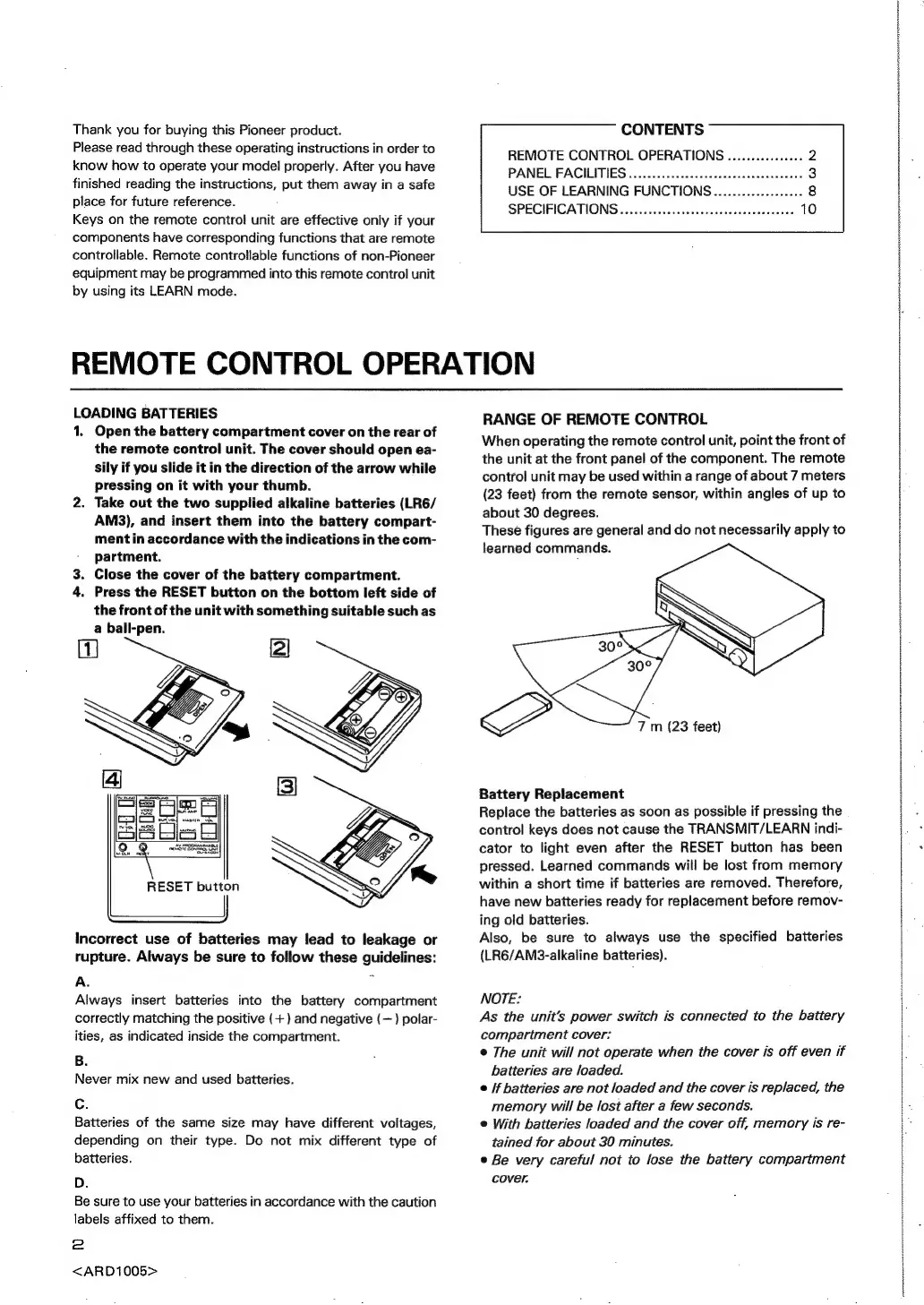
LOADING
BATTERIES
1.
Open
the
battery
compartment
cover
on
the
rear
of
the
remote
control
unit.
The
cover
should
open
ea-
sily
if
you
slide
it
in
the
direction
of
the
arrow
while
pressing
on
it
with your
thumb.
2.
Take
out
the
two
supplied
alkaline
batteries
(LR6/
AM3),
and
insert
them
into
the
battery
compart-
ment
in
accordance
with
the
indications
in
the
com-
partment.
3.
Close
the
cover
of
the
battery
compartment.
4.
Press
the
RESET
button
on
the
bottom
left
side
of
the
front
of
the
unit
with
something
suitable
such
as
a
ball-pen.
Incorrect
use
of
batteries
may
lead
to
leakage
or
rupture.
Always
be
sure
to
follow
these
guidelines:
A.
°
Always
insert
batteries
into
the
battery
compartment
correctly
matching
the
positive
(+)
and
negative
(—)
polar-
ities,
as
indicated
inside
the
compartment.
B.
Never
mix
new
and
used
batteries.
c.
Batteries
of
the
same
size
may
have
different
voltages,
depending
on
their
type.
Do
not
mix
different
type
of
batteries.
D.
Be
sure
to
use
your
batteries
in
accordance
with
the
caution
labels
affixed
to
them.
2
<ARD1005>
RANGE
OF
REMOTE
CONTROL
When
operating
the
remote
control
unit,
point
the
front
of
the
unit
at
the
front
panel
of
the
component.
The
remote
control
unit
may
be
used
within
a
range
of
about
7
meters
(23
feet)
from
the
remote
sensor,
within
angles
of
up
to
about
30
degrees.
These
figures
are
general
and
do
not
necessarily
apply
to
learned
commands.
7
m
(23
feet)
Battery
Replacement
Replace
the
batteries
as
soon
as
possible
if
pressing
the
control
keys
does
not
cause
the
TRANSMIT/LEARN
indi-
cator
to
light
even
after
the
RESET
button
has
been
pressed.
Learned
commands
will
be
lost
from
memory
within
a
short
time
if
batteries
are
removed.
Therefore,
have
new
batteries
ready
for
replacement
before
remov-
ing
old
batteries.
Also,
be
sure
to
always
use
the
specified
batteries
(LR6/AM3-alkaline
batteries).
NOTE:
As
the
unit’s
power
switch
is
connected
to
the
battery
compartment
cover:
©
The
unit
will
not
operate
when
the
cover
is
off
even
if
batteries
are
loaded.
e
/f
batteries
are
not
loaded
and
the
cover
is
replaced,
the
memory
will
be
lost
after
a
few
seconds.
©
With
batteries
loaded
and
the
cover
off,
memory
is
re-
tained
for
about
30
minutes.
e
Be
very
careful
not
to
lose
the
battery
compartment
cover.

Related product manuals