EasyManua.ls Logo

Pioneer CU-SA004 - Page 3

Pioneer CU-SA004
12 pages
Print Icon
To Next Page IconTo Next Page
To Previous Page IconTo Previous Page
Loading...
PANEL
FACILITIES
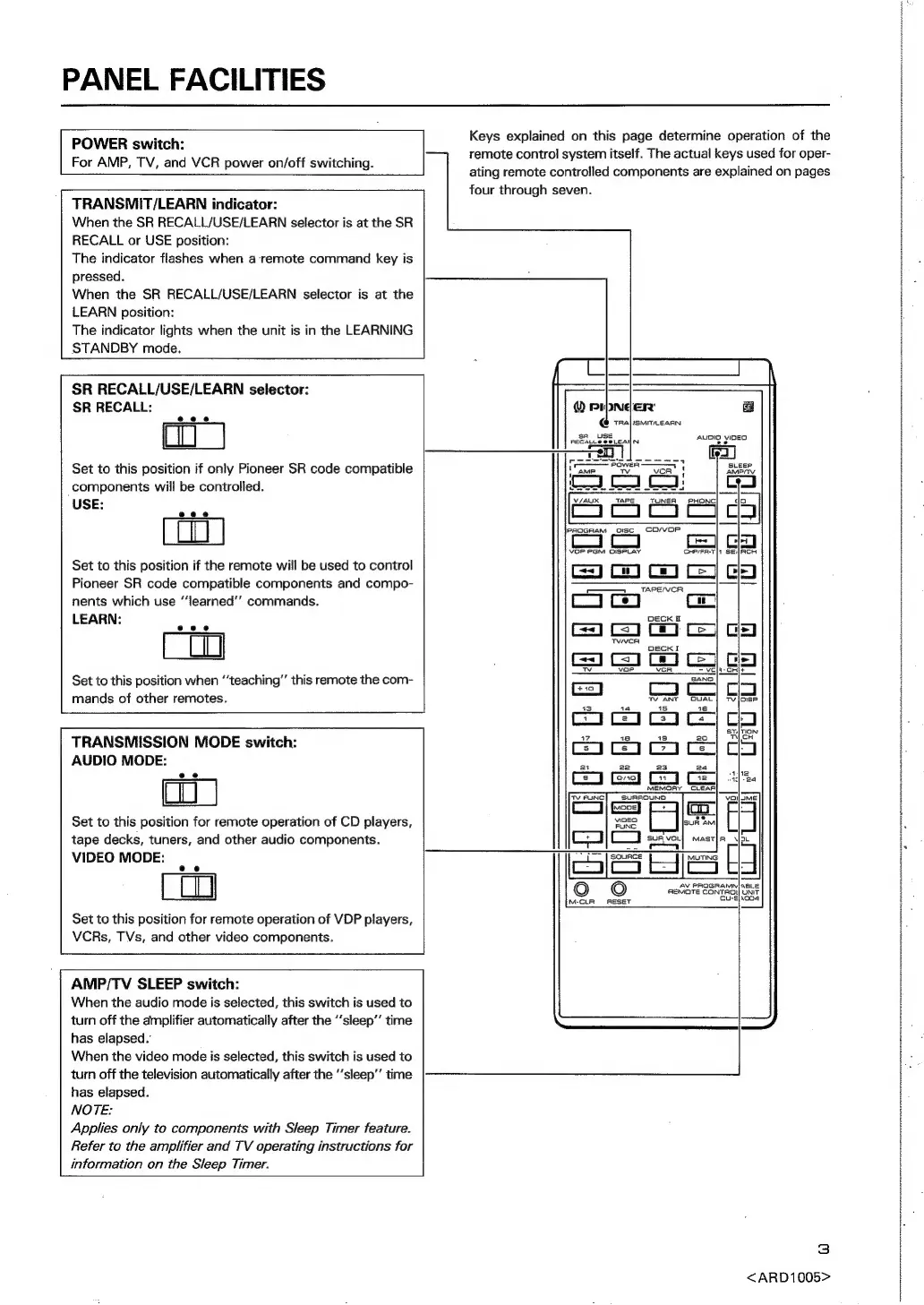
POWER
switch:
For
AMP,
TV,
and
VCR
power
on/off
switching.
ac
emeznneennnenns
preronrnontsatrtnanote
heonertontfet
erence
Snr
Arrears
OE
Aner
ease
ennwneaternnateeetteuoit
treet
thorn
tronic
titer
tre
seen
yi
four
through
seven.
TRANSMIT/LEARN
indicator:
When
the
SR
RECALL/USE/LEARN
selector
is
at
the
SR
RECALL
or
USE
position:
The
indicator
flashes
when
a
remote
command
key
is
pressed.
When
the
SR
RECALL/USE/LEARN
selector
is
at
the
LEARN
position:
The
indicator
lights
when
the
unit
is
in
the
LEARNING
STANDBY
mode.
SR
RECALL/USE/LEARN
selector:
SR
RECALL:
eee
Set
to
this
position
if
only
Pioneer
SR
code
compatible
components
will
be
controlled.
USE:
AUDIO
VIDEO
se
V/AUX
TAPE
TUNER
PHONC|
lPpRQGRAM
_oIsc.
CD/VOP
VOP
PGM
DISPLAY
Set
to
this
position
if
the
remote
will
be
used
to
control
Pioneer
SR
code
compatible
components
and
compo-
nents
which
use
“‘learned’’
commands.
LEARN:
ae
Set
to
this
position
when
‘teaching’
this
remote
the
com-
mands
of
other
remotes.
TRANSMISSION
MODE
switch:
AUDIO
MODE:
Set
to
this
position
for
remote
operation
of
CD
players,
vingo
sunt
AM
tape
decks,
tuners,
and
other
audio
components.
[22]
sugvo.}
masrfa_4
VIDEO
MODE:
| |
SS
Ss
H
|
CL
AV
PROGRAMN]SBLE
AEMOTE
CONTROY
UNIT
Cu-},004
Set
to
this
position
for
remote
operation
of
VDP
players,
VCRs,
TVs,
and
other
video
components.
ot
M-CLR
ESET
AMP/TV
SLEEP
switch:
When
the
audio
mode
is
selected,
this
switch
is
used
to
turn
off
the
amplifier
automatically
after
the
‘‘sleep’’
time
has
elapsed.”
When
the
video
mode
is
selected,
this
switch
is
used
to
turn
off
the
television
automatically
after
the
‘‘sleep”
time
has
elapsed.
NOTE:
Applies
only
to
components
with
Sleep
Timer
feature.
Refer
to
the
amplifier
and
TV
operating
instructions
for
information
on
the
Sleep
Timer.
<ARD1005>
Keys
explained
on
this
page
determine
operation
of
the
remote
control
system
itself.
The
actual
keys
used
for
oper-
ating
remote
controlled
components
are
explained
on
pages
3

Related product manuals