EasyManua.ls Logo

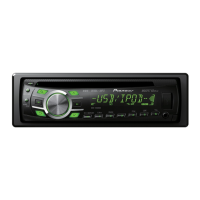
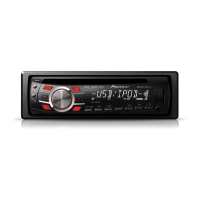
Pioneer DEH-4300UB - User Manual

Pioneer DEH-4300UB
100 pages
Print Icon
To Next Page IconTo Next Page
Loading...
Owner’s Manual
Mode d’emploi
Manuale d’istruzioni
Manual de instrucciones
Bedienungsanleitung
Handleiding
Руководство пользователя
DEH-3300UB
DEH-4300UB
CD RDS RECEIVER
AUTORADIO CD RDS
SINTOLETTORE CD RDS
REPRODUCTOR DE CD CON RECEPTOR RDS
CD RDS-EMPFÄNGER
CD RDS-ONTVANGER
CD RDS ПРИЕМНИК
English Français Italiano Español Deutsch Nederlands
Русский
<CRD4524-A/N>1

Table of Contents

Questions and Answers

  • K
    Kelly BrownJul 29, 2025
    What to do if my Pioneer Car Receiver says 'NO AUDIO'?
    • S
      Samantha JohnsonJul 29, 2025
      If your Pioneer Car Receiver displays 'NO AUDIO', it means the inserted disc doesn't have any playable files. Try replacing the disc with one that contains playable files.
  • C
    carrie42Aug 2, 2025
    What does 'PROTECT' mean on my Pioneer Car Receiver?
    • M
      Michael LeeAug 3, 2025
      If your Pioneer Car Receiver shows 'PROTECT', it indicates that all the files on the inserted disc are embedded with DRM (Digital Rights Management). You should replace the disc.
  • J
    James CarterAug 6, 2025
    What does 'SKIPPED' mean on my Pioneer Car Receiver and how to fix it?
    • J
      James HowellAug 6, 2025
      If your Pioneer Car Receiver displays 'SKIPPED', it means that the inserted disc contains DRM protected WMA files. Replacing the disc should resolve this issue.
  • B
    bsharpAug 10, 2025
    What does ERROR-11 or ERROR-12 mean on a Pioneer Car Receiver?
    • B
      Brian HallAug 10, 2025
      ERROR-11 or ERROR-12 on your Pioneer Car Receiver typically indicates a problem with the disc. It could be that the disc is dirty, in which case you should clean it. Alternatively, the disc may be scratched, and you would need to replace it.
  • T
    tiffanydavisAug 15, 2025
    What to do if my Pioneer Car Receiver displays 'NO DEVICE'?
    • K
      Kimberly AdamsAug 15, 2025
      If your Pioneer Car Receiver shows 'NO DEVICE', it could be due to a couple of reasons. First, if plug and play is off, and no USB storage device or iPod is connected, turn the plug and play on. Second, ensure that a compatible USB storage device or iPod is properly connected to the receiver.
  • J
    James WalshAug 19, 2025
    What does ERROR-23 mean on a Pioneer Car Receiver?
    • T
      Tyler JacobsonAug 19, 2025
      ERROR-23 on your Pioneer Car Receiver indicates that the CD format is not supported. Replacing the disc with a supported format should resolve the issue.
  • F
    francisco05Aug 23, 2025
    What does ERROR-15 mean on a Pioneer Car Receiver?
    • C
      caseystephanieAug 25, 2025
      ERROR-15 on your Pioneer Car Receiver means that the inserted disc is blank. To resolve this, replace the blank disc with a valid one.

Summary

Before You Start

Safety and Precautions

Covers essential safety warnings, including laser product classification and liquid contact.

Demo Mode Operation

Details the demo mode's automatic start and how to cancel it.

Operating this unit

Head Unit and Display Overview

Identifies key components of the head unit and its display elements.

Basic Operations and Controls

Covers essential functions like front panel handling, power, source selection, and volume.

Menu Navigation

Explains how to navigate through various setting and adjustment menus.

Tuner Operations

Covers basic and advanced functions for tuning radio stations, including RDS and PTY search.

Advanced Functions

Details special button operations like traffic announcements and various function settings.

CD;USB Playback

Guides on playing music from CDs and USB devices, including file selection and playback modes.

iPod Operations

Explains how to connect and operate an iPod, including browsing and playback controls.

iPod Specific Functions

Details iPod link play, shuffle, and audiobook settings for enhanced user experience.

Audio Adjustments

Covers adjusting sound settings like fader, balance, equalizer, tone, loudness, and subwoofer.

Subwoofer and SLA Settings

Guides on adjusting subwoofer output and source level adjustments for optimal sound.

Initial Settings and Customization

Explains how to configure initial settings and customize illumination colors for the unit.

AUX Source and Sound Muting

Covers connecting and using an AUX source and the automatic sound muting feature.

Installation

Important Installation Connections

Critical connection guidelines and warnings for safe and proper unit installation.

Mounting the Unit

Details on DIN front-mount and rear-mount installation procedures using mounting sleeves.

Unit Removal and Front Panel Handling

Instructions for removing the unit from the dashboard and handling the front panel.

Additional Information

Troubleshooting and Error Messages

Lists common problems, causes, and actions, along with error message explanations.

Handling Guidelines

Best practices for handling discs, USB storage devices, and iPods to ensure proper operation.

File and Media Compatibility

Details compatibility for compressed audio formats (WMA, MP3, WAV) and iPod models.

Specifications

Technical specifications for the unit, including power, dimensions, and tuner frequencies.

Pioneer DEH-4300UB Specifications

General IconGeneral
MP3 playbackYes
DVD Audio playbackNo
Preset stations quantity24
Output power200 W
Audio output channels4.0 channels
Maximum power per channel50 W
Key illumination color-
Number of optical discs1 discs
Illumination colorMulti

Related product manuals