EasyManua.ls Logo

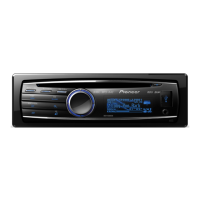
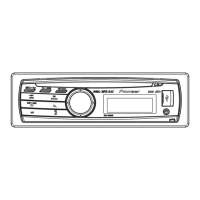
Pioneer DEH-80PRS - User Manual

Pioneer DEH-80PRS
70 pages
Print Icon
To Next Page IconTo Next Page
Loading...
Operation Manual
CD RDS RECEIVER
DEH-80PRS
English

Table of Contents

Other manuals for Pioneer DEH-80PRS

Questions and Answers

  • B
    Brooke ClarkAug 18, 2025
    What to do if my Pioneer DEH-80PRS Car Receiver says 'NO DEVICE'?
    • P
      Penny MitchellAug 18, 2025
      If your Pioneer Car Receiver displays 'NO DEVICE', it means that a compatible USB storage device or iPod is not connected. To resolve this, connect a compatible USB storage device or iPod.
  • D
    Darryl WagnerAug 21, 2025
    Why can't I hear sound from my iPod on my Pioneer DEH-80PRS?
    • J
      jessica76Aug 21, 2025
      If you cannot hear sound from your iPod on your Pioneer Car Receiver, it might be because the audio output direction switched automatically when using Bluetooth and USB connections simultaneously. Please wait until the message disappears, and you should then hear the sound.
  • G
    George JohnsonAug 23, 2025
    Why is there Bluetooth interference with my Pioneer Car Receiver?
    • A
      amy56Aug 23, 2025
      If you're experiencing interference when using Bluetooth with your Pioneer Car Receiver, it could be due to nearby devices that transmit electric waves, such as cellular phones. To resolve this, move any electrical devices that might be causing interference away from the unit.
  • A
    anneevansAug 26, 2025
    What to do if Bluetooth audio isn't playing on my Pioneer DEH-80PRS?
    • K
      Kenneth BrowningAug 26, 2025
      If the Bluetooth audio source is not playing back on your Pioneer Car Receiver, it could be due to several reasons: * If there is a call in progress on a Bluetooth connected cellular phone, the sound will be played back when the call is terminated. * If a Bluetooth connected cellular phone is currently being operated, avoid operating the cellular phone at this time. * If a call was made with a Bluetooth connected cellular phone and then immediately terminated, try reconnecting the Bluetooth connection between the unit and the cellular phone.
  • S
    Sarah BrownAug 28, 2025
    How to turn off demo mode on a Pioneer DEH-80PRS?
    • M
      Michael FisherAug 28, 2025
      To turn off Demo mode on your Pioneer Car Receiver, you can try the following: * Press and hold the on/DISP button to cancel demo mode. * Turn off the demo display setting.
  • A
    Aaron ScottAug 31, 2025
    Why does my Pioneer DEH-80PRS display return to normal automatically?
    • K
      Kevin PerezAug 31, 2025
      If your Pioneer Car Receiver display automatically returns to the ordinary display, it might be because you haven't performed any operation within about 30 seconds. To resolve this, simply perform the operation again.
  • S
    Scott MercadoSep 2, 2025
    Why does the repeat play range change on my Pioneer DEH-80PRS?
    • J
      Jose RobersonSep 2, 2025
      If the repeat play range changes unexpectedly on your Pioneer Car Receiver, it might be because, depending on the repeat play range, the selected range may change when another folder or track is being selected or during fast forwarding/reversing. Try selecting another repeat play range.
  • H
    hholderSep 4, 2025
    What to do if movie playback stops on my Pioneer DEH-80PRS Car Receiver?
    • S
      Sarah ButlerSep 5, 2025
      If movie playback is stopped automatically on your Pioneer Car Receiver, it could be because the temperature around the unit is 50°F or less. Wait until it warms back up.
  • D
    David BurgessSep 7, 2025
    Why did the display scrolling stop on my Pioneer Car Receiver?
    • A
      Annette RossSep 7, 2025
      If display scrolling is stopped automatically on your Pioneer Car Receiver, it could be because the temperature around the unit is 50°F or less. Wait until it warms back up.
  • D
    Dawn WuSep 10, 2025
    Why won't my Pioneer Car Receiver play a subfolder?
    • C
      christian90Sep 10, 2025
      If a subfolder is not playing back on your Pioneer Car Receiver, it may be because subfolders cannot be played when Folder repeat is selected. Try selecting the repeat play range again.

Summary

Before You Start

Safety of Your Ears

Guidance on setting safe listening levels to protect hearing from loud audio.

Operating This Unit

Audio Adjustments

Detailed settings for sound adjustments, equalizers, and modes.

Auto TA and EQ

Automatic time alignment and equalizer setup using a microphone.

Using Bluetooth Wireless Technology

Connecting and using the unit with Bluetooth-enabled devices.

Additional Information

Troubleshooting

Common symptoms, causes, and actions for resolving issues.

Error Messages

List of error messages and their corresponding causes and actions.

Specifications

Connections and Installation

Installation Procedures

Steps and guidelines for installing the unit in a vehicle.

Installing the Microphone

Pioneer DEH-80PRS Specifications

General IconGeneral
Audio systemMOS-FET
MP3 playbackYes
DVD Audio playbackNo
USB direct playback-
Audio formats supportedAAC, MP3, WAV, WMA
AM band range530 - 1710 kHz
FM band range87.9 - 107.9 MHz
Supported radio bandsAM, FM
Preset stations quantity24
Output power200 W
Product colorBlack
Volume controlRotary
Disc types supportedCD-R, CD-RW
Equalizer bands quantity16
Signal-to-Noise Ratio (SNR)72 dB
Display typeLCD
Display resolution192 x 48 pixels
Display number of lines3 lines
USB version2.0
Bluetooth version2.0+EDR
Bluetooth profilesA2DP, AVRCP, HFP, SSP
Line outputs (RCA)2
Headphone connectivity3.5mm
Compatible memory cardsminiSD, MMC, SD, SDHC
MP3 bit rates8 - 320 Kbit/s
Output voltage5 V
Input frequency11025 - 48000 Hz
Package weight1200 g
Weight and Dimensions IconWeight and Dimensions
Dimensions (WxDxH)178 x 165 x 50 mm

Related product manuals